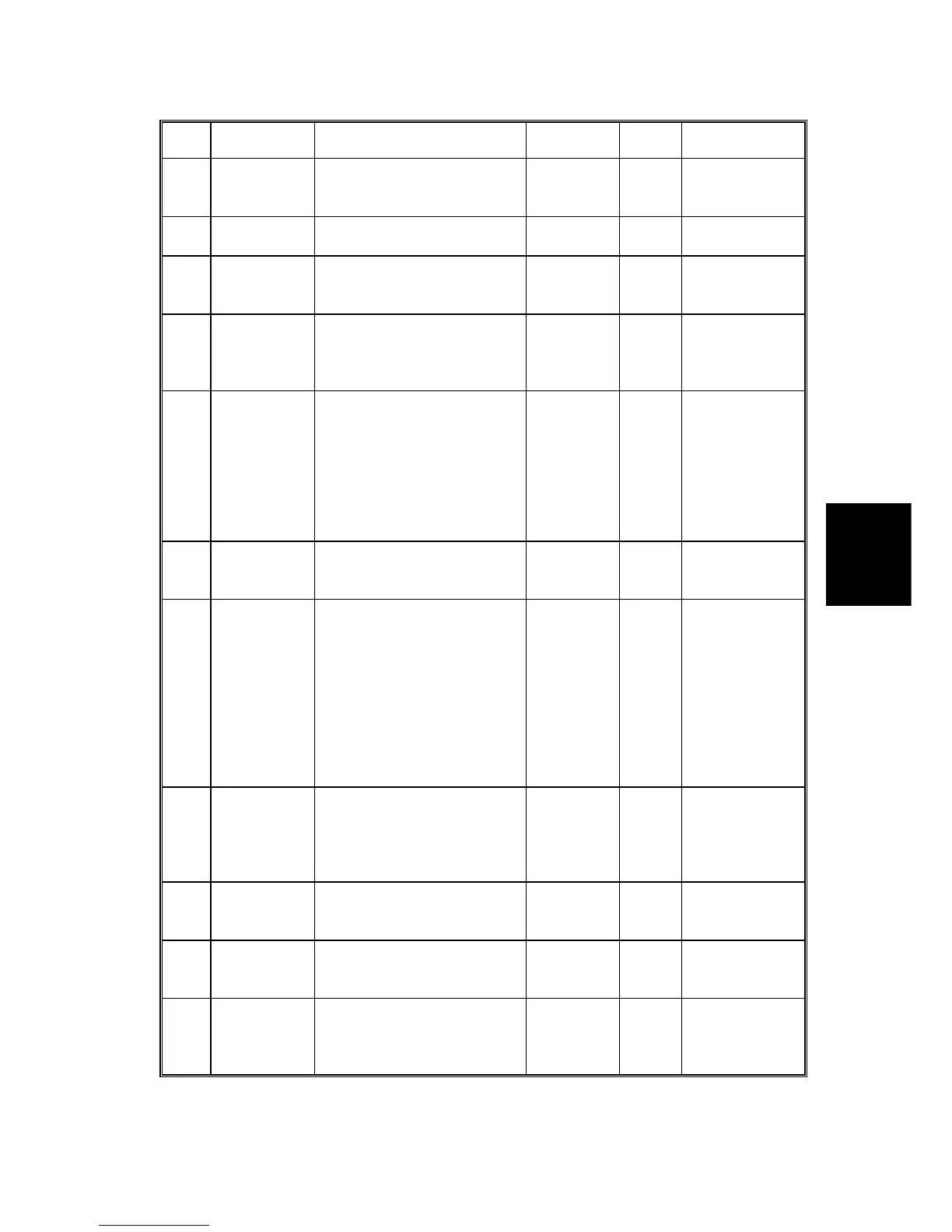
SERVICE PROGRAM TABLE
4-15
SM C231/C237/C238
Service
Tables
No. Display Function Settings
Factory
Setting
Comments
73 Paper
Delivery Jam
(G)
Displays the total number of
paper delivery jams.
0
74
Master Feed
Jam (C)
Displays the total number of
master feed jams.
0
75 Master
Delivery Jam
(F)
Displays the total number of
master delivery jams.
0
76 Clear Jam
Counters
Clears all jam counters. 0: No
1: Yes
0 The memory is
cleared after
pressing the
Enter (#) key.
*81 Quality Start
No.
Specifies how many prints
are made with the lowest
drum rotation speed (30
rpm) to stabilize image
density for the beginning
prints after a new master is
made.
0 to 3
sheets
0 This mode is to
ensure that the
first print has
sufficient ink
density even if
the machine
was not used
for a long.
*82 Skip Feed
No.
Specifies how many prints
are skipped between prints
in the skip feed mode.
1 to 9 2 "1" means no
skip.
*84
Auto Multi
Copy
Specifies the initial mode for
the Combine 2 Originals
mode.
0: No
1: Yes
(Two
identical
images
are made if
the Master
Making key
is pressed
once.)
0
85 Initial
Compression
Specifies whether full
master box detection is
made at power-up.
Compressing the ejected
masters is done.
0: No
1: Yes
0 See Remark 3
*87 Memory
Print
Specifies the printing
operation when in Memory
mode.
0: Memory
1: Stack
0 See Remark 4
*88 Auto
Memory/
Class
Specifies whether the
Memory/Class mode is
used.
0: No
1: Yes
0 See Remark 5
90
Thermal
Head Test
Select "1" to carry out the
thermal head test.
0: Off
1: On
0
See the Test
Pattern Image
Mode, section
4.5



 To Next Page