66
How to Save
DMEM’s
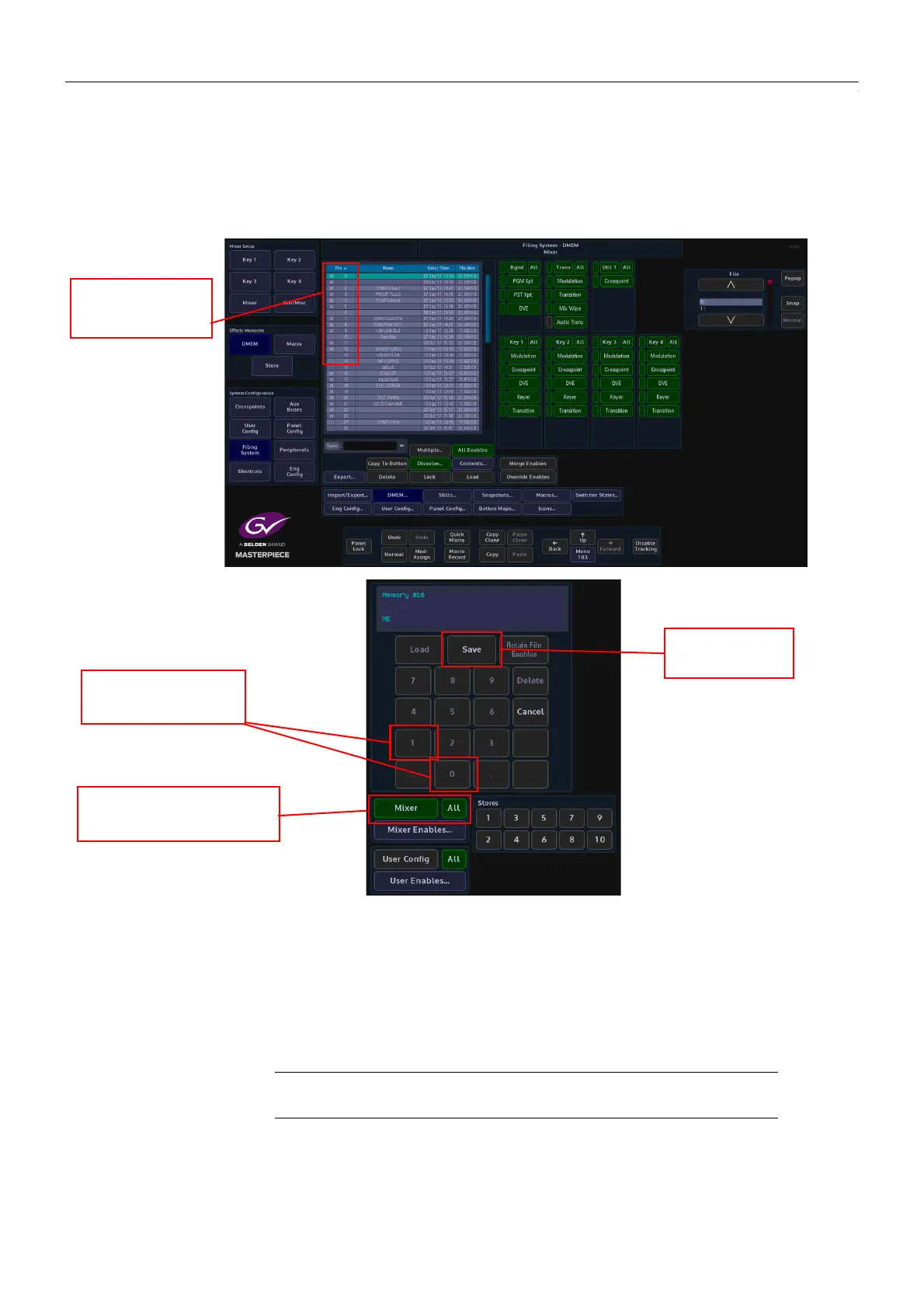
When saving a new DMEM, look in the “Filing System - DMEM” menu, so that you can select a
DMEM file number that is free.
Go back to the “Shortcuts” menu and enter the DMEM file number, then select what you want
to save within the DMEM; Mixer, User Config or a Store.
If the information you have entered is valid, the {Save} button text will light up bright white.
Touch the {Save} button to save the DMEM.
To update or add to an existing DMEM, again, if you are unsure of the DMEM file number, open
the “Filing System - DMEM” menu and locate the DMEM file number.
Make the change required to the system and then open the “Shortcuts” menu. Use the
number pad to enter the DMEM file number and touch the {Save} button. A dialog box will be
displayed asking you if you want yo continue. Touch “Ye s ” to continue and “No” to leave the
menu.
When “Recalling” a DMEM, simply enter the DMEM number and then touch the {Load} button.
Enter the DMEM File
Number
Select what you
want to save in the DMEM
Touch the Save
button
Check what
DMEM file number
you can use
Note: Pressing [CANCEL] at any point before saving will cancel the entire
operation



 To Next Page