Routing elements
119
System functions and features as of R4.1
syd-0570/1.2 – R4.1 – 08.2016
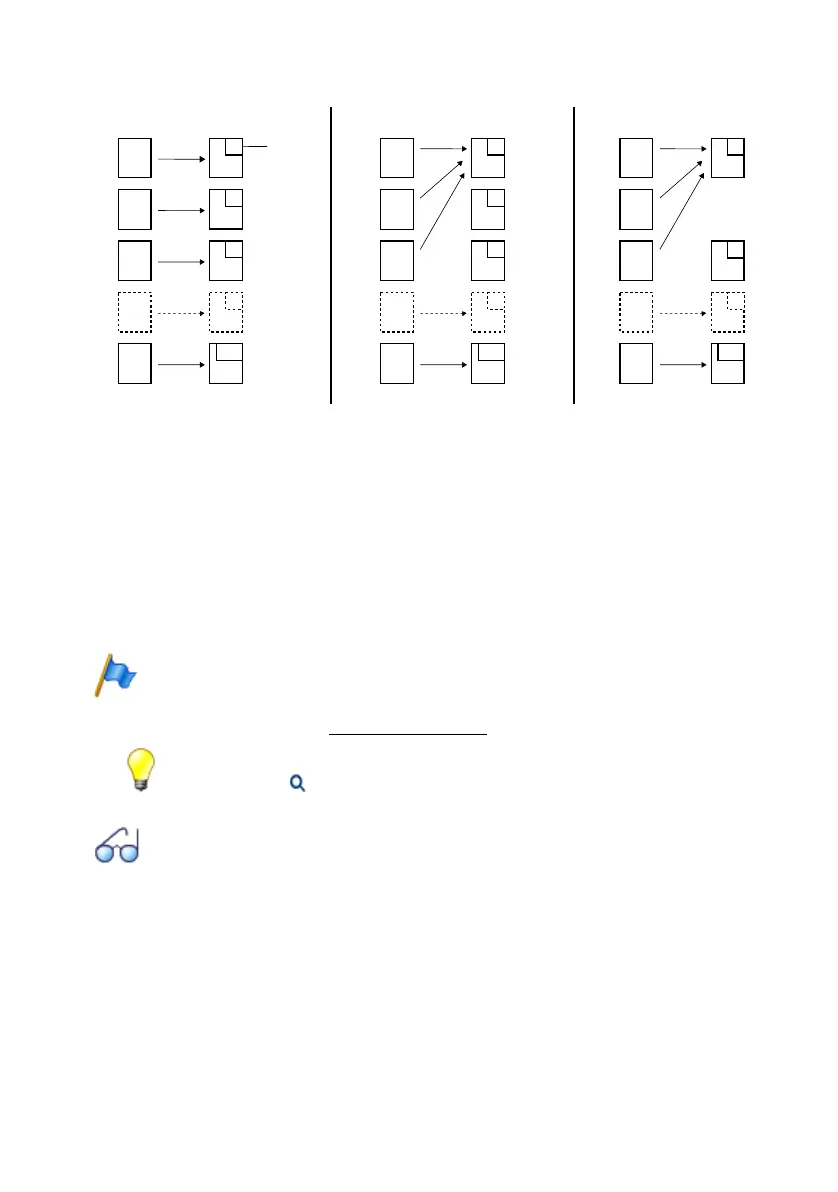
1. When direct dial numbers are created, call distribution elements are assigned automatically
2. Several direct dial numbers can be allocated to one call distribution element.
3. For performance reasons unused call distribution elements should be deleted.
Fig. 56 Linking direct dial numbers with call distribution elements
The system provides DDI plans only for the ISDN/CAS and SIP network interfaces.
Destinations can be allocated to the linked call distribution elements as soon as they
are created. It is also possible to allocate the corresponding users automatically. You
can find more information about the various options in the online help.
Note:
A CDE is defined as standard as the destination for a DDI. If a fax server is in operation on the
applications card of a CPU2 (Mitel 470 only), routing destination = FAX must be configured for
the fax numbers (see also "Fax service", page 261.)
Tip:
In the overview tab ( =0k) you can also create a direct dialling in number and assign it to an
internal user, using the New button.
Other Subjects Related to Direct Dialling Plans:
Trunk group, Call distribution, Incoming traffic, Traffic in the PISN, Identification elements, Num-
bering plan
200
202
299
201
200
202
299
201
200
202
299
201
2
3
4
101
2
3
4
101
2
4
101
444
400
3. Delete2. Allocate
1. Create
Reference
number
Call distribution
element
Call distribution
element
Call distribution
element
DDI
number
DDI
number
DDI
number



 To Next Page