System interfaces
37
System functions and features as of R4.1
syd-0570/1.2 – R4.1 – 08.2016
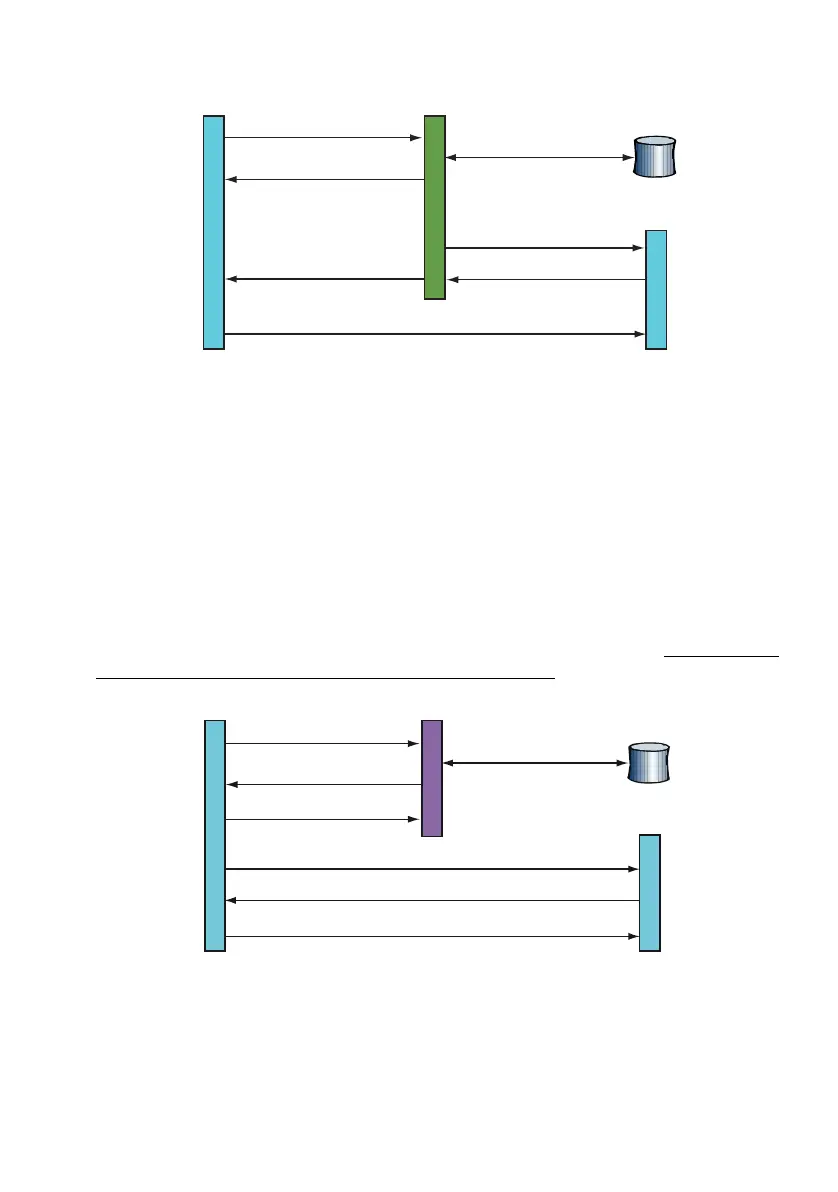
Fig. 13 Connection setup using a Proxy Server
This type of connection requires that the User Agents register with the Registrar Server
and regularly update their data.
Method 3: Connection setup using a Redirect Server
The User Agent Client sends the "INVITE" request for a connection setup to the Redi-
rect Server. The Proxy Server retrieves the current IP address of the User Agent
Server from the database of the location service and sends it back to the User Agent
Client, who confirms the action with an "ACKNOWLEDGE". The User Agent Client now
sets up a direct connection with the User Agent Server, as described in "Method 1: Di-
rect connection setup between the User Agents", page 36.
Fig. 14 Connection setup using a Redirect Server
This type of connection also requires that the User Agents register with the Registrar
Server and regularly update their data.
INVITE
INVITE
OK
OK
ACKNOWLEDGE
Location Service
User Agent ServerProxy ServerUser Agent Client
Database query
<IP address>
<IP address>
ACKNOWLEDGE
OK
INVITE
INVITE
ACKNOWLEDGE
User Agent Server
Location Service
Database query
<IP address>
Redirect Server
<IP address>
User Agent Client



 To Next Page