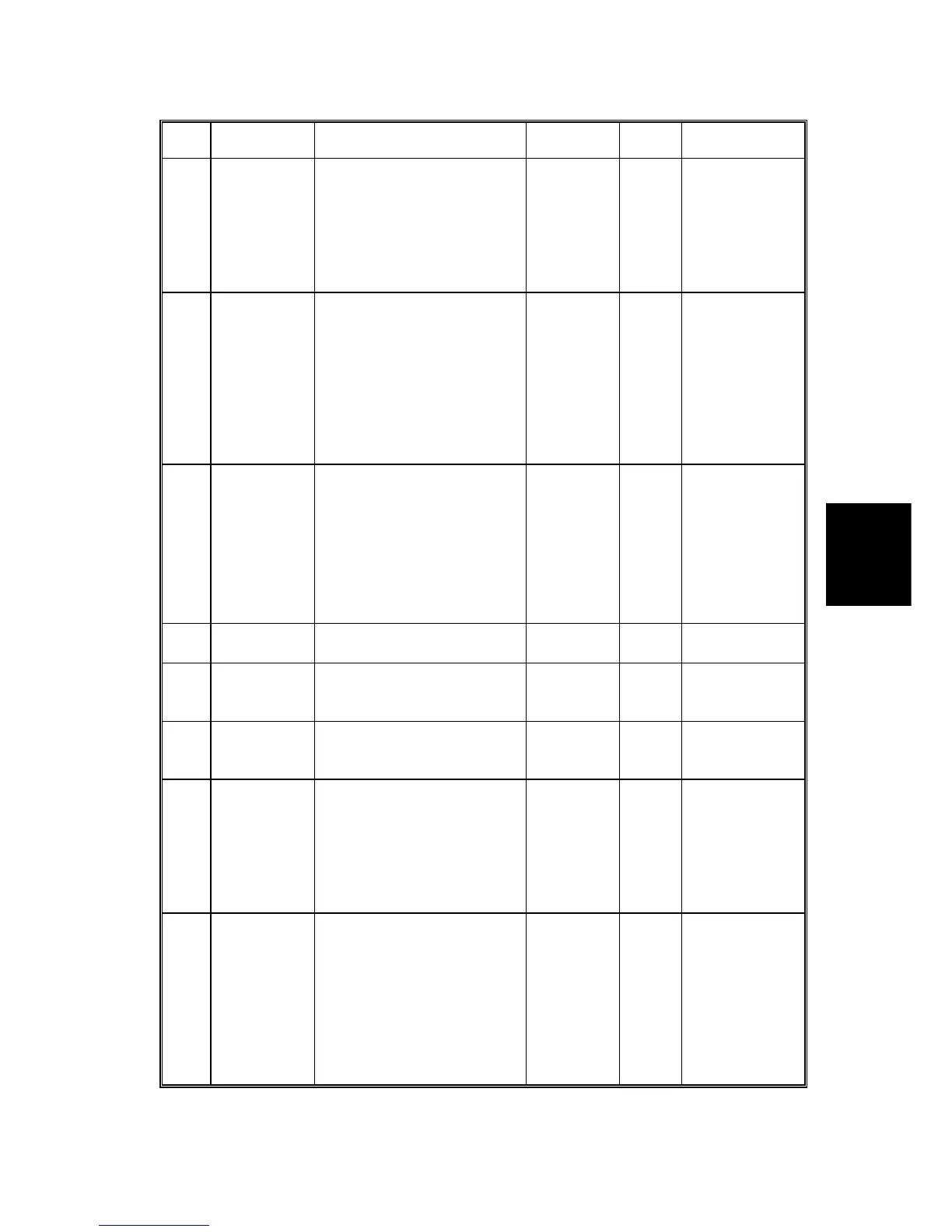
SERVICE PROGRAM TABLE
4-13
SM C231/C237/C238
Service
Tables
No. Display Function Settings
Factory
Setting
Comments
30 Sub Scan
Mag. Adjust
Adjusts the sub-scan
magnification.
-1.9 to
+1.9%
•
For the platen
mode
•
0.1% steps
•
Use the
Memory/
Class key for
"+" or "-"
31
SCN Center
Adjust
Adjusts the center position
of copies in the platen
mode.
-1.9 to +1.9
mm
0
•
For the platen
mode
•
0.1 mm steps
•
Use the
Memory/
Class key for
"+" or "-"
•
See Remark
1
32 SCN Line
Adjust
Adjusts the position of the
scanner (CIS) in the ADF
mode. If images cannot be
scanned in the ADF mode,
adjust the position.
If the value is changed, also
perform SP38.
-1.9 to
+1.9%
•
This is for the
production
use only.
•
0.1% steps
•
Use the
Memory/
Class key
for "+" or "-"
33 Lead Edge
Adjust
Adjusts the lead edge
margin.
4 to 10 mm 5
34 Head Energy
Adjust
(Normal)
Adjusts the thermal head
energy for the normal mode.
0 to -99%
35 Economy
Head Energy
Adjust
Adjusts the thermal head
energy for the Economy
mode.
0 to -99% (-10)
36 ADF Mag.
Adjust
Adjusts the ADF sub-scan
magnification.
-1.9 to
+1.9%
(0)
•
For the ADF
mode
•
0.1% steps
•
Use the
Memory/
Class key for
"+" or "-"
37
ADF Center
Adjust
Adjusts the center position
of copies in the ADF mode.
-1.9 to +1.9
mm
0
•
For the ADF
mode
•
0.1 mm steps
•
Use the
Memory/
Class key for
"+" or "-"
•
See Remark
1



 To Next Page