ProSYS Installation and Programming Manual 81
Zones: Maintenance
Quick Keys Parameter
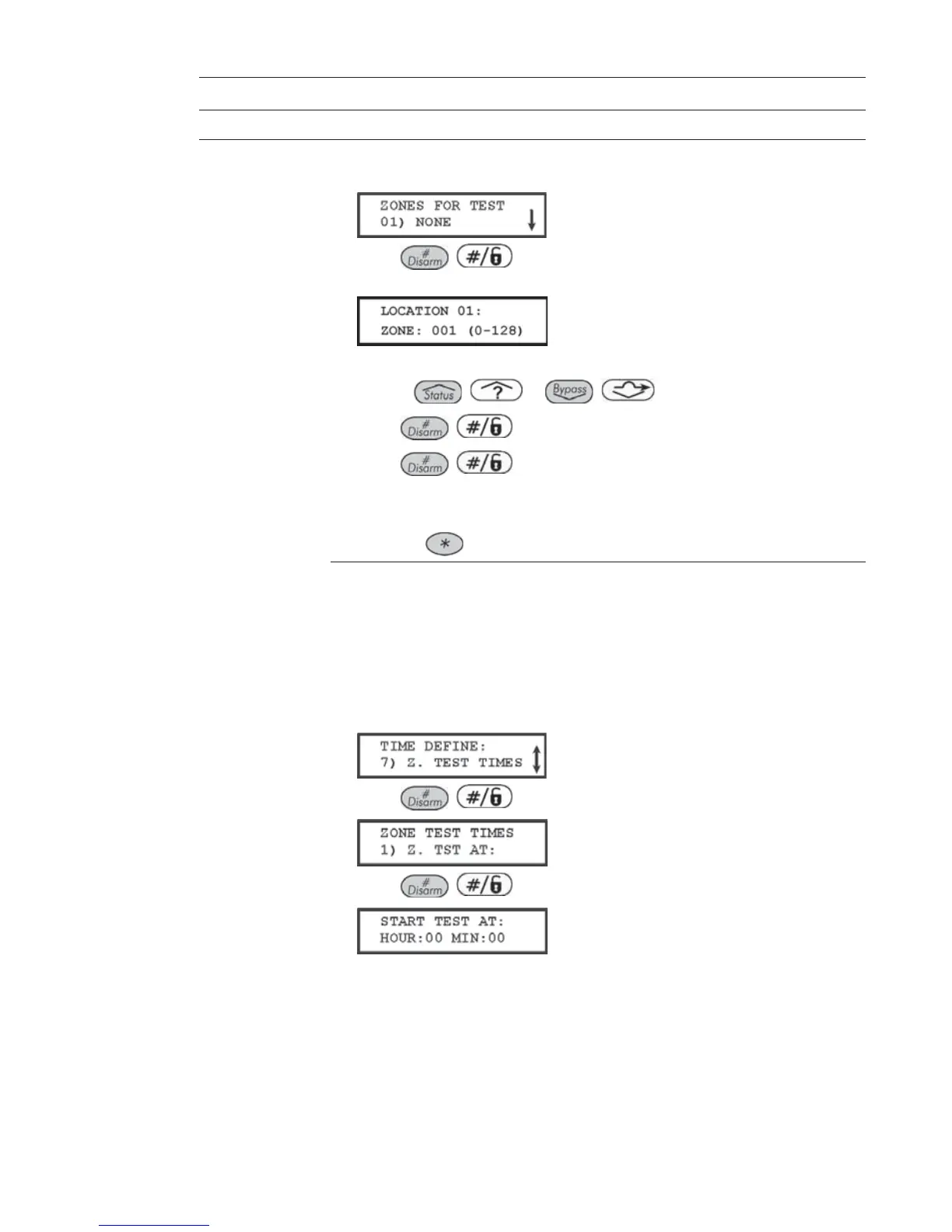
CHOOSING ZONES FOR SELF-TESTING:
1. Press [8]. The following display appears:
2. Press / to specify the first of 16 possible zones for self-
testing. The following display appears:
3. Enter the zone number of the first selected zone.
4. Use the
/ or / keys to position the cursor.
5. Press
/ .
6. Press
/ again, and repeat step 2, above, for the next
selected zone.
7. Continue this process until all zones are selected.
8. Press the
key to exit.
CHOOSING A TESTING SCHEDULE:
Default: 00 hours; 00 minutes
Range: 00 to 24 hours; 00 to 59 minutes
The following is a detailed procedure for using the Zone Test Times
parameter (Quick Keys [1] [1] [7], described on page 48.)
1. From the main Installer Programming menu, press [1] [1] and select option
[7]. The following display appears:
2. Press / . The following display appears:
3. Press / again. The following display appears:
4. Define the time (in 24-hour format) for the first test to begin. The defaults
are 00 hours and 00 minutes. The range is 00 to 24 hours and 00 to 59
minutes.



 To Next Page