Features
397
System functions and features as of R4.1
syd-0570/1.2 – R4.1 – 08.2016
Tip:
More files than planned can be uploaded to the file system, provided they each have a different
name. The uploaded files can also be seen in the file browser ( =2s) under voice/announce/.
Files can also be uploaded and/or deleted there.
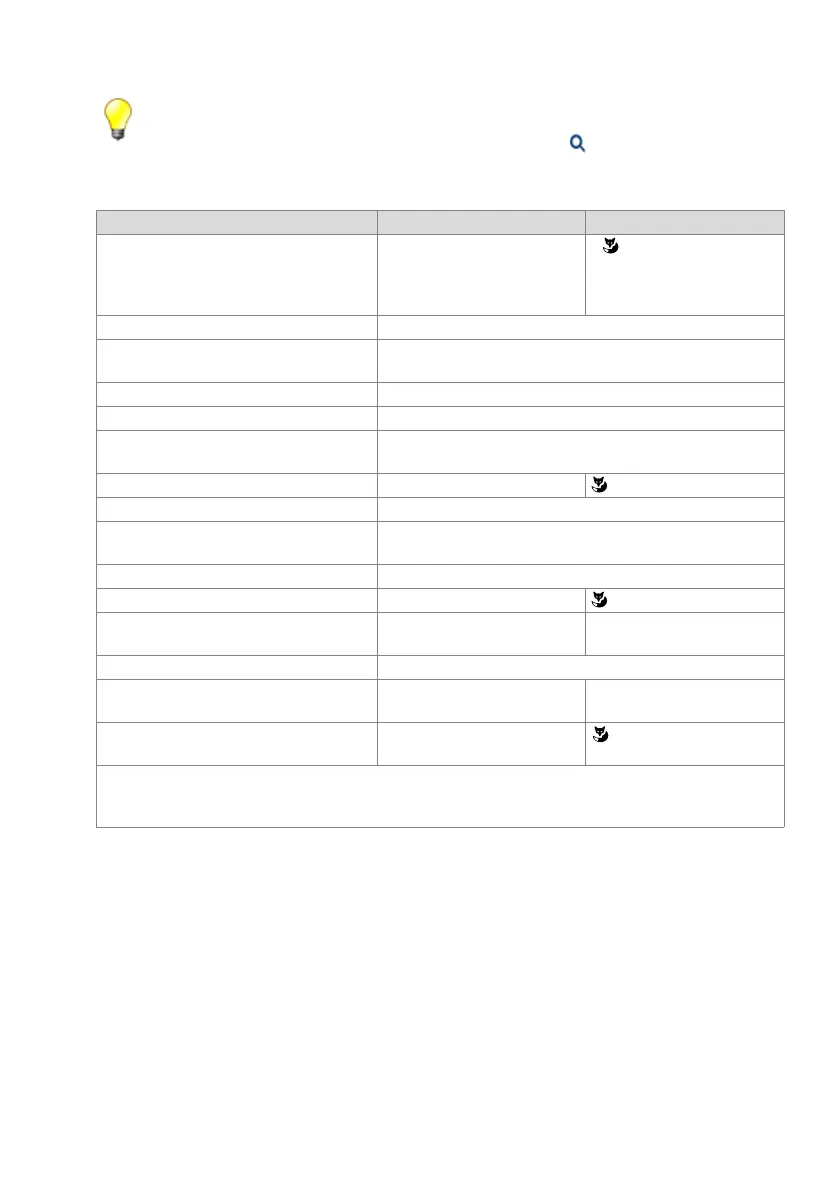
Tab. 206 Function code for making a normal announcement
Function Function code System phones
Announcement to one user with phone *7998 <SC No.> # •
1)
• Office 35, Office 45,
MiVoice 5370, MiVoice 5380:
double-click team key
1)
Also possible in suffix dialling (does not apply for Mitel 6700 SIP / 6800 SIP)
Announcement to one user with audio file *7997 x yy <SC No.> #
Announcement to one user with audio file and
phone
*7996 x yy <SC No.> #
Announcement to several users with phone *7998 <SC No.> * <SC No.> * ... <SC No.> #
2)
2)
Maximum 16 users. The maximum dialling string length is 32 characters.
Announcement to several users with audio file *7997 x yy <SC No.> * <SC No.> * ... <User No.> #
2)
Announcement to several users with audio file
and phone
*7996 x yy <SC No.> * <SC No.> * ... <User No.> #
2)
Announcement to a group with phone *7988 <group No.>
Announcement to a group with audio file *7987 x yy <group No.>
Announcement to a group with audio file and
phone
*7986 x yy <group No.>
Stop an ongoing announcement with audio file *7990 or *7980
3)
3)
Only by the executing user and with many repetitions
answer an ongoing announcement or lift the handset
4)
4)
Does not apply to Mitel 6700 SIP / 6800 SIP
Play back an ongoing announcement on the
handset
Lift the handset
5)
5)
Applies to Mitel 6700 SIP / 6800 SIP only
answer an ongoing announcement *89
6)
6)
By a user outside the group. The other users in the announcement group are switched out. Several an-
nouncements can be active on groups. Therefore, acceptance with *89 is not clear. The announcement that
first reaches the system is answered.
Abort an ongoing announcement (on this
phone only)
Hang up
Protect own set against announcement / Allow
announcement to own set
x = <1...9> number of audio file repetitions
yy = <01...40> 2-digit file number
Group No. = <01...16> for Mitel 415/430or <01...50> or Mitel 470



 To Next Page