IMAGE FUSING
2-113
Detailed
Descriptions
SM A229
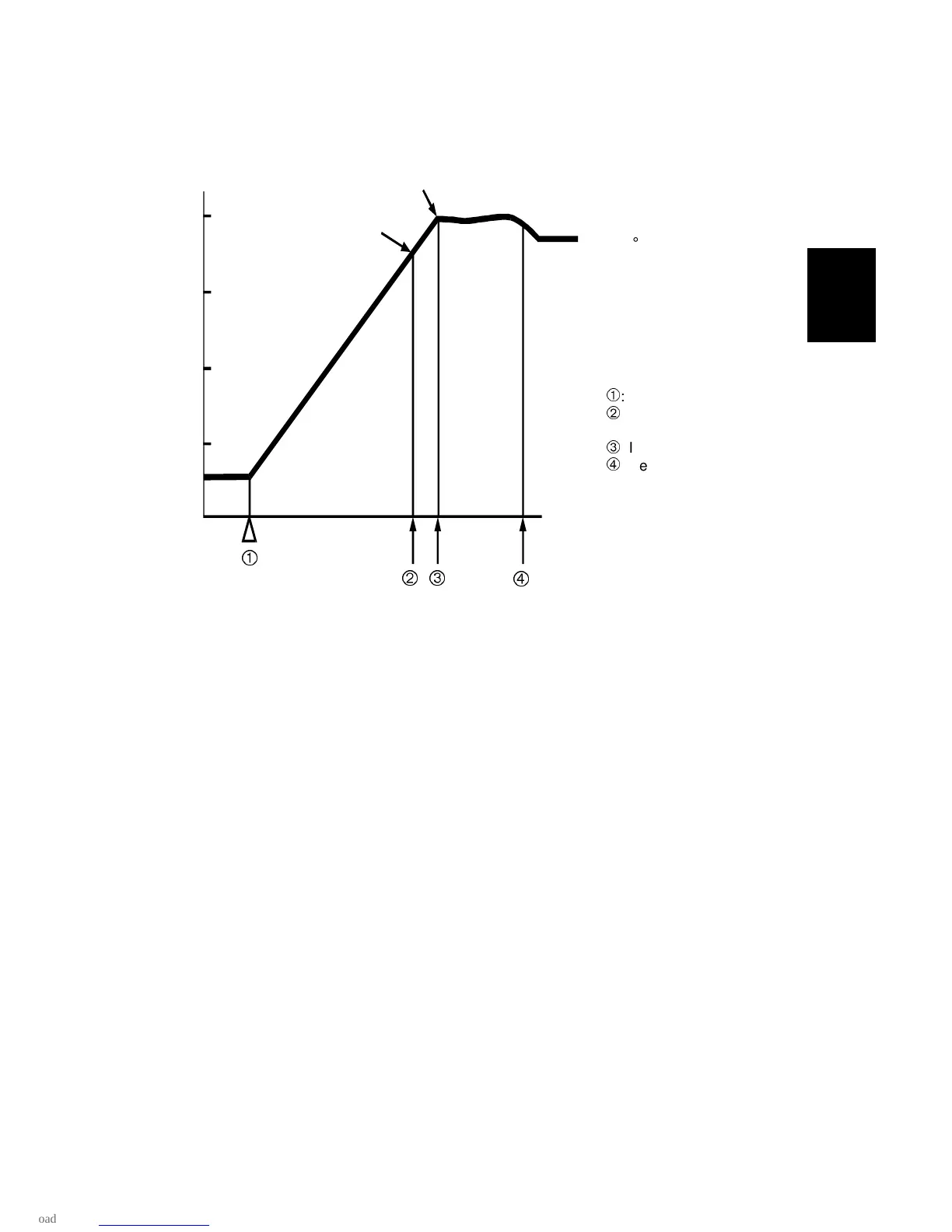
2.9.4 FUSING LAMP CONTROL
When the main switch is turned on, the CPU turns on the two fusing lamps.
When the fusing temperature reaches 180
°
C, the machine starts the process
control data initial setting. If the fusing temperature was already above 100
°
C when
the main switch was turned on, process control initial setting is not done.
When the CPU detects a fusing temperature of 200
°
C, the copier starts fusing
idling. The idling period can be adjusted with SP mode 1-103. If the fusing
temperature was already above 100
°
C when the main switch was turned on, the
copier does not go into the fusing idling mode.
When fusing idling has finished, the warm-up period is completed and the Ready
indicator turns on. After this, fusing temperature is kept at 185
°
C.
The CPU changes the fusing lamp on period depending on the temperature
measured by the thermistor to keep the fusing temperature as close as possible to
the target temperature.
A229D521.WMF
200
°
C
180
°
C
: Main switch on
: Process control data
initial setting start
: Idling start
: Ready
185
°
C









 To Next Page