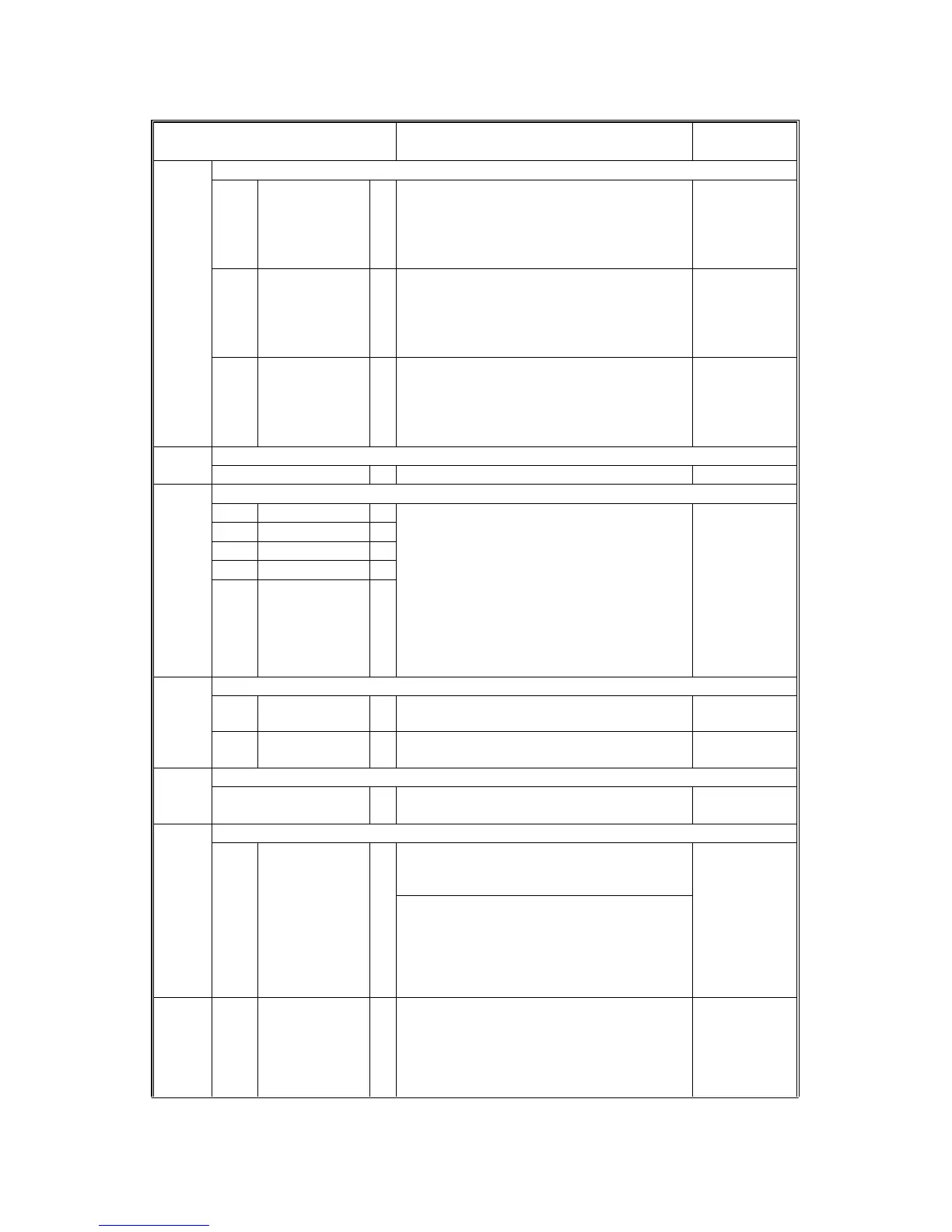
SERVICE PROGRAM MODE
4-12
A229 SM
Mode No.
(Class 1 , 2
&
3)
Function Settings
1-105 Fusing Temperature Adjustment
1 By-pass * Adjusts the fusing temperature for paper
fed from a by-pass tray.
Use the “
•
” key to toggle from + to - and
the Clear/Stop key to toggle from - to +
before entering the value.
170 ~ 200
1
°
C/step
185
°
C
2 OHP * Adjusts the fusing temperature for OHP
sheets fed from the by-pass feed unit.
Use the “
•
” key to toggle from + to - and
the Clear/Stop key to toggle from - to +
before entering the value.
+10 ~ -10
°
C
1
°
C/step
0 (165
°
C)
3 Thick Paper *
Adjusts the fusing temperature for thick
paper fed from the by-pass feed unit.
Use the “
•
” key to toggle from + to - and
the Clear/Stop key to toggle from - to +
before entering the value.
+5 ~ -10
°
C
1
°
C/step
0 (195
°
C)
1-106 Fusing Temperature Display
Displays the fusing temperature.
1-901 CPM Change for Thick Paper
1Tray 1 *
2Tray 2 *
3Tray 3 *
4Tray 4 *
5LCT *
Selects the copy speed when the fusing
temperature goes down when using thick
paper.
During a long copy run, the hot roller cools
down. This may cause poor fusing. To
prevent this, the copy speed can be
reduced when the temperature reaches a
certain level.
The 4th tray is used for the Japanese
version only.
0: None
1: 50 cpm -
165
°
C
2: 45 cpm -
175
°
C
1-904 By-pass Tray Paper Size Correction
1 Minimum Size *
Calibrates the minimum paper width
position of the sensor (100 mm).
Start
2Maximum Size*
Calibrates the maximum paper width
position of the sensor (A4 sideways).
Start
1-905 Thick Paper Mode - By-pass Table
* Selects the by-pass feed clutch on mode
for thick paper mode.
ON: Twice
OFF: Once
2-001 Charge Corona Bias Adjustment
1 Image Area * Adjusts the voltage applied to the grid plate
during copying when auto process control
is
off
.
Normally, there is no need to adjust this. If
there is an ID or TD sensor problem, the
machine goes into fixed toner supply
mode.
After replacing the drum or charge corona
wire, change this value to the default.
-600 ~ -1300
10 V/step
-1000 V
2-001 2 ID Sensor
Pattern
*
Adjusts the voltage applied to the grid plate
when making the ID sensor pattern.
Normally, there is no need to adjust this.. If
the user wants high density copies, the
sensor pattern must be lighter, so this voltage
must be a higher negative voltage.
-600 ~ -1300
10 V/step
-650 V
Rev. 12/15/98









 To Next Page