FUSING UNIT
A229 5-90 SM
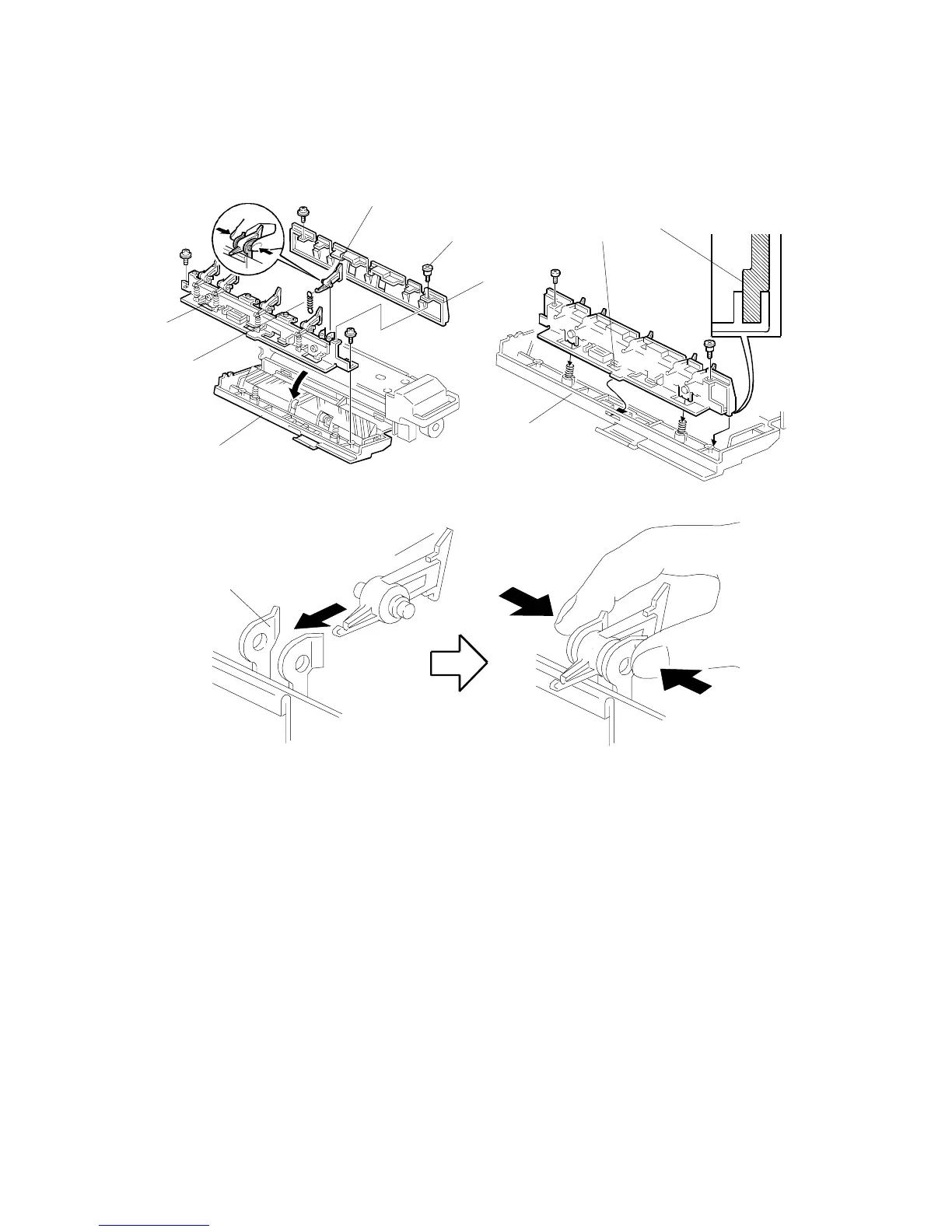
5.9.6 HOT ROLLER STRIPPER PAWL REPLACEMENT
1. Turn off the main switch and pull out the fusing unit.
2. Lower the fusing exit assembly [A].
3. Remove the fusing exit guide [B] (2 screws).
4. Remove the two screws (the front screw [C] is a stepped screw) that hold the
upper exit guide [D].
5. Unhook the spring [E] then replace the pawls [F].
NOTE:
1) After installing the new pawls, check that they are correctly held by
the holders [G] as shown. If not, remove the pawl and bend the
sides of the holder inward. Apply Barrierta L55/2 grease to the inner
surfaces of the holder.
2) When re-attaching the upper exit guide, put the hook [H] in the
opening in the fusing exit assembly and fit the rib [I] in the rail.
A229R510.WMF
A229R653.WMF
A229R511.WMF
[A]
[C]
[D]
[E]
[F]
[F]
[A]
[I]
[G]
[H]
[B]









 To Next Page