PAPER EXIT/DUPLEX UNIT
SM 5-97 A229
Replacement
and
Adjustment
5.10.6 DUPLEX TRANSPORT SENSORS 2 & 3
1. Open the front door.
2. Pull out and remove the duplex unit (see Duplex Transport/Duplex Feed Clutch
Removal).
3. Remove the duplex front cover (see Jogger Motor Removal).
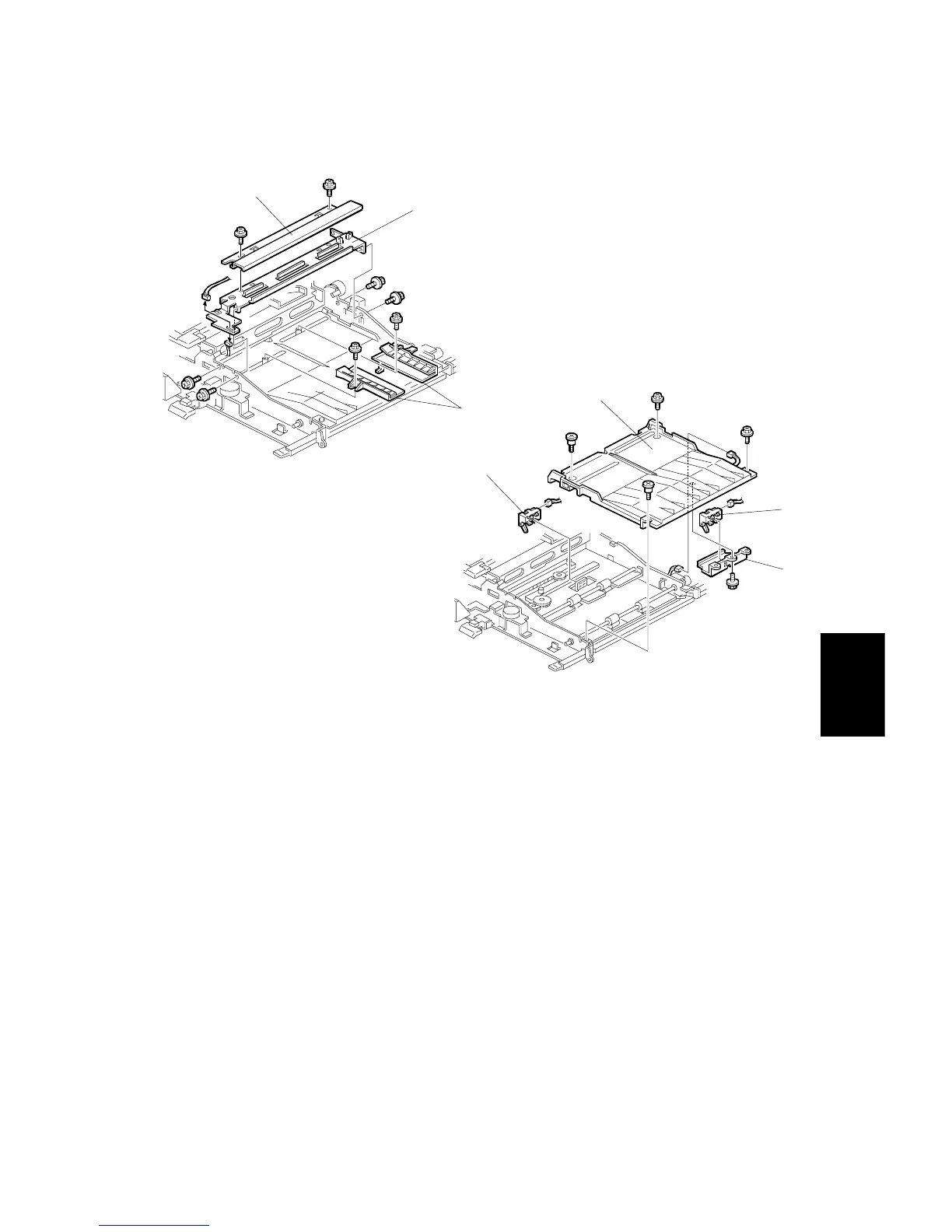
4. Remove the cover bracket [A] (2 screws).
5. Remove the center bracket [B] (4 screws, 2 connectors).
6. Remove the jogger fences [C] (1 screw each).
7. Remove the upper duplex cover [D] (4 screws, 1 connector).
8. Remove duplex transport sensor 2 [E] (1 connector).
9. Remove the duplex transport sensor bracket [F] (1 screw).
10. Remove duplex transport sensor 3 [G] (1 connector).
A229R587.WMF
A229R588.WMF
[A]
[B]
[C]
[D]
[E]
[F]
[G]



 To Next Page