SCANNER UNIT
A229 5-26 SM
23. Remove the front scanner wire bracket [A], tension spring [B], and the wire
tension bracket [C] (1 screw). Then remove the front scanner wire.
Reinstallation
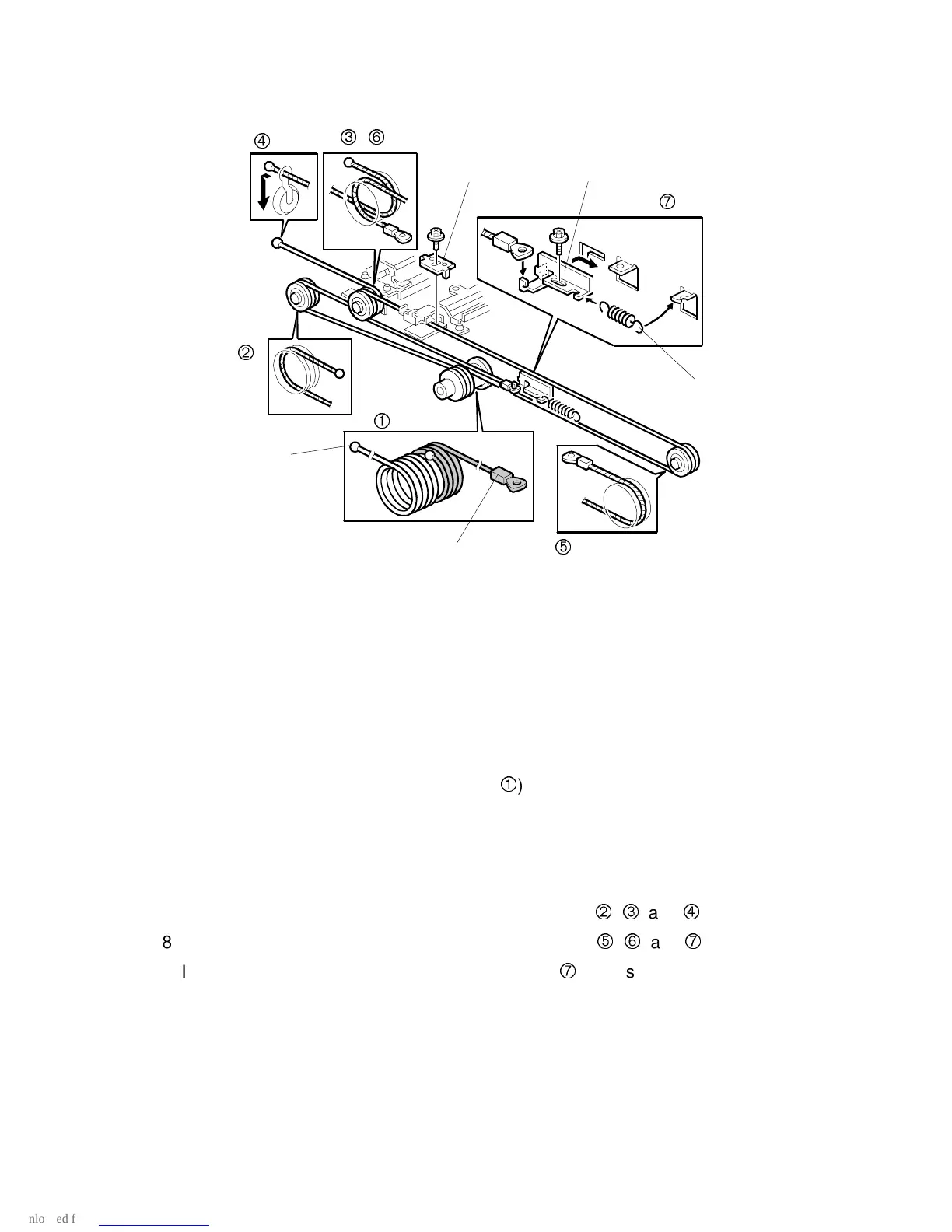
24. While making sure of the direction, place the bead on the middle of the wire in
the pulley hole. Then wind the wire (ball side) [D] clockwise 7 times, and the
other side (ring side) [E] once as shown (
). Secure the pulley with tape to
keep this condition.
25. Place the pulley on the scanner drive shaft.
26. Secure the pulley with the Allen screw in the position where the Allen screw
hole faces up.
27. Wind the end of the new wire with the ball as shown (
,
, and
).
28. Wind the end of the new wire with the ring as shown (
,
, and
).
29. Install the tension spring on the tension bracket (
), and slightly tighten the
tension bracket.
A229R687.WMF
[B]
[D]
[C]
[E]
,
[A]









 To Next Page