COPY IMAGE ADJUSTMENTS: PRINTING/SCANNING
SM 5-103 A229
Replacement
and
Adjustment
5.12 COPY IMAGE ADJUSTMENTS: PRINTING/SCANNING
NOTE:
1) You need to perform these adjustment(s) after replacing any of the
following parts:
•
Scanner Wires
•
Lens Block
•
Scanner Motor
•
Polygon Mirror Motor
•
Paper Side Fences
•
Memory All Clear
2) For more details about accessing SP modes, refer to section 4.
5.12.1 PRINTING
NOTE:
1) Make sure the paper is installed correctly in each paper tray before you
start these adjustments.
2) Use the Trimming Area Pattern (SP2-902-3, No. 10) to print the test
pattern for the following procedures.
3) Set SP 2-902-3 to 0 again after completing these printing adjustments.
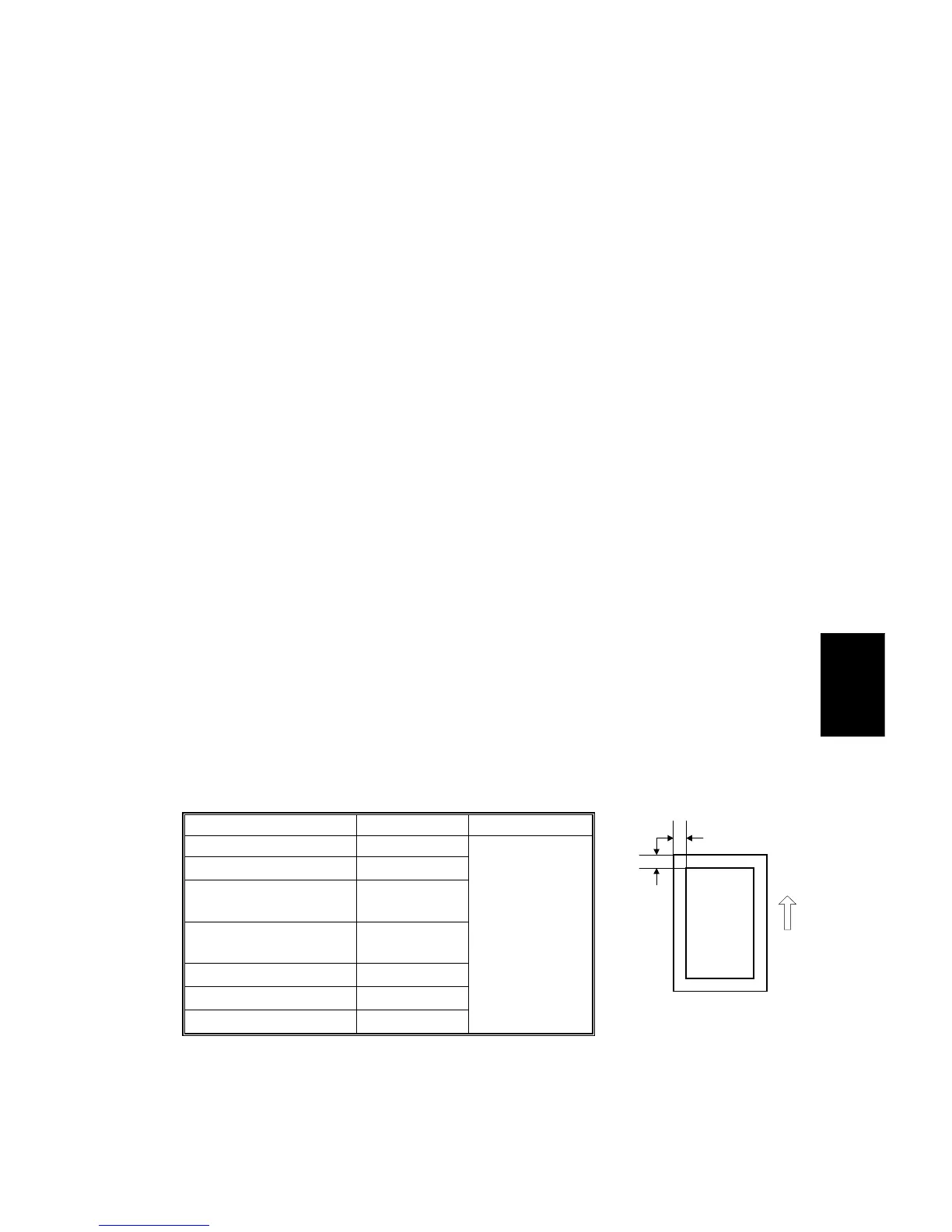
Registration - Leading Edge
1. Check the leading edge registration using the Trimming Area Pattern, and
adjust it using SP1-001 if necessary. The specification is: 3
±
2 mm.
Registration – Side-to-Side
Do the parallel image adjustment after the side-to-side registration adjustment.
Using SP Mode
1. Check the side-to-side registration for each paper feed station using the
Trimming Area Pattern, and adjust them using the following SP modes if
necessary.
SP mode Specification
1st paper feed SP1-002-1
2nd paper feed SP1-002-2
3rd paper feed
(Optional PFU tray 1),
SP1-002-3
4th paper feed
(Optional PFU tray 2)
SP1-002-4
Duplex SP1-002-5
By-pass feed SP1-002-6
LCT SP1-002-7
2
±
1.5 mm
B
A
A229R633.WMF
A: Leading Edge Registration
B: Side-to-side Registration



 To Next Page