FUSING UNIT
A229 5-92 SM
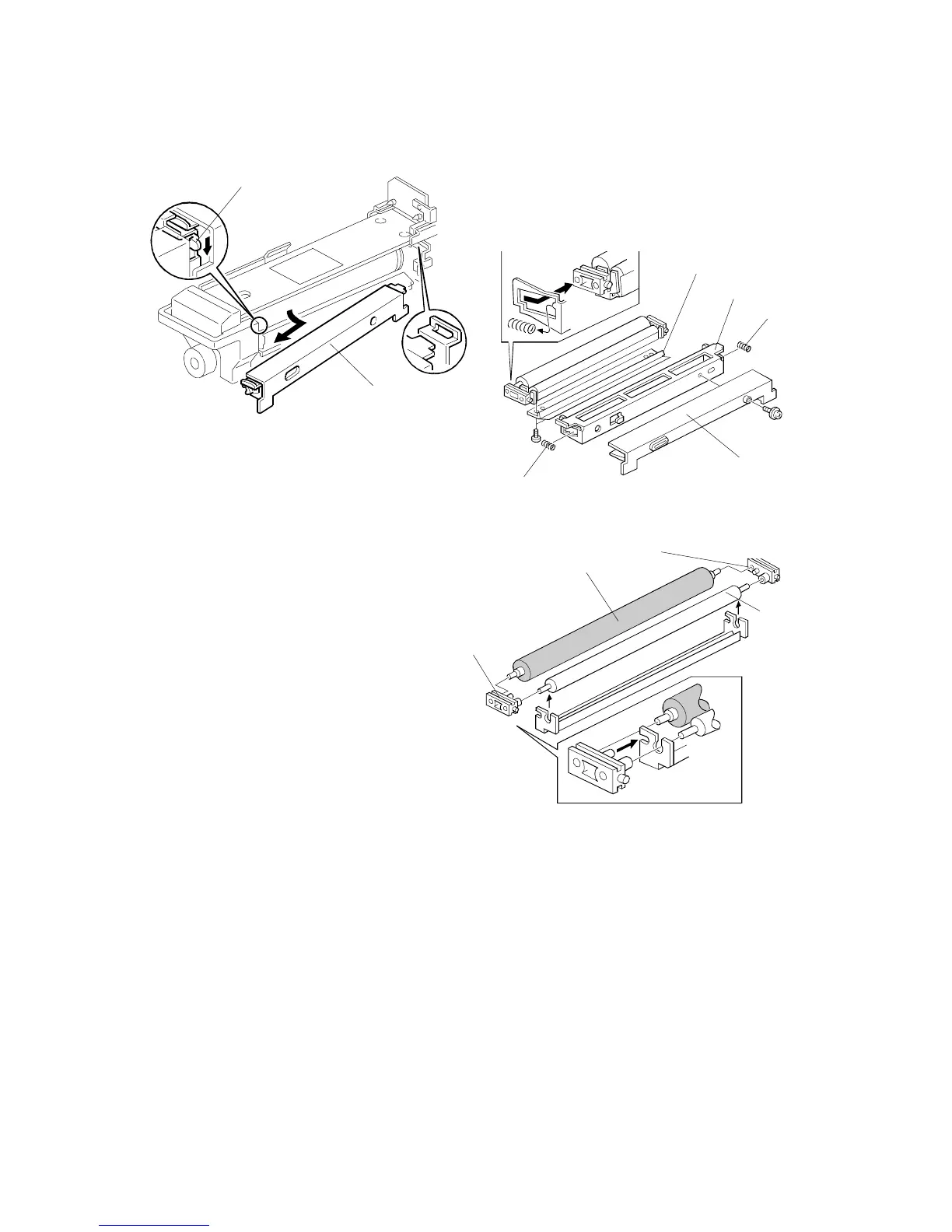
5.9.8 OIL SUPPLY/CLEANING ROLLER REPLACEMENT
1. Pull out the fusing unit.
2. Lower the lever [A].
3. Remove the oil supply unit [B].
4. Remove the upper entrance guide
[C] (1 screw).
5. Remove the mylar bracket [D] (2
screws).
6. Remove the springs [E].
7. Remove the bushings [F].
8. Remove the oil supply roller [G],
and the cleaning roller [H].
9. Install the new cleaning roller [H], and oil supply roller [G]. Then reassemble the
unit.
NOTE:
Assemble the cleaning roller [H], oil supply roller [G], and bushings [F].
Then, install the assembled parts on the bracket [I].
A229R514.WMF
A229R654.WMF
A229R655.WMF
[A]
[B]
[E]
[D]
[A]
[C]
[I]
[F]
[H]
[G]
[F]









 To Next Page