TRANSFER BELT UNIT
SM 5-55 A229
Replacement
and
Adjustmen
t
5.7 TRANSFER BELT UNIT
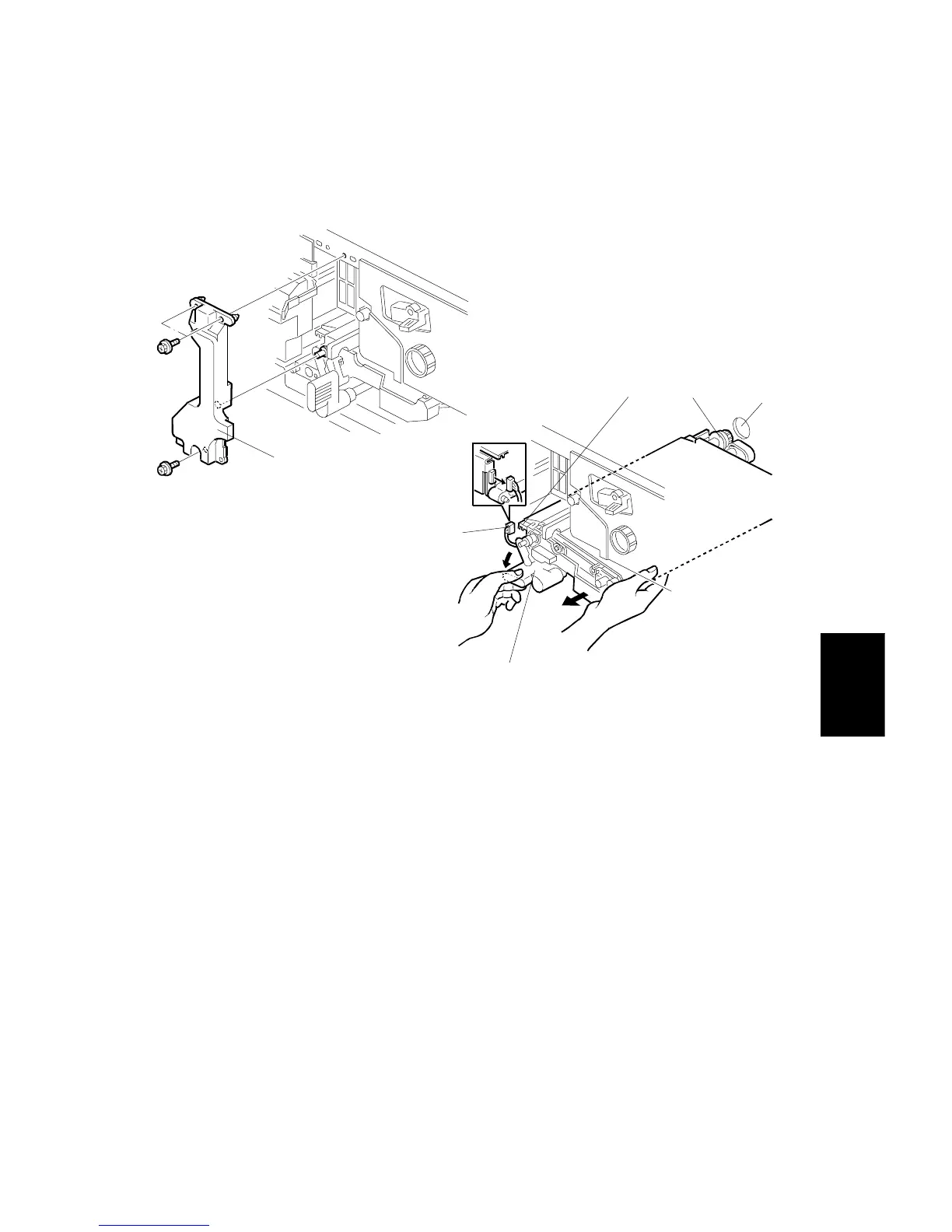
5.7.1 TRANSFER BELT UNIT REMOVAL/INSTALLATION
- Removal -
1. Turn off the main switch.
2. Remove the transfer belt unit prop [A] (3 screws).
3. Disconnect the connector [B].
4. While turning the lever [C] counterclockwise, take out the transfer belt unit.
NOTE:
1) Do not touch the transfer belt with bare hands.
2) Take care not to scratch the drum with the transfer belt unit. Be
careful when installing the transfer belt unit.
- Installation -
1. While turning the lever [C] counterclockwise, install the transfer belt unit.
NOTE:
1) Insert the gear [D] into the opening [E] in the rear frame.
2) Place the slot [F] in the transfer belt unit on the rail.
A229R527.WMF
A229R528.WMF
[A]
[B]
[C]
[D]
[E]
[F]









 To Next Page