INSTALLATION PROCEDURE
SM 9-9 A229
Copier
Connector Kit
A808
3. INSTALLATION PROCEDURE
CAUTION
Unplug the machine power cord before starting the following procedure.
NOTE: Both machines should have the same program version. The software
program version must be at least version A2297540G.
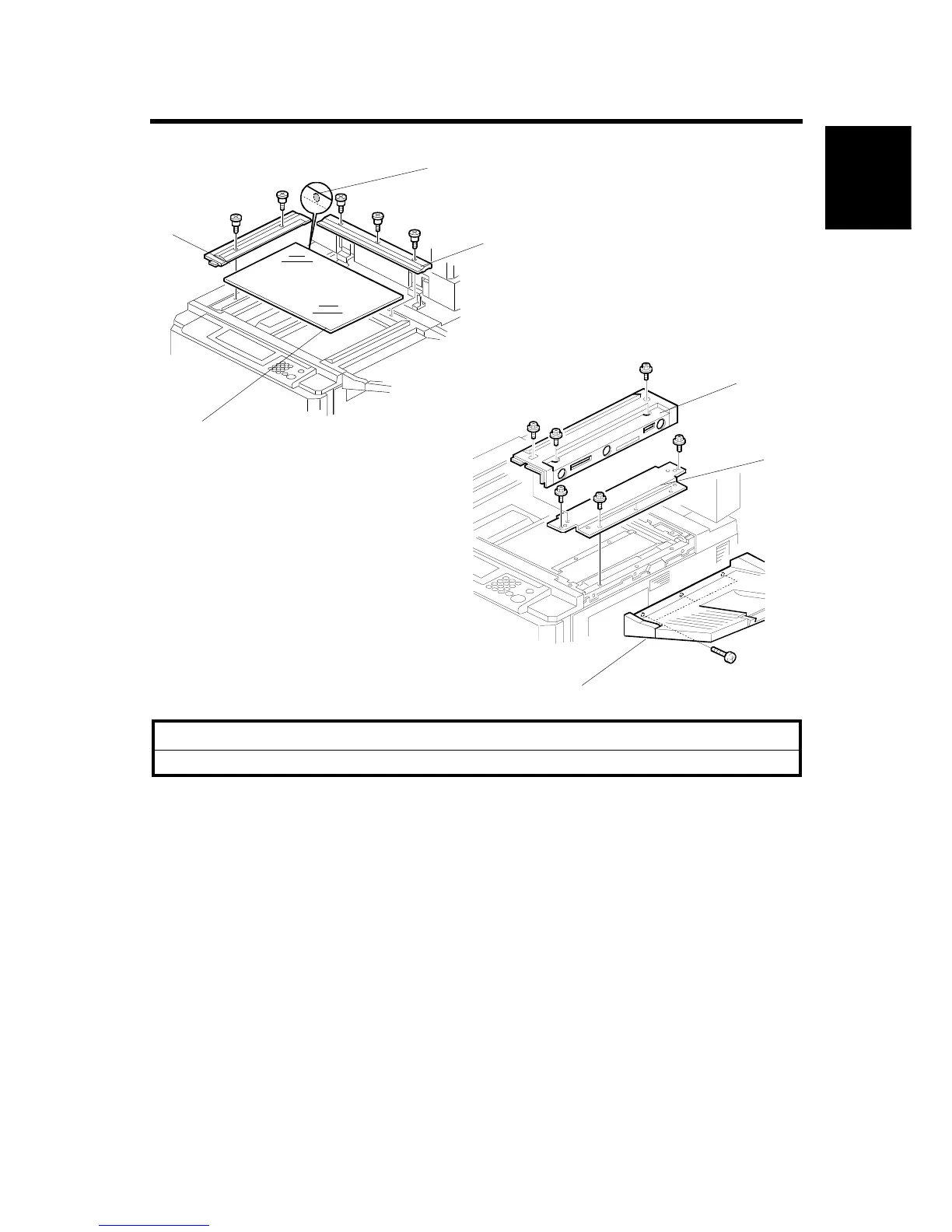
1. Open the DF.
2. Remove the rear scale [A] (3screws).
3. Remove the left scale [B] (2 screws).
4. Remove the exposure glass [C].
NOTE: When reinstalling the exposure glass, make sure that the mark [D] is
positioned at the rear left corner as shown.
5. Remove the original exit tray [E] (3 screws).
6. Remove the upper right cover [F] (4 screws).
7. Remove the right stay [G] (5 screws).
A808I501.WMF
A808I500.WMF
[A]
[B]
[C]
[D]
[E]
[F]
[G]









 To Next Page