COPY IMAGE ADJUSTMENTS: PRINTING/SCANNING
A229 5-108 SM
5.12.3 SCANNING
NOTE:
1) Before doing the following scanner adjustments, check the printing
registration/side-to-side adjustment and the blank margin adjustment.
2) Use an OS-A3 test chart to perform the following adjustments.
Registration: Platen Mode
1. Place the test chart on the exposure glass and make a copy from one of the
feed stations.
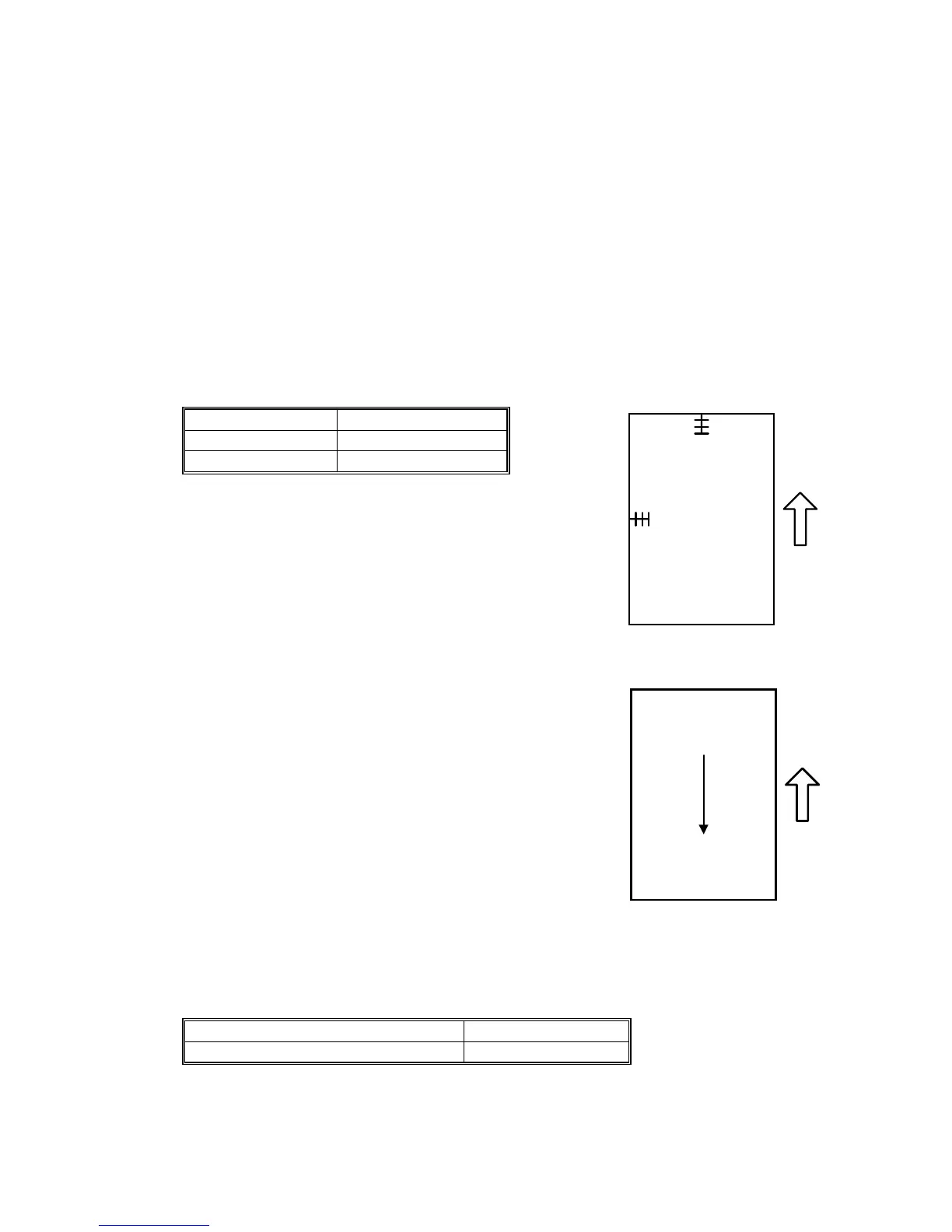
2. Check the leading edge and side-to-side registration, and adjust them using the
following SP modes if necessary.
SP mode
Leading Edge SP4-010
Side-to-side SP4-011
A: Leading Edge Registration
B: Side-to-side Registration
Magnification
NOTE:
Use an OS-A3 test chart to perform the following
adjustment.
Scanner Sub Scan Magnification
A: Sub Scan Magnification
1. Place the test chart on the exposure glass and make a
copy from one of the feed stations.
2. Check the magnification ratio, and adjust it using the following SP mode if
necessary. The specification is
±
1%.
SP mode
Scanner Sub Scan Magnification SP4-008
B
A
A229R635.WMF
A
A229R636.WMF



 To Next Page