PAPER FEED
SM 5-61 A229
Replacement
and
Adjustmen
t
5.8.2 PAPER TRAY REMOVAL
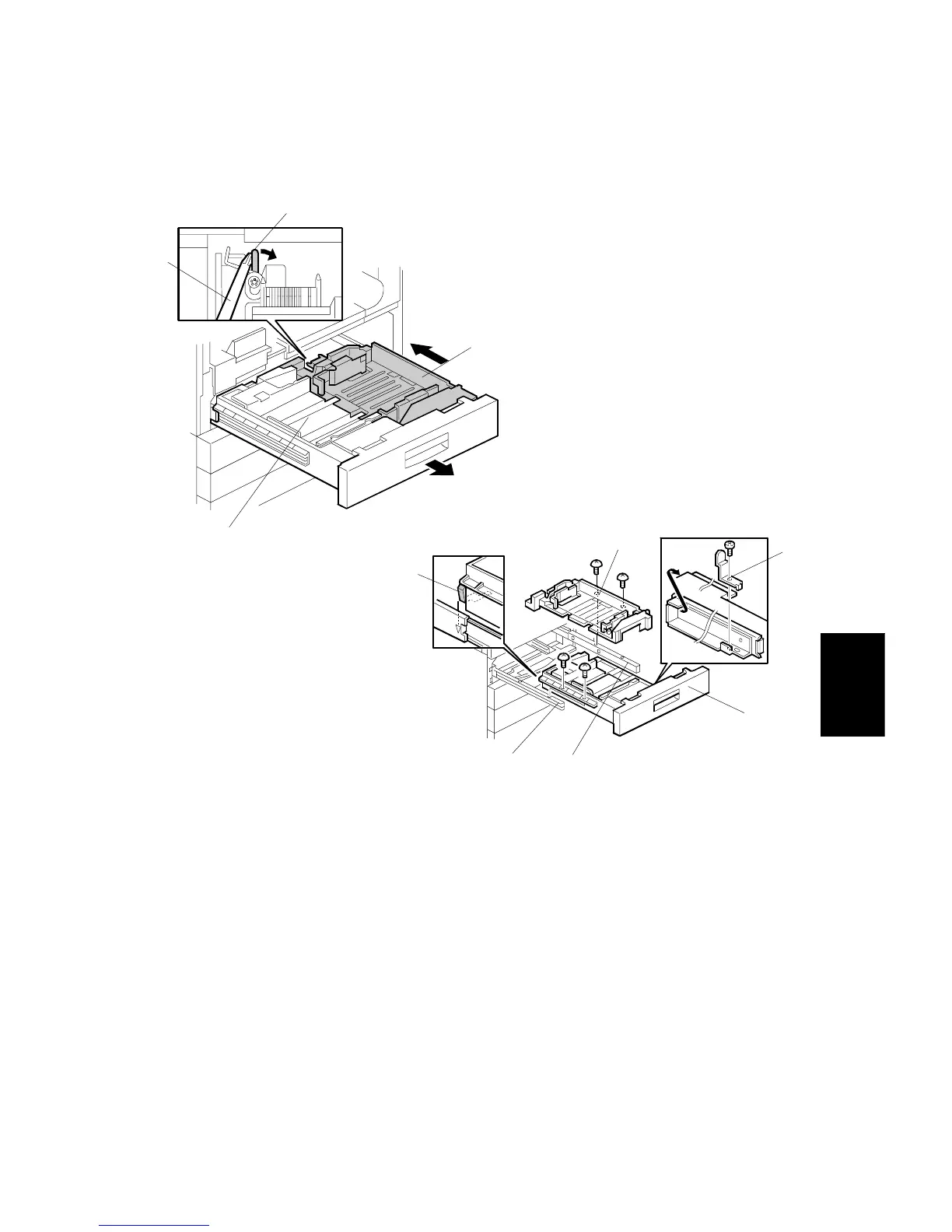
Tandem Tray Removal
1. Open the front door and draw out the tandem tray.
2. While pushing the release lever [A] to the right with a screwdriver [B], slightly
push the right tandem tray [C] to separate it from the left tandem tray [D].
3. Remove the stopper [E] (1 screw).
4. Remove the left tandem tray [D] from the left guide rail [F] (2 screws).
5. While holding the right tandem tray [C] from the bottom, remove the right
tandem tray from the right guide rail [G] (2 screws).
NOTE:
1) If the two screws are removed without holding the right tandem tray,
the tray will drop out.
2) Be careful not to deform the grounding plate [H] when reinstalling
the left tandem tray.
A229R595.WMF
A229R594.WMF
[A]
[B]
[C]
[D]
[H]
[C]
[G]
[E]
[D]
[F]









 To Next Page