DEVELOPMENT AND TONER SUPPLY
A229 5-48 SM
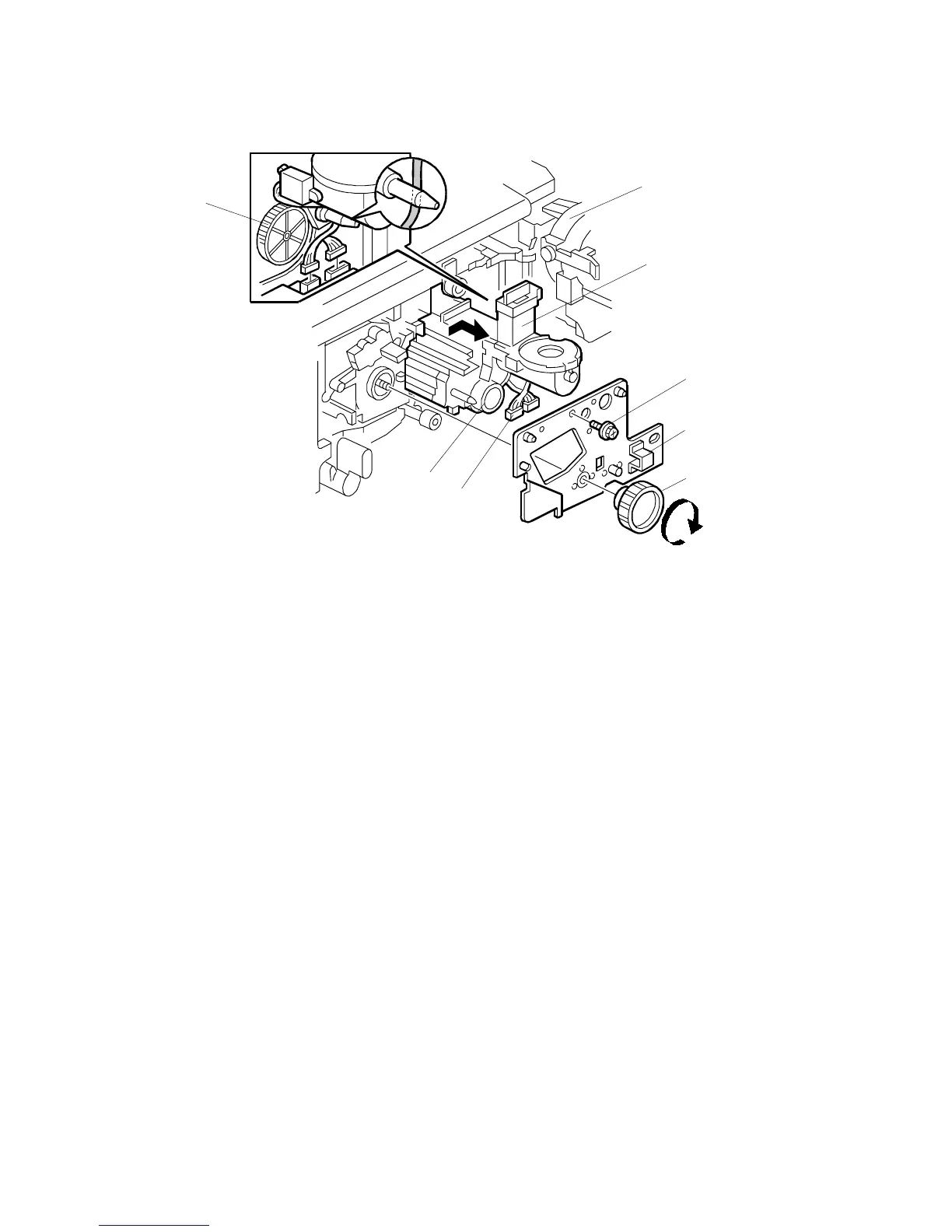
5. Open the toner bottle holder [A].
6. Remove the screw [B] that holds the drum stay.
7. Remove the drum stay knob [C] then take out the drum stay [D].
8. Disconnect the two connectors [E].
9. Pull out the development unit [F].
NOTE:
1) To prevent scratches on the drum, push the development unit to the
right while pulling it out.
2) When installing the development unit, do not forget to connect the
two connectors [E].
3) When installing the drum stay, be careful not to pinch the cables.
Also, keep the cables away from the gears [G].
4) When pulling out the development unit, do not hold the knob [H].
5) Keep the development unit connector as far as possible away from
the development unit when cleaning the unit with a vacuum cleaner.
6) Do not touch the pins of the development unit connector when
carrying the development unit away from the main frame or cleaning
it.
A229R537.WMF
[B]
[D]
[C]
[F]
[E]
[G]
[A]
[H]









 To Next Page