40 ProSYS Installation and Programming Manual
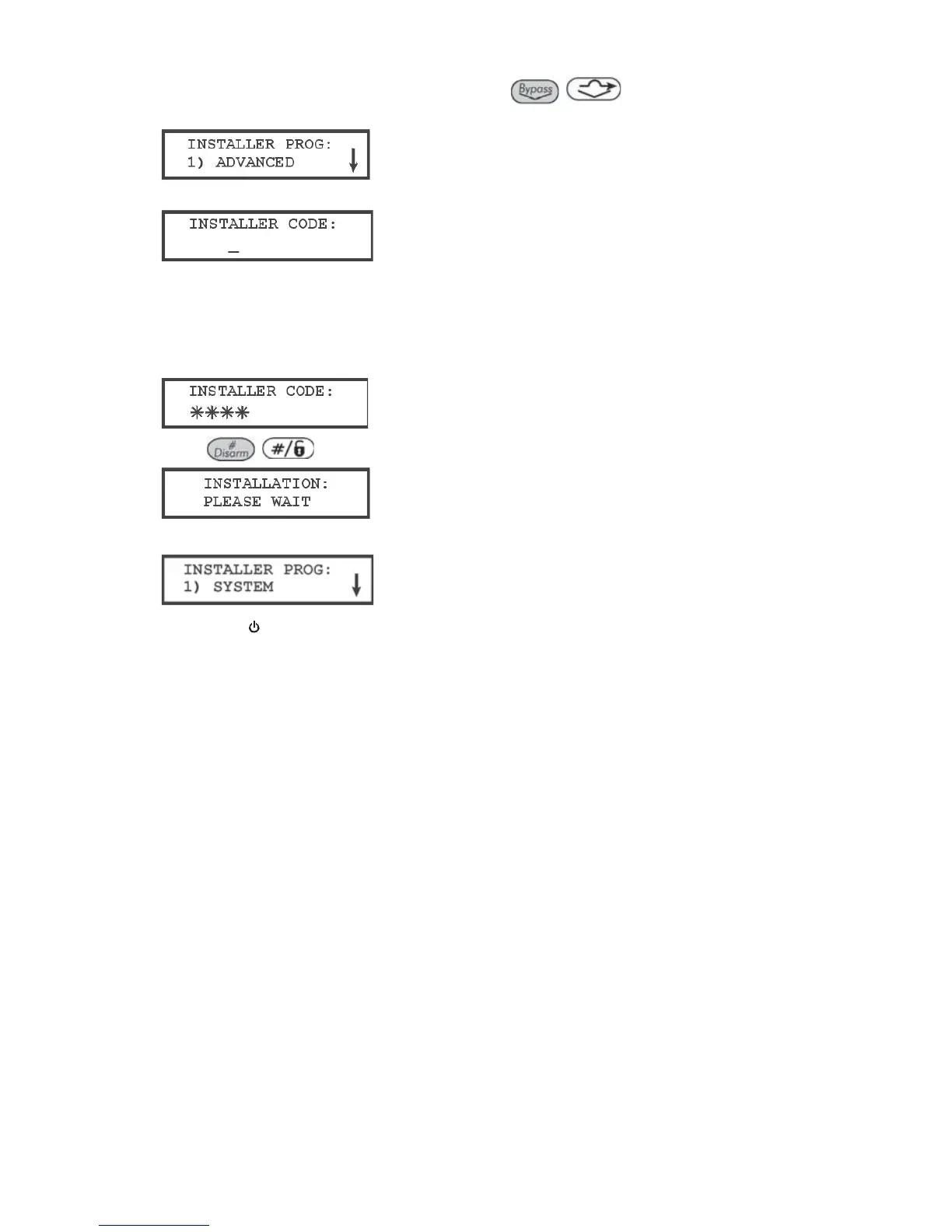
2 Press [7] to select the Installer option or use the
/
key. The keypad displays
the first option, as follows:
3 Press [1] Advanced. The keypad prompts you for the Installer code, as follows:
4 Enter the default Installer Code, depending on the ProSYS model:
O ProSYS 128: [0][1][2][8]
O ProSYS 40: [0][1][4][0]
O ProSYS 16: [0][1][1][6]
The code appears as ,,,, on the keypad display, as follows:
5 Press
/
. The keypad displays the following message:
Then the first main Installer Programming menu option is displayed, as follows:
The Power/
LED begins flashing slowly at this point, indicating that you have entered a
programming session.
The main Installer Programming menu options are available, as follows:
[1] SYSTEM
[2] ZONES
[3] UTIL OUTPUT
[4] CODE MAINT
[5] DIALER
[6] REPORT CODES
[7] ACCESSORIES
[8] MISCELLANEOUS
[9] ACCESS CONTROL
[0] EXIT PROGRAM
Each of the main Installer Programming menu options enables you to access and
program all of the ProSYS options. Refer to Appendix E, Installer Programming Maps for
a complete list of all the programming options. Each option is also discussed in detail in
Chapter 5, Using the Installer Programming Menus.



 To Next Page