104 Pamux User’s Guide
BUS TIMING
WRITE TIMING
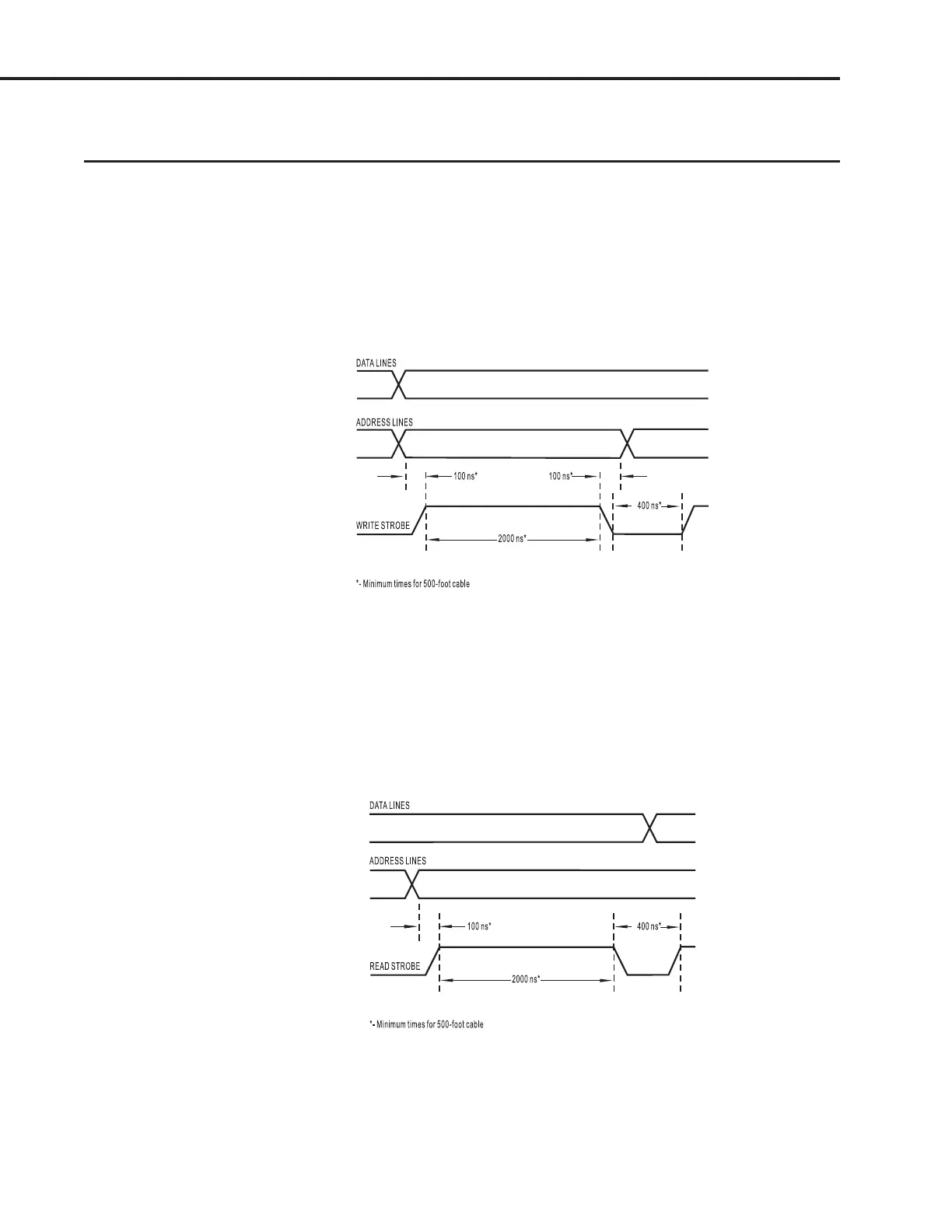
Pamux write timing is simple to generate. First, apply the Pamux address and data to the bus, wait for
at least 100 nanoseconds, then activate the write strobe for at least 2000 nanoseconds. When you
deactivate the write strobe, the data will be latched on the addressed Pamux station. The address lines
must be held stable for a minimum of 100 nanoseconds after the write strobe is brought low.
Figure 4-1 shows the minimum bus timing for a Pamux bus write.
Figure 4-1: Write Timing on the Pamux Bus
READ TIMING
To generate the Pamux bus read cycle, first apply the Pamux address to the bus, wait for at least 100
nanoseconds, then activate the read strobe. After 2000 nanoseconds, the data will be available. Read
the data and then deactivate the read strobe.
Figure 4-2 shows the minimum bus timing for a read cycle on a Pamux bus with 500 feet of cable.
Figure 4-2: Read Timing on the Pamux Bus
PROGRAMING WITHOUT THE PAMUX DRIVER



 To Next Page