Atmospheric Pre-aligner Manual
4000-0015 Rev 1
52
Checking Pre-aligner Status
You can check various connections by sending information request
commands to the controller or by using EQT 32 Information Request. The
firmware recognizes the current axes and returns information for those
axes.
Command Purpose
STAT Send status word
AST 1 Check error status on communications port 1 (COM1)
AST 2 Check error status on communications port 2 (COM2)
GLST Check status of the Galil motion control board
INPUT G Read input port G
RLS Read limit switches
RNCS Read NVSRAM check-sum
ALST Check Alignment status when STAT bit 7 is set to 1
VER Read firmware version number
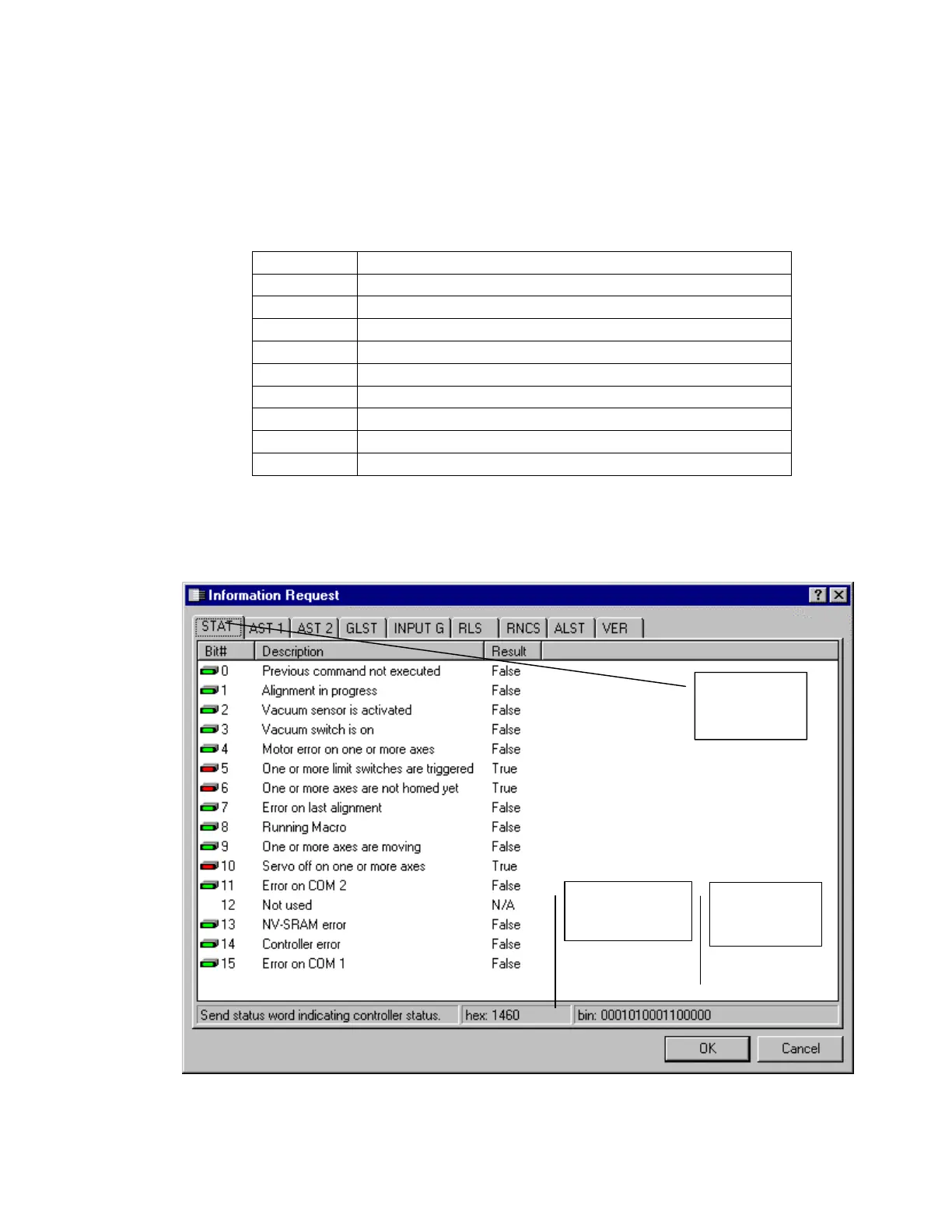
In EQT 32, select the Troubleshooting button. The Troubleshooting
dialog is displayed. Select Information Request and press the Run
button. Nine commands are executed and the results are displayed as text
messages. Problems are highlighted with a red box.
Binary
equivalent
Hexadecimal
status word
STAT tab
is selected.



 To Next Page