Vacuum Robot Manual
4000-0315 Rev 1
24
Commands and Macros for Robots
You operate the robot directly with commands or macros. The commands
are documented in the Equipe Software and Controller Manual. Except
for a few standard macros, macros are system-specific. To review your
macros, use any text editor to view the macro file (*.mac) delivered on
diskette with your system.
To execute a command or macro, type the command or macro name at the
Terminal mode prompt and press the Enter key. For example, to turn on
the servo motor for the Z axis, enter:
SVON Z
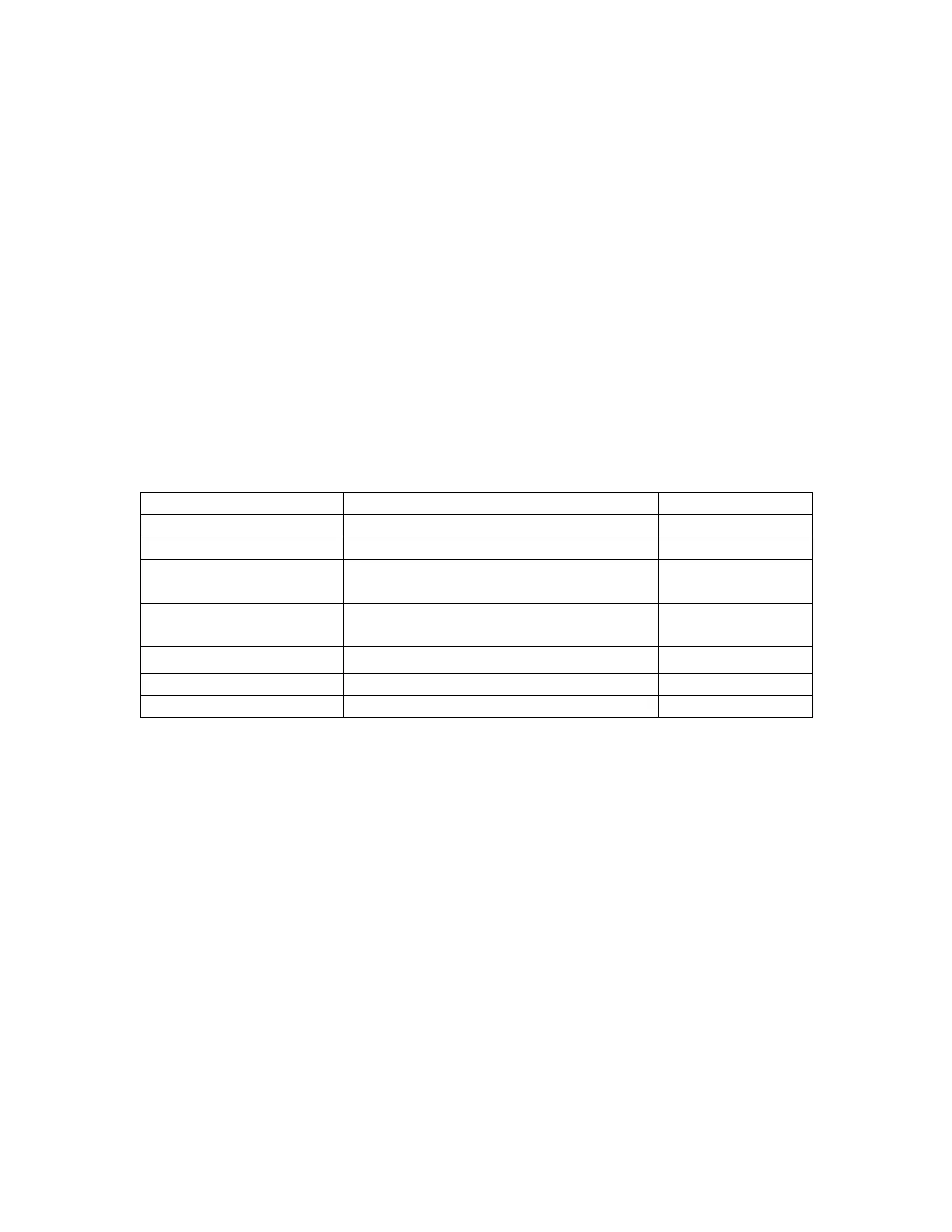
Here’s a short list of often-used commands. For axis, use the robot axis
(T, R, or Z), pre-aligner axis (t), or A, where A is all robot axes. For
position parameters, list the value in mils. Commands are case sensitive.
Command or Macro Description Example
LMCR Lists all macros in NVSRAM. LMCR
LMCR name Lists all lines in one macro. LMCR HOM
MOVA axis, position Move absolute. This moves the robot 6
inches from the zero (0) position.
MOVA z, 6000
MOVR axis, position Move relative. Moves the specified
distance from the current position.
MOVR z, 900
STOP axis Stop all movement. STOP A
SVON axis Turn on the servo motors for all axes. SVON A
SVOF axis Turn off the servo motor for the Z axis. SVOF Z
Coordinate File
The coordinate file contains the coordinates for all positions or stations,
indexer information, and other special coordinate items. You can add
more stations to the coordinate file or change the coordinates of the
existing stations. That is, you place the robot in a position or station that
you want the robot to remember. You then teach the station coordinates
by saving the coordinates for that position or station in a coordinate file
(*.cor) stored in NVSRAM.
For stations that are multi-layered, teach the location of the first wafer slot
in three axes. From that, the controller calculates the coordinates for the
upper layer based on the cassette pitch. Thus, when you issue the macro
GET A, 2
the robot moves to the coordinate position of Station A and gets the wafer
from the second wafer slot.



 To Next Page