D950/Vista Digital Mixing System
4-120 GC Operation SW V3.3 Date printed: 05.08.03
4.7.6.2 Signal Out Configuration
Signaling Outputs are generally relays installed in the Monitoring frame.
They may be used for various purposes, such as:
• Fader Start;
• Microphone ON actions (loudspeaker muting, etc);
• Parallel Record/Ready mode of tape-machine tracks.
Up to four different relays may be configured for each source. They may
feature different Trigger Setups (see later). For each relay, Latching or Im-
pulse operation modes can be selected.
Multiple sources can be configured to one single relay, forming a logical
OR combination.
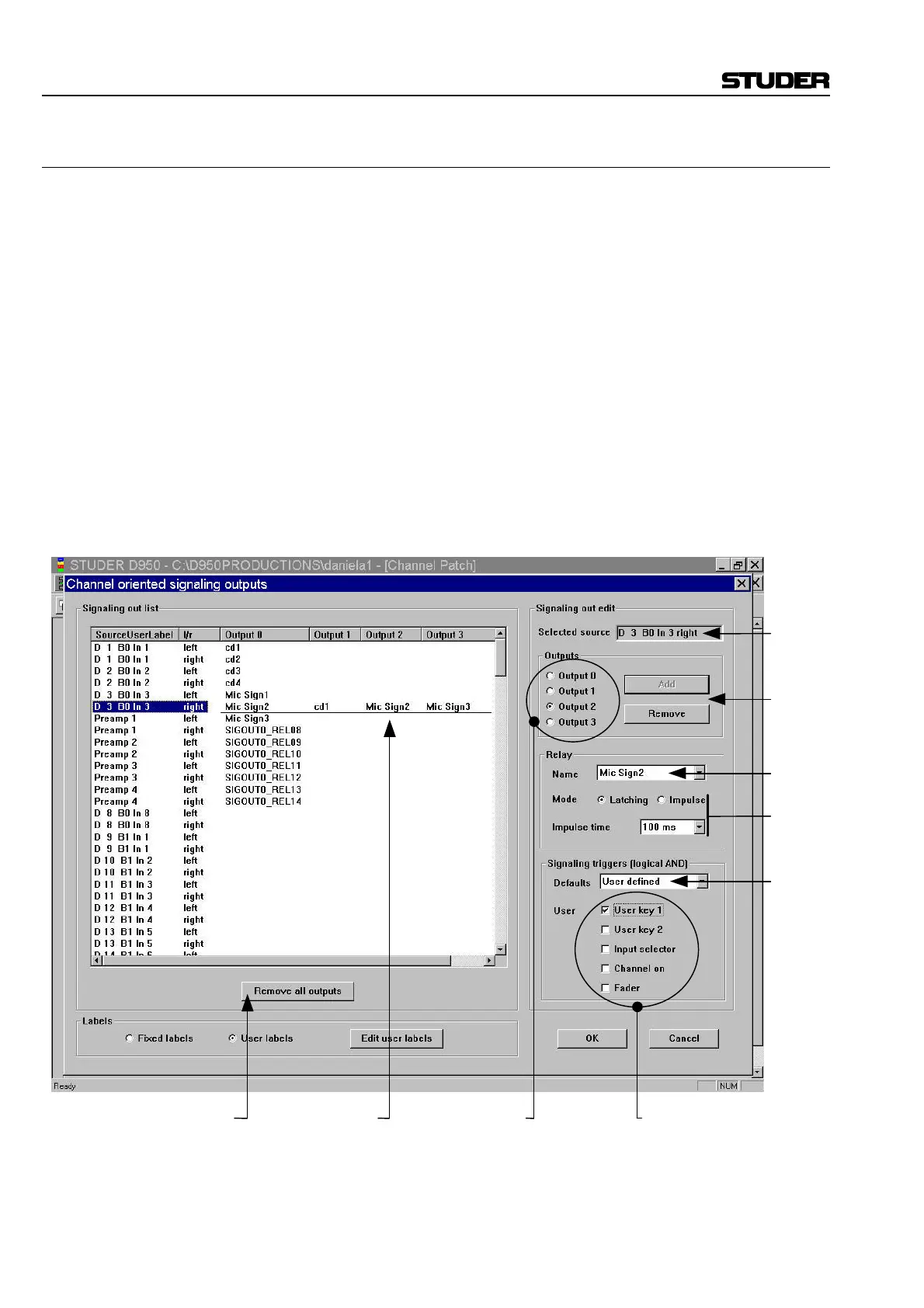
There are four steps in the Signaling Configuration:
1. To configure the Signaling, first select a source in the Signaling Out List,
2. Within the Signaling Out Edit window, select the desired output 0 to 3. In
most cases the correct Output (the next one that is unassigned) will be se-
lected automatically. Now you can add or remove a relay to/from this
source.
Click to Remove
all Assigned Relays
Up to 4 Relays
Can be Selected
per Source
Selected
Add or
Remove
a relay
Select
a Relay
Select
Operating
Mode
Select
Fader
Start or
User
Select which
of 4 Outputs
Set User Defined
Triggers



 To Next Page