CommandCenter Display 9980 Self-Propelled Peanut Combine
Home Pages
The home pages provide you with current
information
about your machine. Certain
fields allow you to select which items to view.
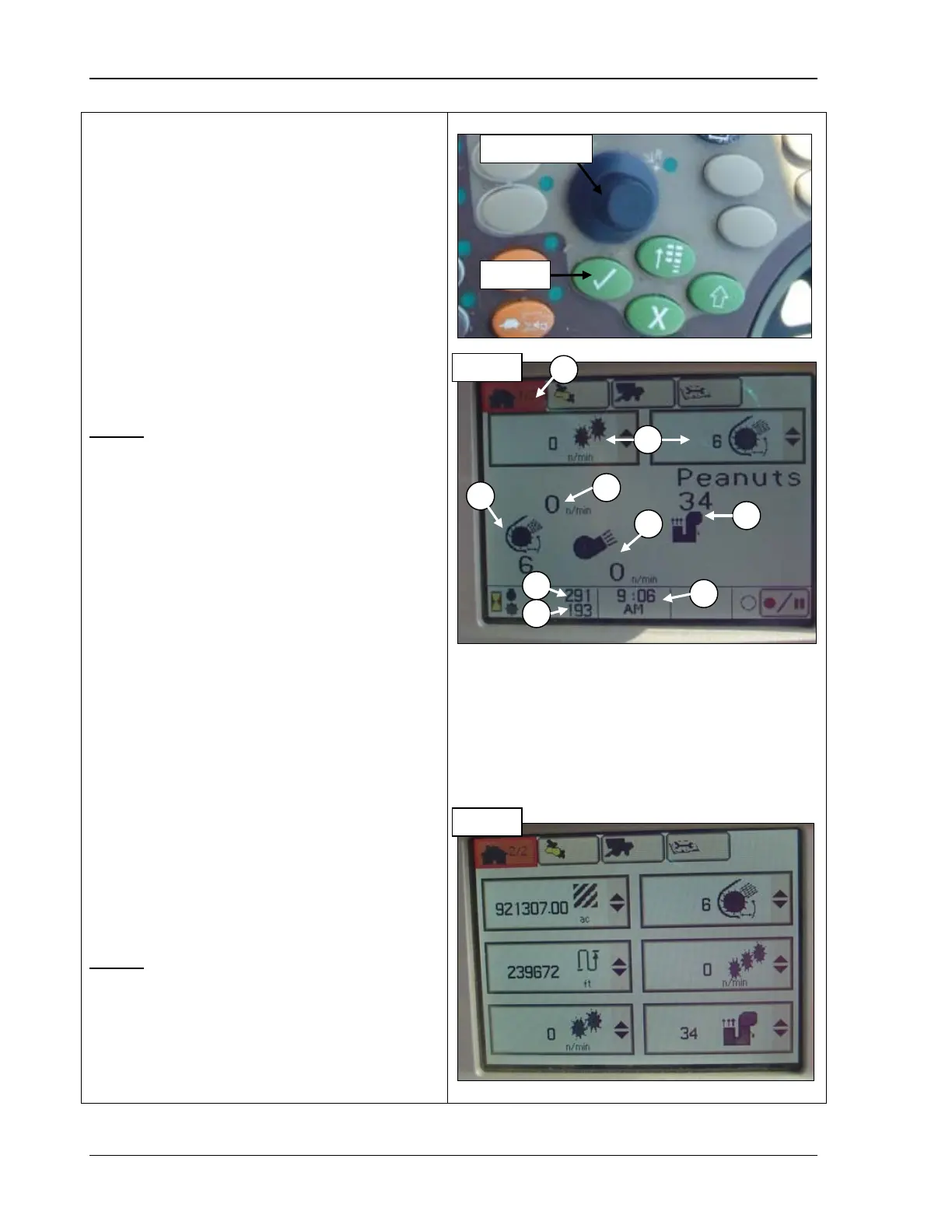
1. Rotate the Selection dial (top photo) until
the Home Page icon (A) is highlighted.
Or, press the first button at the top of the
CommandCenter to display the page in
the example.
2. Press Confirm (top photo). The first home
page screen displays as in the example.
Page 1
A – Home page icon
B – Selectable machine readings
select which machine readings to display (see
“Select Machine Readings to Display” on
page 89).
C – Threshing speed: NOTE
threshing speed RPM number displayed is
always TWICE the actual speed of the
cylinder.
D – Cleaning fan damper position
E – Cleaning fan speed
F – Elevator fan damper position
G – Engine hours
H – Threshing hours
I – Current time: this can be set in standard
or military time
Page 2
This page displays the machine readings in
the order you select, allowing you to monitor
six machine functions at a time.
– Machine readings
– Threshing speed
– Cleaning fan
damper position
– Cleaning fan
damper position
G – Engine hours
H – Threshing hours
I – Current time
88 09/04/15 MAN141



 To Next Page