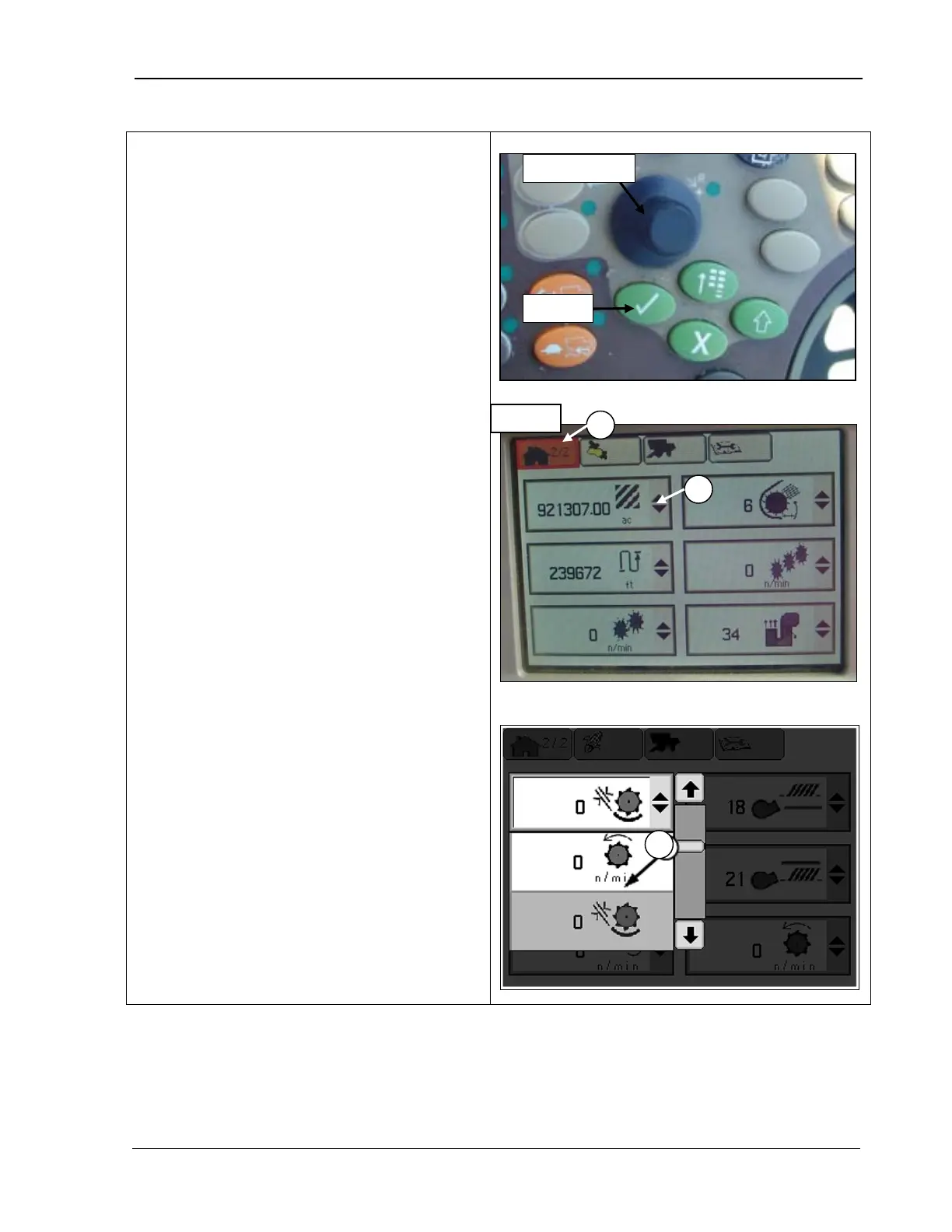
9980 Self-Propelled Peanut Combine CommandCenter Display
Select Machine Readings to
Display
Certain display fields allow you to select
which machine readings you want to display.
The following machine readings are available:
• Distance counter
• Area counter
• Threshing speed
• Cleaning fan damper position
• Elevator fan damper position
• Header speed
• Engine speed
To select:
1. Rotate the Selection dial (top photo) until
the page icon (A) is highlighted. Or,
press the first button at the top of the
CommandCenter to display the page in
the example.
2.
Press Confirm (top photo). The second
home page screen
example.
3.
Rotate the Selection dial until a setting
menu is highlighted (B).
4. Press Confirm. The
displays as in the bottom sketch.
5. Rotate the Selection dial until the reading
you want displayed in that area is
highlighted (C).
6.
Press Confirm; that reading will be
displayed in the selected area.
7. Repeat Steps 3-
6 until you have
displayed the desired machine readings
in your preferred order.
MAN141 09/04/15 89



 To Next Page