CommandCenter Display 9980 Self-Propelled Peanut Combine
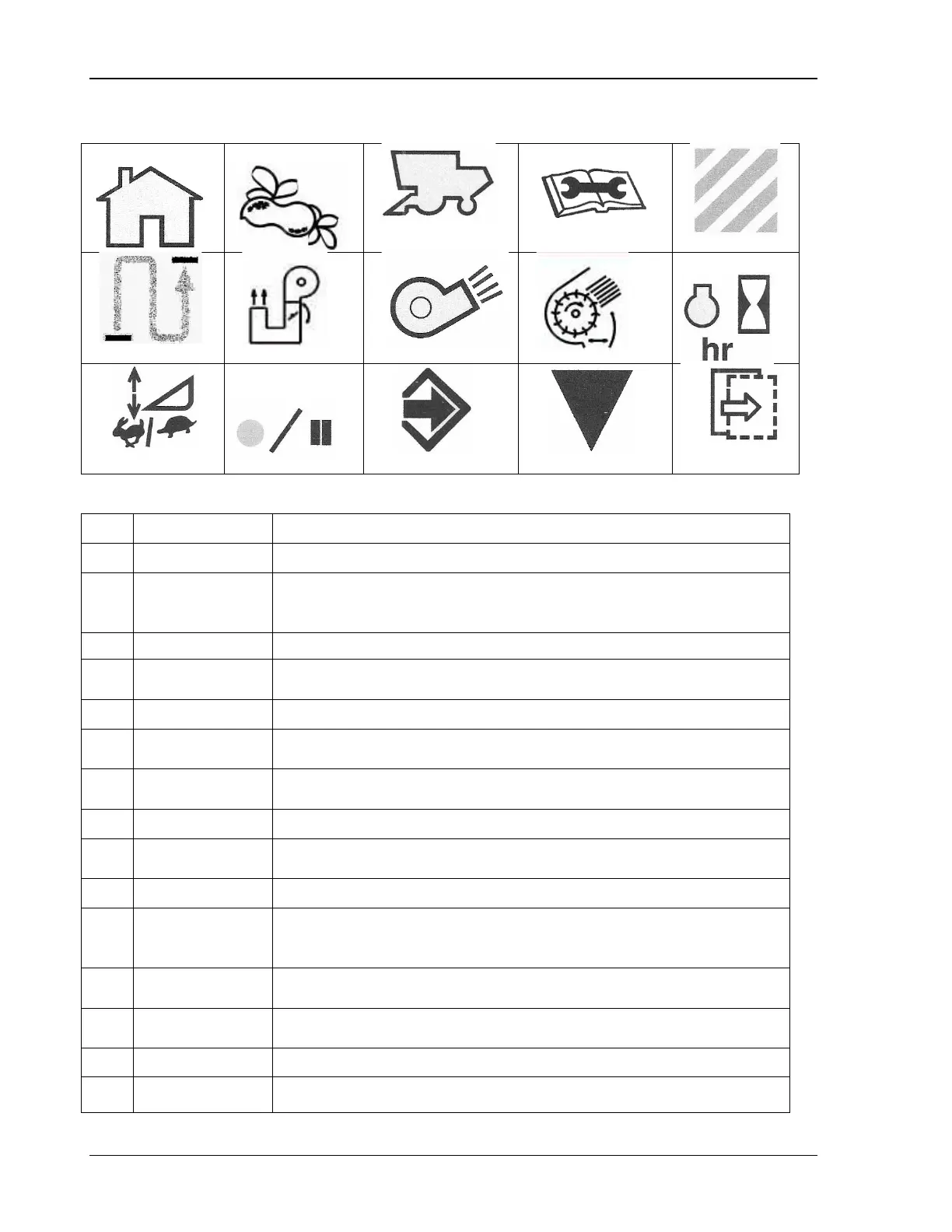
Display Icons
3 4
5
6
7
8
9
11
13 14
15
Icon Name Function
1 Home Displays current machine settings previously set by operator.
2
Harvesting
Information
Displays current harvest monitor information,
performance/productivity, totals, and allows operator to adjust
3 Setup Displays current machine settings and current header width.
4
Diagnostics and
Calibration
Displays machine calibrations, diagnostic readings templates and
special tests (templates).
5 Area Harvested Displays the amount of area harvested.
6
Displays total distance traveled for current active load.
7
Displays position of elevator fan damper.
8 Cleaning Fan Displays current fan speed
9
Displays position of cleaning fan damper door.
10 Engine Hours Displays current rate.
11
Rate and
Displays current rate and sensitivity settings.
12
Displays if the recording is on or off.
13 Enter/Accept
Allows the operator to enter or accept the desired information or
settings.
14 Calibrate Allows the operator to calibrate certain features.
15 Next Step Allows the operator view the next page of information.
86 09/04/15 MAN141



 To Next Page