9980 Self-Propelled Peanut Combine Operator’s Controls
MAN141.rev1 08/05/16 47
Set Point Modes (Manual or
Automatic)
Set point modes function as follow:
Both manual and automatic modes:
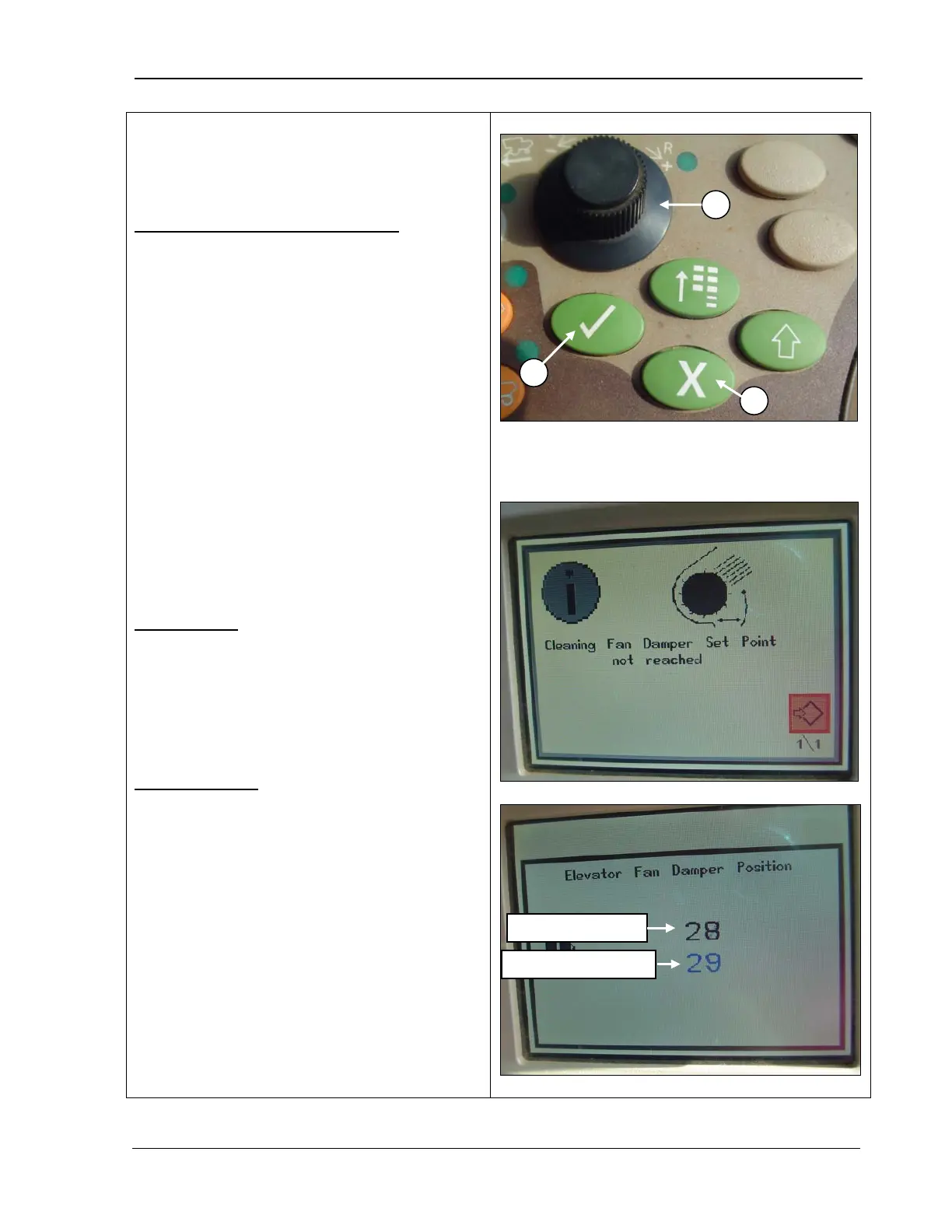
• When you turn the selection dial (A)
set point is either increased (toward +) or
decreased (toward -).
• If you select a set point that is outside of
machine range, an alarm sounds and an
error screen displays as in the middle
photo.
•
When the set point screen displays, the
black number is the current set point, and
the blue number is the value that is being
increased or decreased (bottom photo).
• When a set point screen is displayed on
the CommandCenter, press Confirm (B)
or Cancel (C) to return to the home page.
Manual mode:
•
Pressing Confirm (B) while adjusting
deactivates the system.
•
Pressing Cancel (C) while adjusting
deactivates the system.
Automatic mode:
• Press Confirm (B) while adjusting and the
system continues adjusting in the
background.
•
Pressing Cancel (C) while adjusting
deactivates the system.
A – Selection dial
B – Confirm
C – Cancel



 To Next Page