CommandCenter Display 9980 Self-Propelled Peanut Combine
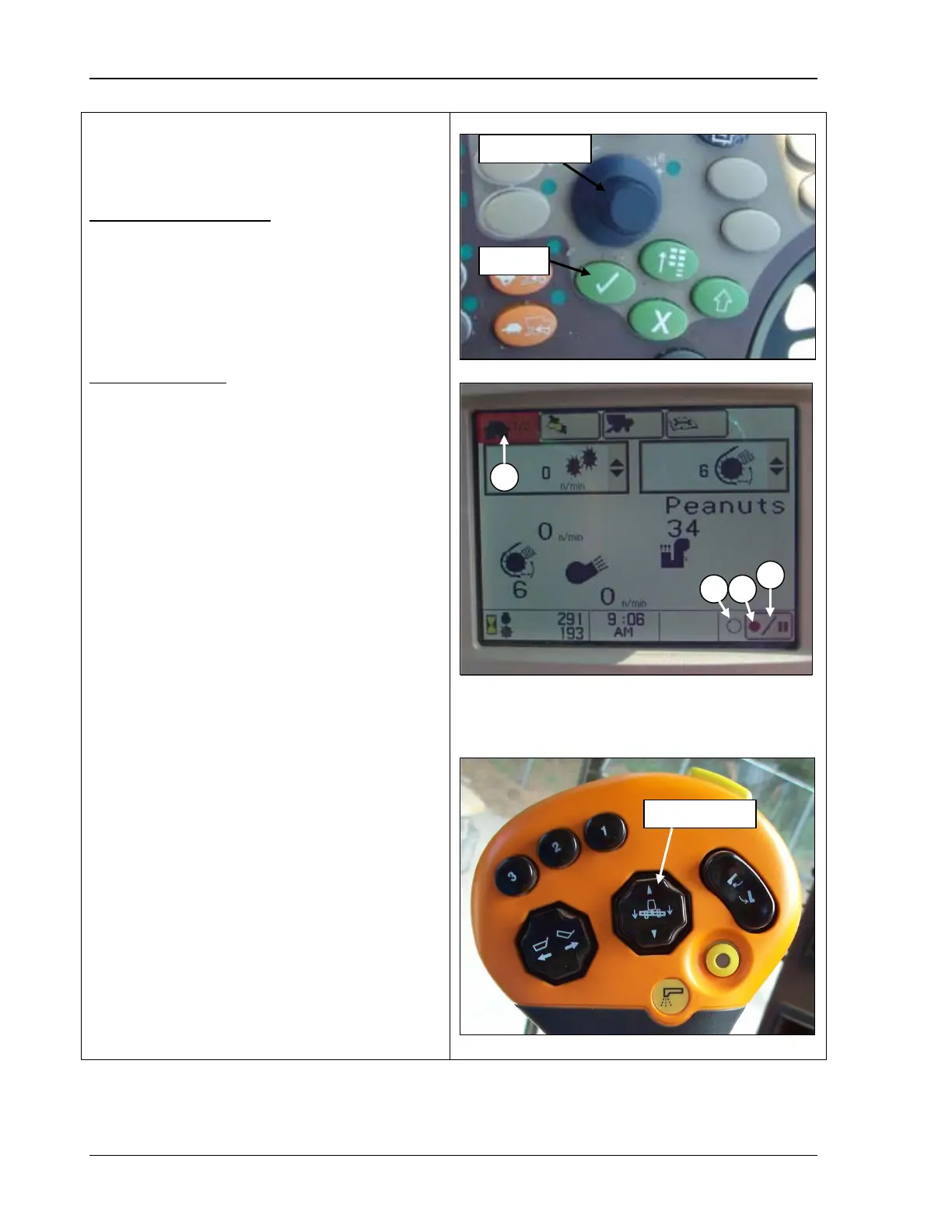
The manual recording screen
status of the data recording: ON or OFF.
To start recording data, ALL
must occur or be turned ON manually:
• Separator engaged
• Header engaged
• Engine at high idle
• Header lowered to recording position
To stop recording, ONE of the following must
occur:
•
Header raised past the record stop height
set point
• Header disengaged
• Recording is manually turned OFF
Recording can be manually stopped and
restarted without the
raising header or
disengaging separator (example: when
approaching areas such headlands, end rows
already harvested, waterways, etc., for which
recording data is not desired).
1. From home page icon (A) (middle photo),
rotate the Selection Dial (top photo) until
the recording ON/OFF icon (B) is
highlighted.
2. Press Confirm (top photo). The Recording
ON/OFF indicator toggles between an
open and filled circle.
• Filled flashing circle (C) – Recording
ON
• Open circle (D) – Recording OFF
3.
Press Confirm again to turn recording ON
and to manually resume recording data.
4. Push the header lower button (bottom
photo) on the
multifunction control handle
(a
slight touch of header lower button
starts recording data).
A – Home page icon
B – Recording icon
C – Filled circle
D – Open circle
90 09/04/15 MAN141



 To Next Page