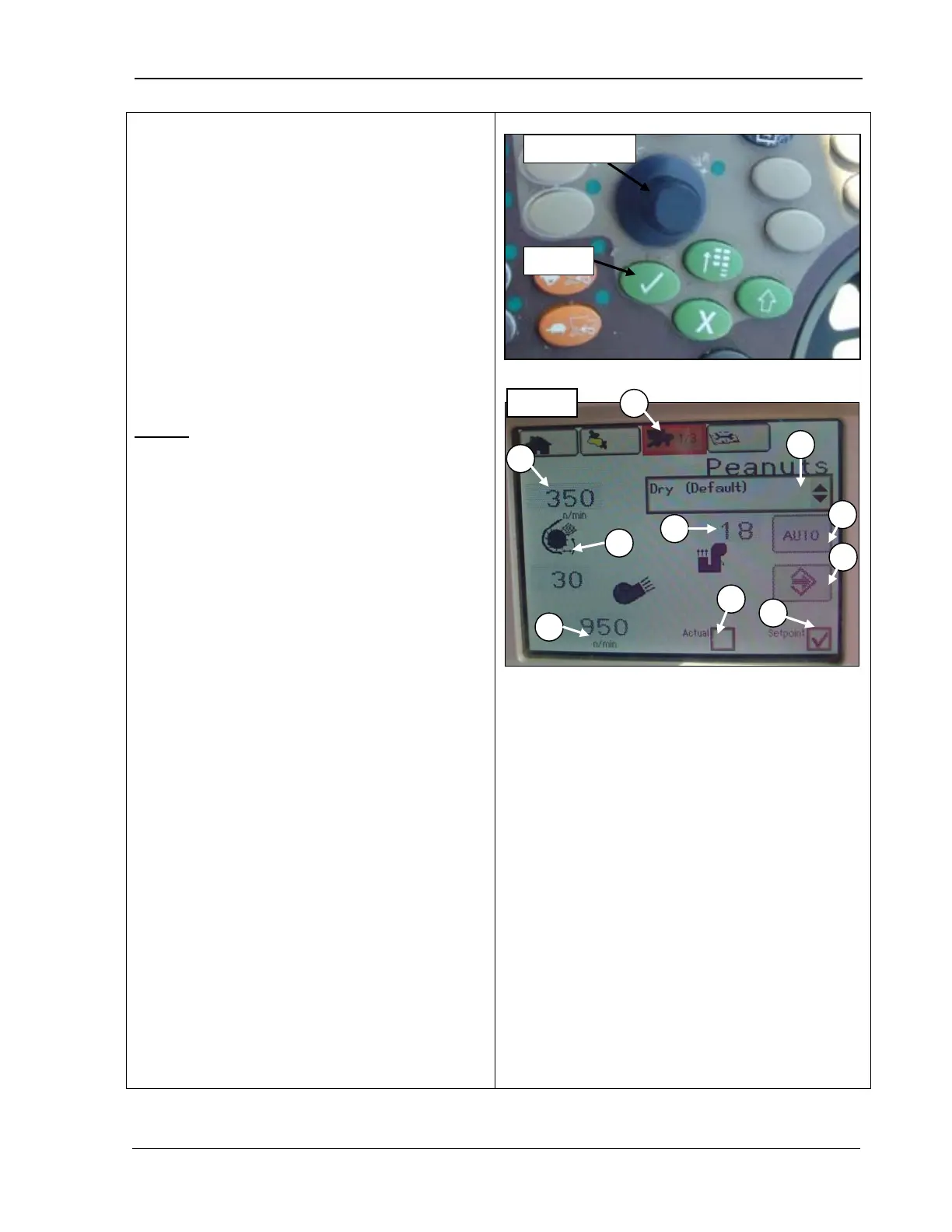
9980 Self-Propelled Peanut Combine CommandCenter Display
1.
Rotate the Selection dial (top photo) until
the Setup icon (A) is highlighted. Or,
press the third button at the top of the
CommandCenter to display the page in
the example.
2. Press Confirm (top photo). The first page
displays.
3. Rotate the Selection dial to highlight the
desired field.
4. Make changes and then press Confirm.
Page 1
B – Threshing speed: N
threshing speed RPM number displayed is
always TWICE the
cylinder. This can be set from 300 to 400
RPM, in increments of 10.
C – Crop modifiers: dry
factory settings), new (set for when a new set
is settings is to be entered), cleanout (default
factory settings in order to clean out machine).
D – Cleaning fan damper position: enter the
numerical amount damper is to be open
between
E – Elevator fan damper position
: enter the
numerical amount damper is to be open
between
F – Cleaning fan speed: displays speed at
which fan is running.
G –
Auto icon: you can select desired
machine settings and the machine will
automatically adjust to the settings shown on
the CommandCenter display.
H – Save icon: use this field to save personal
machine settings. You can save
up to nine
sets of settings, depending on harvesting
conditions, pull up the settings by name as
applicable. Note that personalized machine
settings do not override the factory settings.
B – Threshing speed
C – Crop modifiers
D – Cleaning fan
damper position
E – Elevator fan
damper position
speed
G – Auto icon
H – Save icon
I – Actual box
J – Setpoint box
MAN141 09/04/15 93



 To Next Page