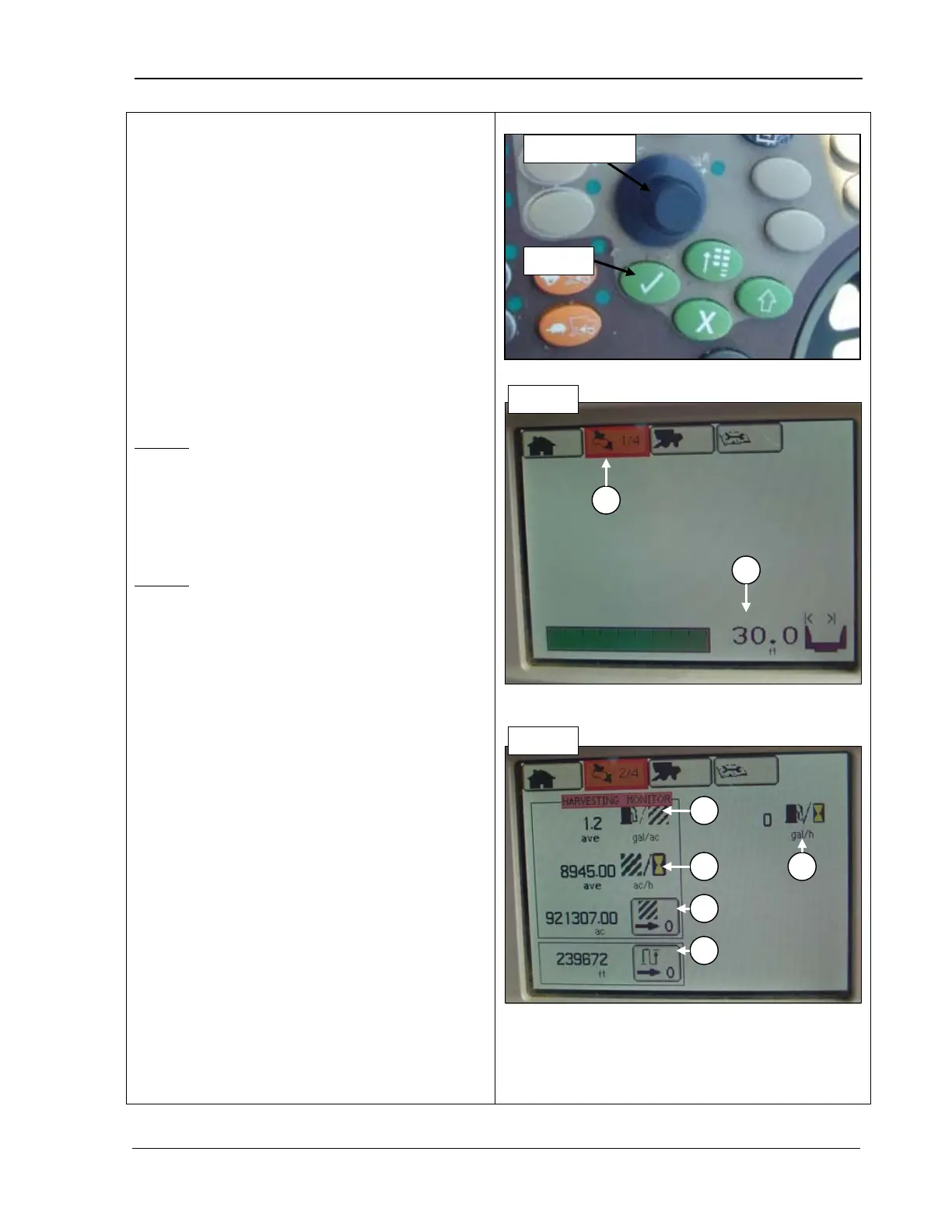
9980 Self-Propelled Peanut Combine CommandCenter Display
Pages
1.
Rotate the Selection dial (top photo) until
the Harvesting Information icon (A) is
highlighted.
Or, press the second button
at the top of the CommandCenter to
display the page in the example.
2. Press Confirm (top photo). The first page
displays.
3. Repeat Steps 1-
2, turning the Selection
dial until the correct page number is
displayed.
Page 1
B - Header width
: displays the width of the
header currently attached to the combine.
Note that this number only displays if the
header is correctly attached.
Page 2
A – Fuel consumption: gallons
consumed per acre.
B – Acres: number of acres harvested per
hour.
C – Acres recorded: the number of acres
recorded as harvested.
D – Distance
: the recorded distance in feet
covered by the combine
E – Gallons
: the number of fuel gallons
consumed per hour
A – Harvesting information icon
B – Header width
A – Fuel consumption
B – Acres
C – Acres recorded
D – Distance
MAN141 09/04/15 91



 To Next Page