9980 Self-Propelled Peanut Combine Calibration
The following user calibration procedures
can be performed using the instructions
provided on the appropriate screen:
• Cleaning fan damper calibration
• Header calibration
• Feeder house speed calibration
• Elevator fan damper calibration
• Service hours calibration
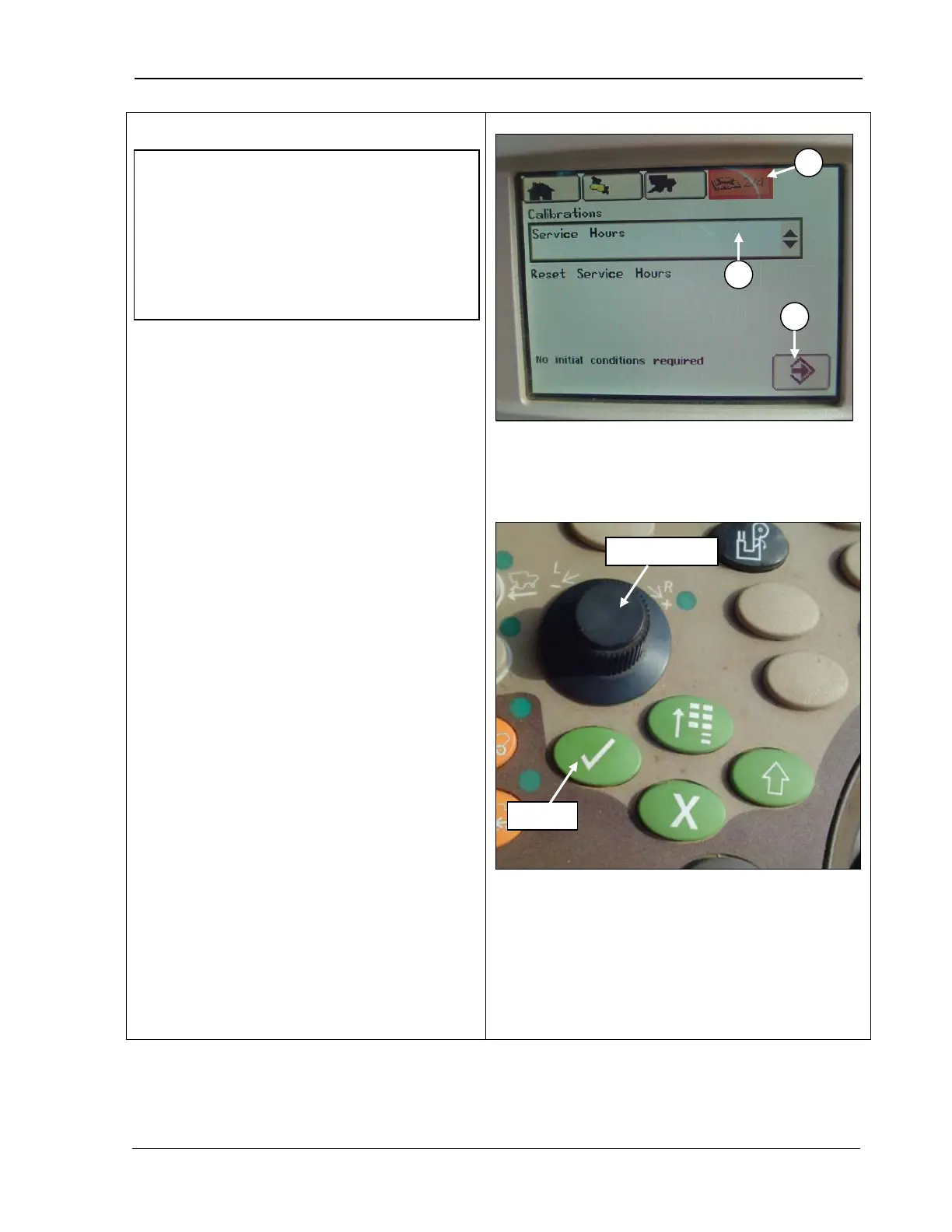
To access calibration screen:
1. Rotate the Selection dial
until the Diagnostic and Calibrations icon
(A) at the top of the screen is highlighted
(top photo).
2.
Rotate the Selection dial until the
Calibrations screen (top photo) displays.
3. Press Confirm (bottom screen) and
rotate the S
election dial until the desired
calibration menu (B) is highlighted.
4. Press C
onfirm and rotate the selection
dial until the calibration icon (C) is
highlighted.
5. Press Confirm and follow the instructions
shown on CommandCenter display
screen to calibrate the selected item.
6. Repeat Steps 3-
calibrations.
A – Calibrations and diagnostics icon
B – Calibration menu
C – Calibration icon
IMPORTANT! Headers, the cleaning fan,
and feeder house speed are calibrated at
the factory and should ONLY be re-
calibrated if the LC1 controller is replaced.
The elevator fan is also calibrated and
should ONLY be replaced if the LC2
controller or elevator fan damper actuator
MAN109 09/04/15 129



 To Next Page