CommandTouch Cornerpost 9980 Self-Propelled Peanut Combine
Display
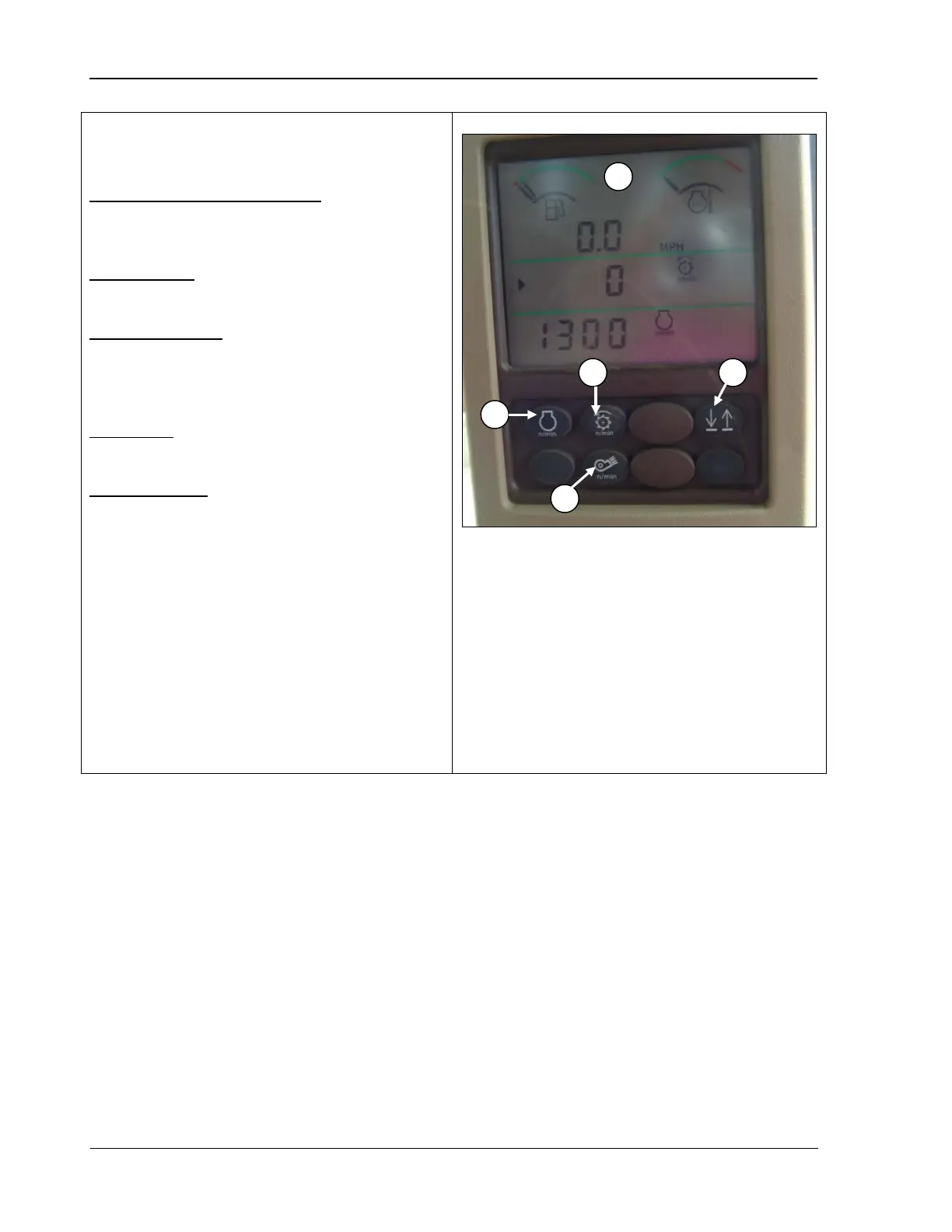
Triple tachometer display lines (A): allows you
to display operating data while the machine is
running.
Engine speed (B): press to display the current
engine speed in RPMs.
Threshing speed
(C): press to display the
current cylinder speed in RPMs. NOTE THAT
THE SPEED DISPLAYED IS TWICE THAT
OF THE ACTUAL RPM CYLINDER SPEED.
Fan speed (D): press to display the current
fan speed in RPMs.
Up/down arrow (E): allows you to set which
data you wish to have displayed on the bottom
two data lines.
For example, press the up arrow so th
small arrow to the left of the screen moves to
the middle line and press the Cleaning fan
speed button (D); the cleaning fan speed
displays instead of the threshing speed. Press
the bottom arrow button so that the arrow
moves to the bottom line and press any button
(A, B, or C) and that information displays for
approximately 10 seconds before defaulting
back to your original setting.
A – Triple tachometer display lines
B – Engine speed
C – Threshing speed
D – Cleaning fan speed
E – Up/down arrow (line selection)
122 09/04/15 MAN141



 To Next Page