CommandCenter Display 9980 Self-Propelled Peanut Combine
Diagnostic Readings, Tests
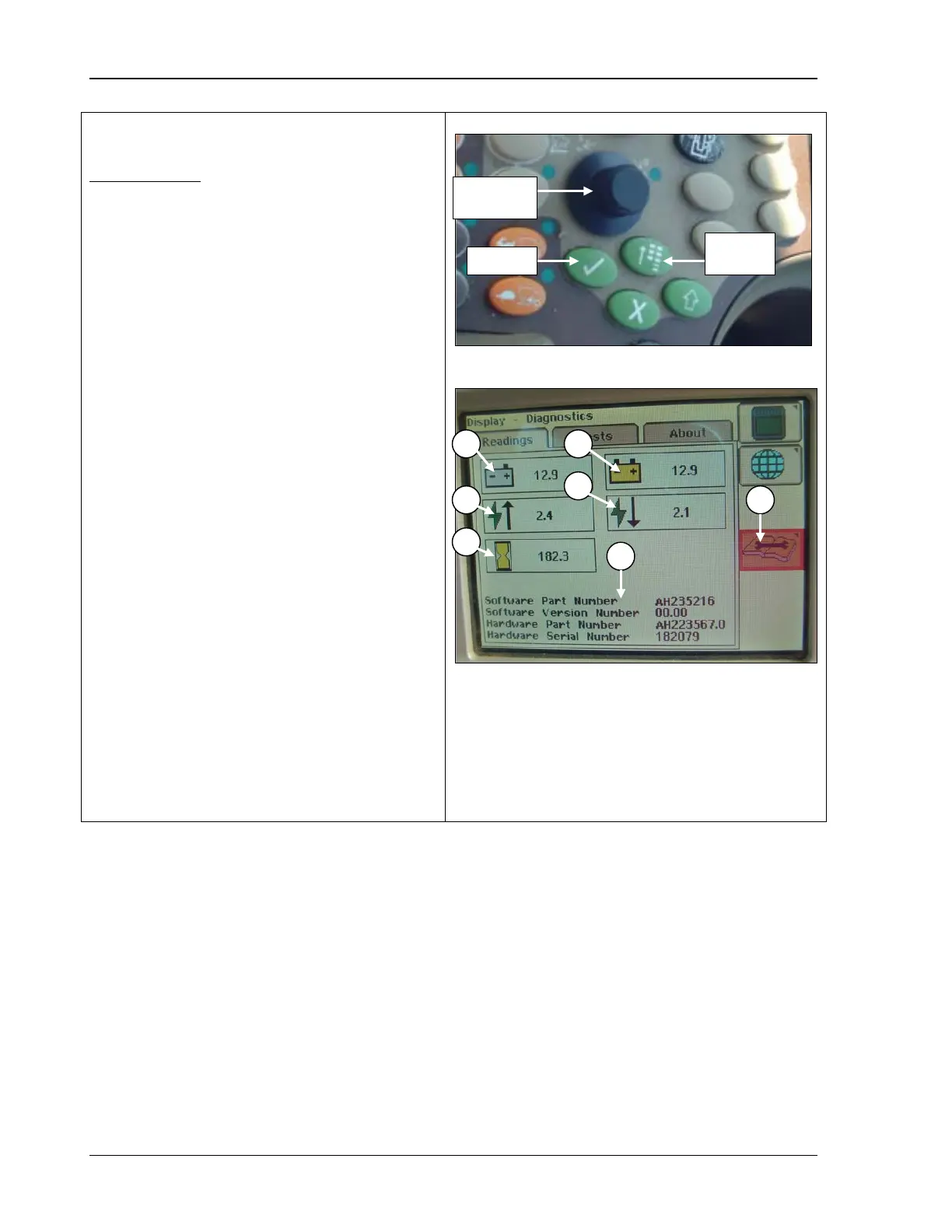
Reading Menu
1. Press the Main Menu button.
2. Rotate the Selection dial until the Display
Settings icon is highlighted.
3. Press Confirm.
4.
Rotate the selection dial until the
Diagnostic icon (A) is highlighted.
5.
Press the confirm button; the following
displays:
• Unswitched Voltage
• Switched Voltage
• CAN High Voltage
• CAN Low Voltage
• Operation Hours
• Software and Hardware Information
° Software Part Number
° Software Version Number
° Hardware Part Number
° Hardware Version Number
A – Diagnostic Icon
B – Unswitched Voltage
C – Switched Voltage
D – CAN High Voltage
E – CAN Low Voltage
F – Operation Hours
G – Software and Hardware Information
104 09/04/15 MAN141



 To Next Page