9980 Self-Propelled Peanut Combine Performance
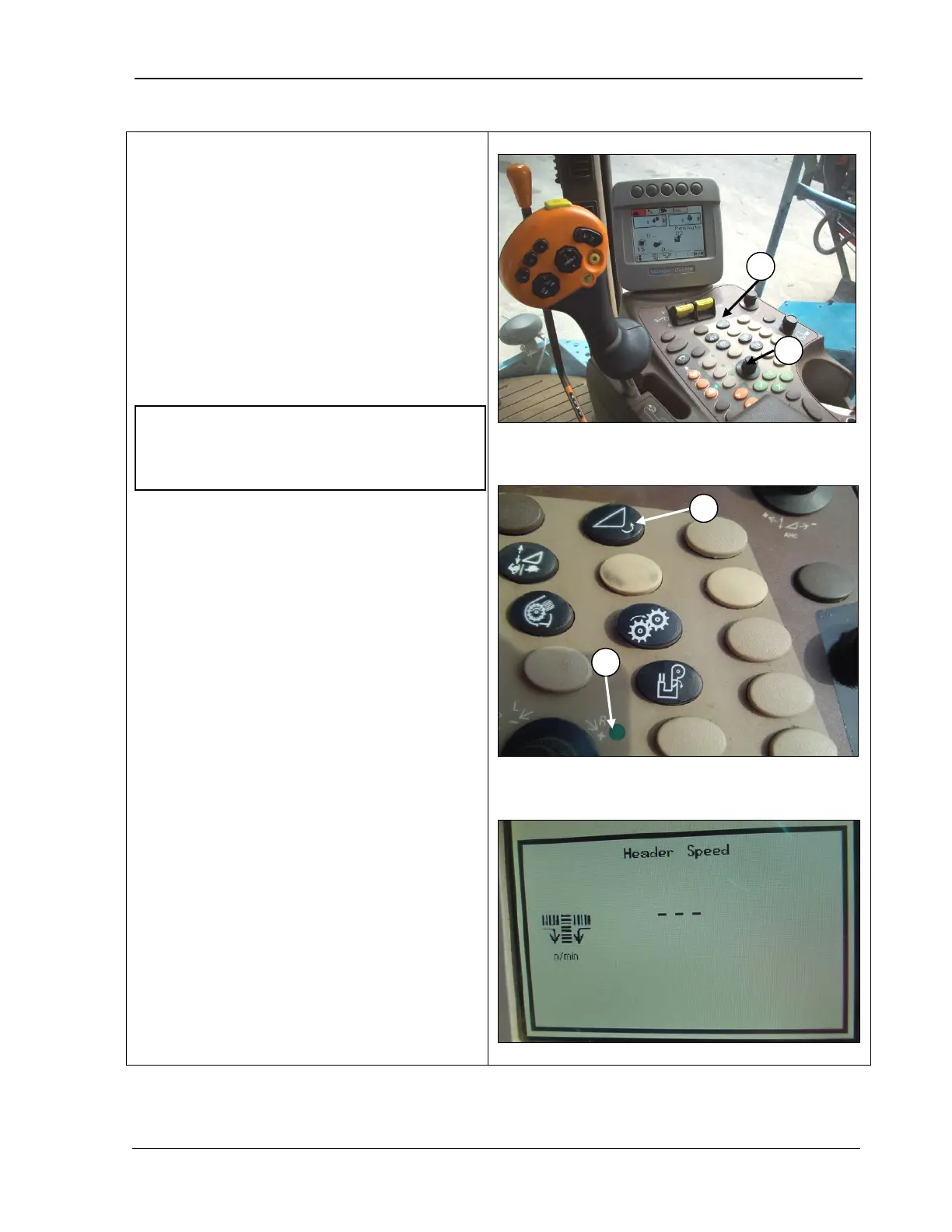
Header Speed Control
The header speed control is located in the
operator’s armrest control panel. Set the
header speed so that it picks up the windrow
completely as the combine travels through
the field. If the header is too slow, it will push
the vines along before picking
causing peanuts to fall off the vines. If it is
operated too fast, the vines will pull apart
before entering the combine, and peanut loss
will occur. Dry vines typically require higher
pickup speeds than green.
1. Press the header speed button (A) (top
and middle photos
indicator light turns ON (C) (middle
photo).
2. Use the selection dial (B) (
turn the speed up (+) or slow it down (-
).
The CommandCenter displays
adjustment to the header speed (bottom
photo).
A – Header speed control
B – Selection dial
C – Selection dial indicator light
NOTE! If windrows have excessive dirt,
increase the header speed slightly to help
shake out dirt before it enters the machine.
MAN141 09/04/15 207



 To Next Page