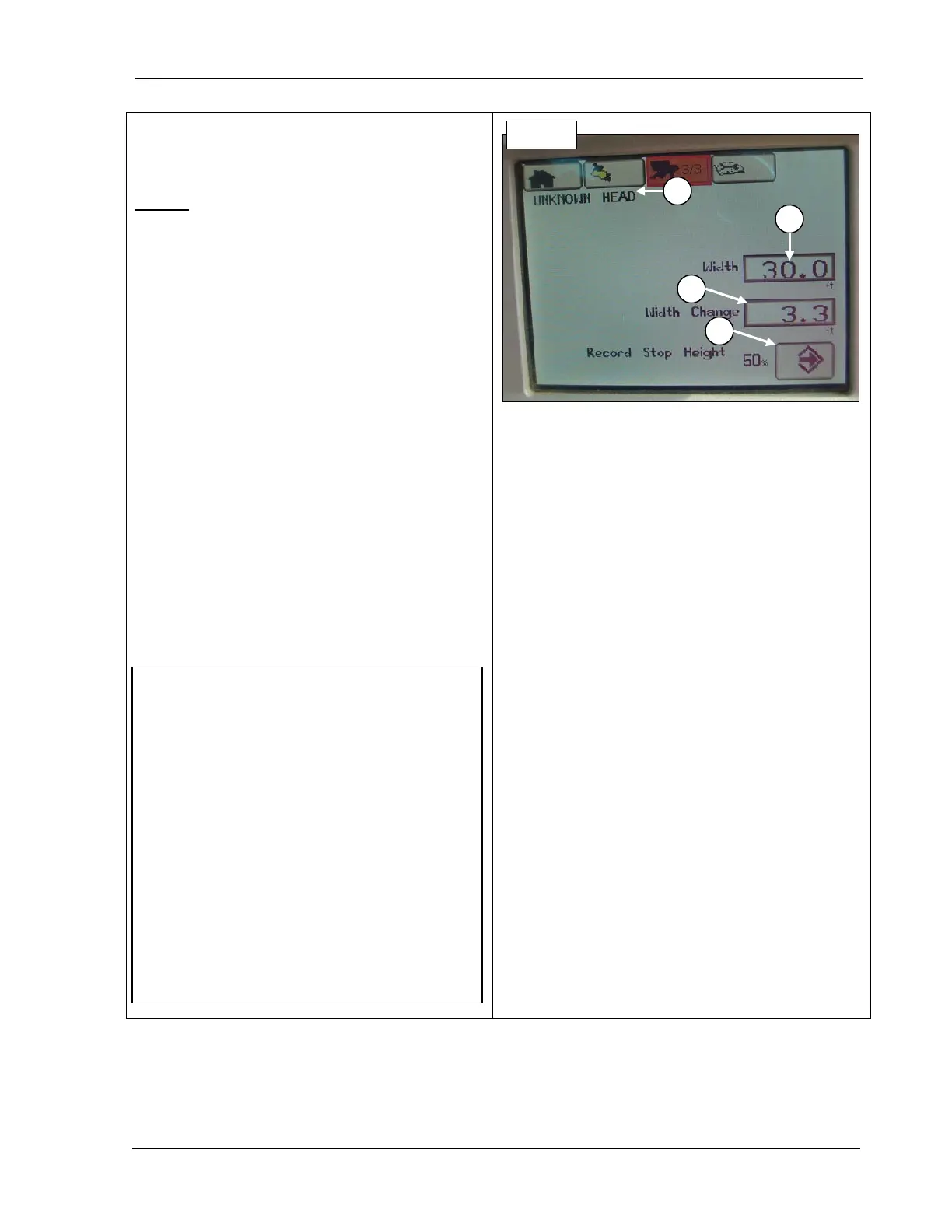
9980 Self-Propelled Peanut Combine CommandCenter Display
Note that page 2/3 is not used by AMADAS.
Page 3
A –
Header: once correctly attached, the
name of the header displays. If none is
attached “UNKNOWN HEAD” displays.
B – Header width: allows you to type in the
width of the header currently attached.
C – Width Change: displays the difference in
width between the header currently installed
and the one installed previously.
D – Record stop height: allows you to pick a
header raised height at which the system
stops recording for harvesting information.
For example, if you want recording to stop
when the header is raised 30% off the ground
and is obviously no longer harvesting, enter
30.
Use the Selection dial to display the
percentage desired
displayed.
B – Header width
D – Record stop
NOTE! Recording automatically turns
OFF at and above the height preset in this
field. Recording automatically turns back
ON below this preset height, provided all
other conditions are met (separator
engaged, engine at high idle, etc.) See
“Manual Recording ON/OFF
chapter
for information on temporarily
overriding.
If Header Height Sensing is active, the
record stop height is not used by the
machine and recording turns ON, provided
other conditions are met (separator
engaged, engine at high idle, etc.).
MAN141 09/04/15 95



 To Next Page