INSTALLATION PROCEDURE
SM 9-11 A229
Copier
Connector Kit
A808
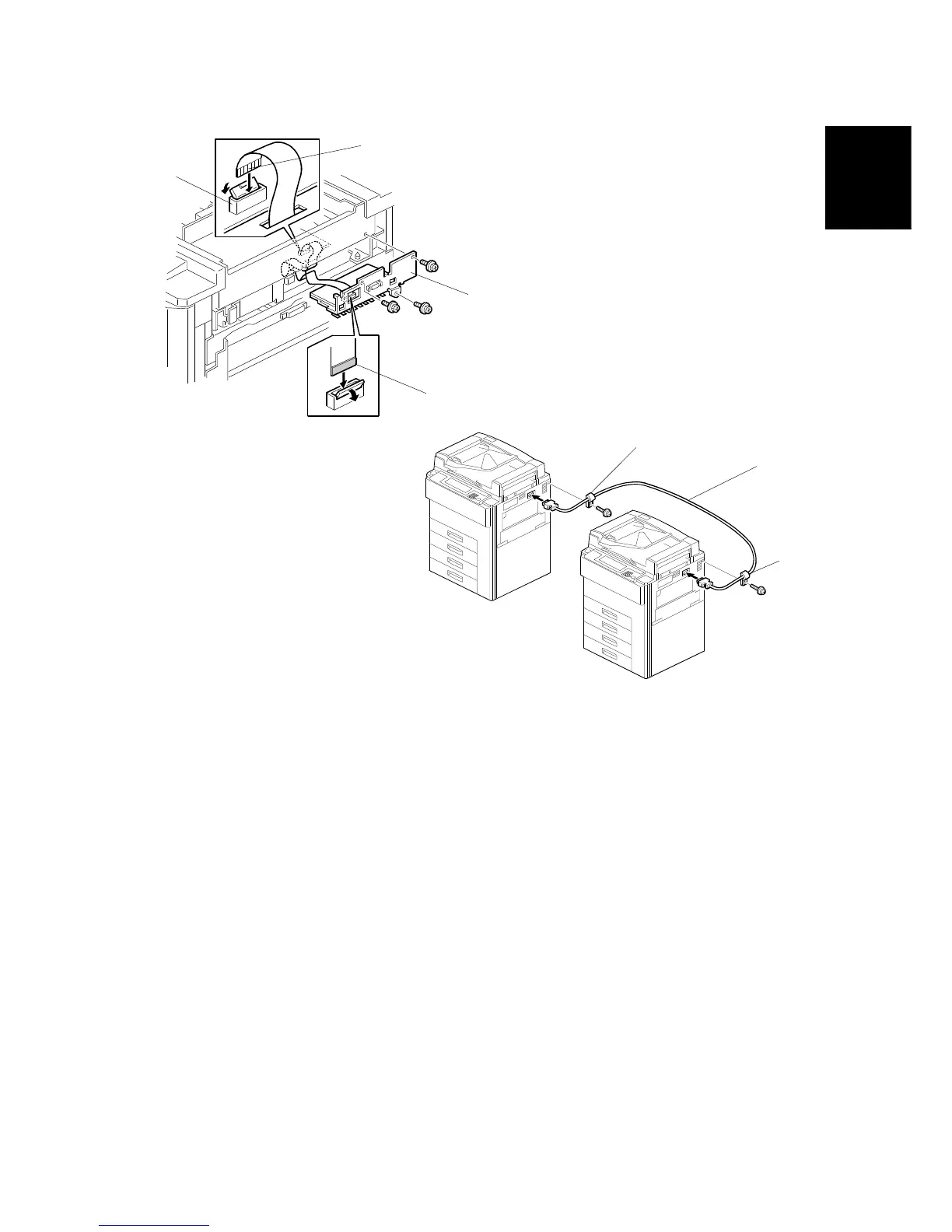
15. Connect the cable to the SBICU board connector CN317 [A].
NOTE:
The terminal [B] should be to the right (as viewed from the front of the
machine).
16. Connect the cable to the copy connection board [C].
NOTE:
The terminal supporter [D] should be to the right (as viewed from the
front of the machine).
17. Install the copy connection board (3 screws).
NOTE:
Carefully tuck excess ribbon cable under the SBICU so it does not
block the optics cooling fan.
18. Reassemble the machine.
19. Install the other copy connection board in the other machine using the same
procedure (steps 1 to 18).
20. Connect the two machines with a cable [E] and hold it with a clamp [F] (1
screw) on each machine.
21. Check the operation.
A808I506.WMF
A808I505.WMF
[A]
[B]
[C]
[D]
[F]
[F]
[E]









 To Next Page