Strasbaugh Universal Vacuum System
Page 24 Version 1.2—March 2004
ADJUSTMENTS
VACUUM
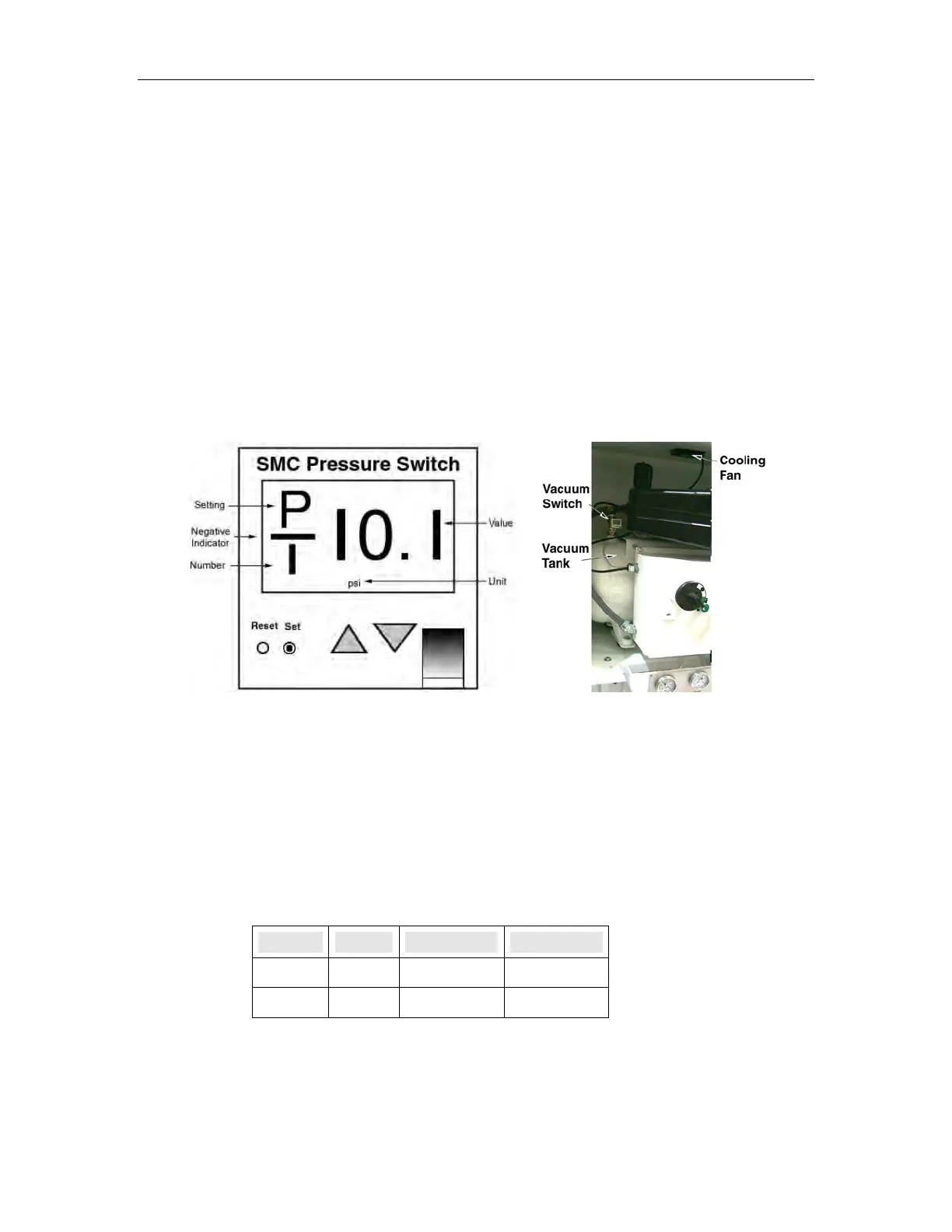
The vacuum switch is an SMC switch (part 226044). This switch is adjusted at the factory
to turn on the vacuum pump when vacuum reaches 20 inches of mercury and to turn off the
pump when vacuum reaches 25 inches of mercury.
Adjust this switch if the vacuum does not remain between the desired settings.
Figure 1-4 Vacuum Connections
The switch is set at the factory. To recalibrate this switch:
1. Hold the SET button until the units flash.
2. Press the DOWN key until the display shows units as psi.
3. Press the SET button (locks units and enters mode setting).
4. Pres the SET button again until P1 is displayed.
5. Press the UP/DOWN keys unil P1 is set to –10.1.
6. Press the SET button to adjust P2 to –11.2.
7. Press the SET button to finish (return the switch to normal mode).
Setting Mode in. Hg. psi
ON P1 20 - 10.1
OFF P2 25 - 11.2


 To Next Page