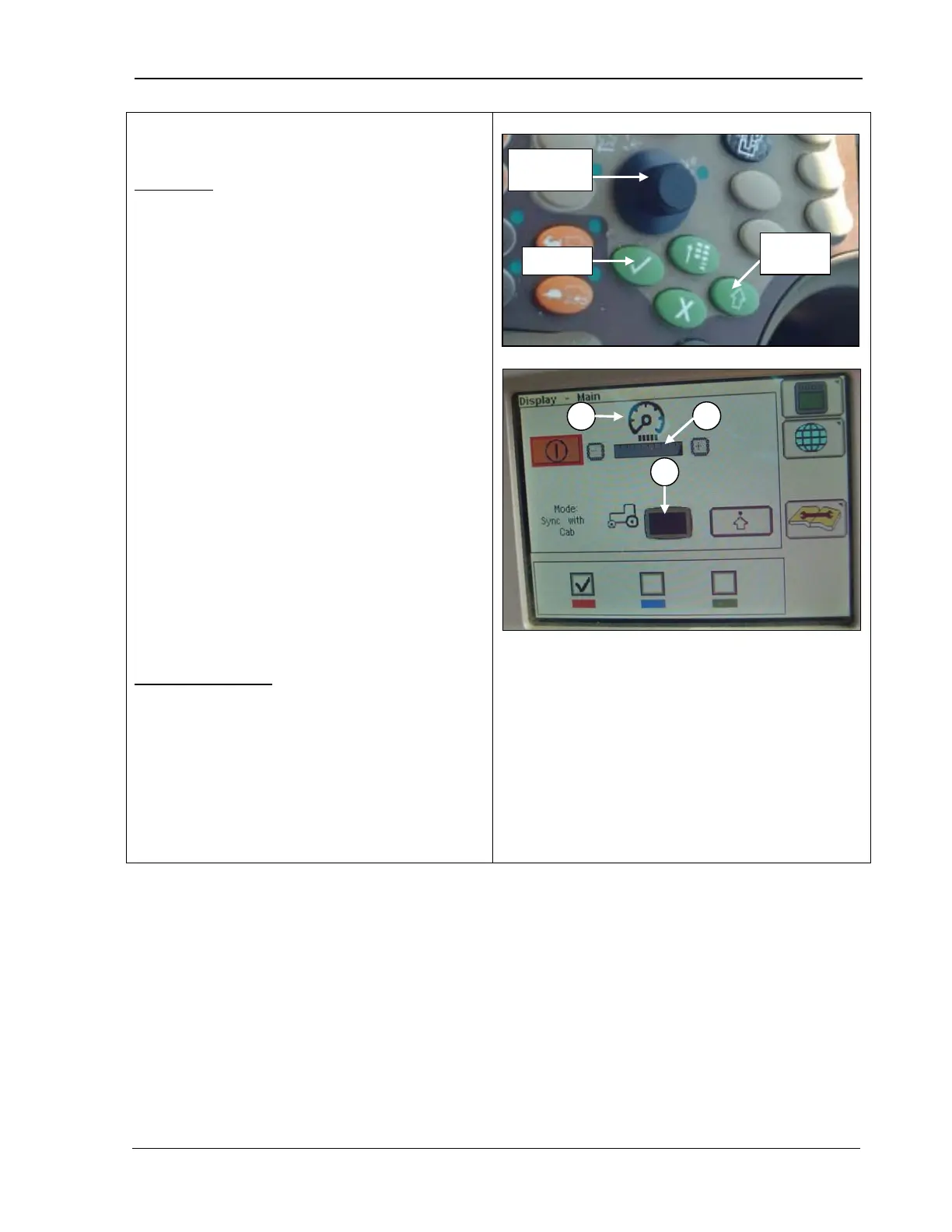
9980 Self-Propelled Peanut Combine CommandCenter Display
Backlight Level Control and Boundary Box
Color
Panel Dim
Quickly darkens the display screen with one-
button push. When selected, the panel dim
feature temporarily darkens the screen to
reduce glare. The screen resumes normal
brightness when an alarm condition exists or
activates any button on the display control.
1. Rotate the Selection Dial (top photo) until
the Panel Dim icon (A) is highlighted.
2. Press Confirm (top photo).
3. Rotate the Selection D
Adjusting Indicator (B) is highlighted.
4. Press Confirm (top photo).
5.
Rotate the selection dial to select the
brightness of the screen:
• Clockwise to brighten the screen.
• Counterclockwise to dim it.
Sync with Cab (C)
Synchronizes the CommandCenter display
with the dimmer switch
when the lights are ON.
1. Rotate the S
election dial until the Sync
with Cab box (C) is highlighted.
2. Press Confirm.
A – Panel Dim Icon
B – Adjusting Indicator
C – Synchronize with Cab Box
MAN141 09/04/15 99



 To Next Page