CommandCenter Display 9980 Self-Propelled Peanut Combine
Regional Settings, Time/Date Settings,
Units of Measurement
Time and Date Settings
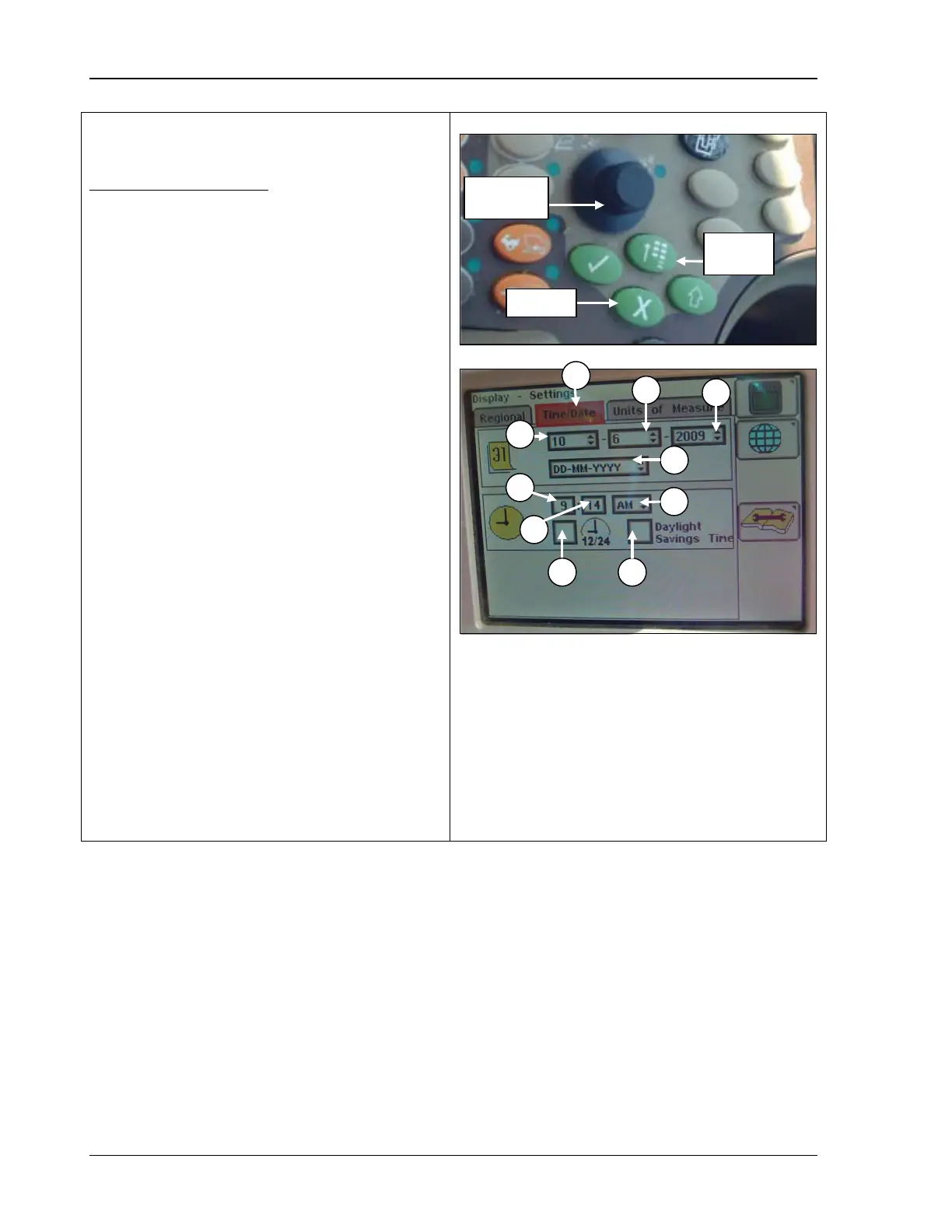
1. Rotate the Selection Dial until the
time/date menu is highlighted (bottom
photo, A).
2. Press Confirm.
3. Rotate the Selection Dial to select:
B - Month/Day
C - Year
D - Date Format
E - Hour
F - Minute
G - A.M. or P.M.
4. Press Confirm
highlighted; menu ch
highlighted menu display.
5. Rotate the Selection D
choice is highlighted.
6. Press Confirm.
7. Rotate the Selection Dial to select:
H - Military Time or Standard Time
I - Daylight Savings Time
8. Press Confirm; the time displays in military
time. Press Confirm a
standard time.
B – Month/Day
C – Year
D – Date format
E – Hour
G – AM or PM
H – Military/standard
time
I – Daylight savings
102 09/04/15 MAN141



 To Next Page