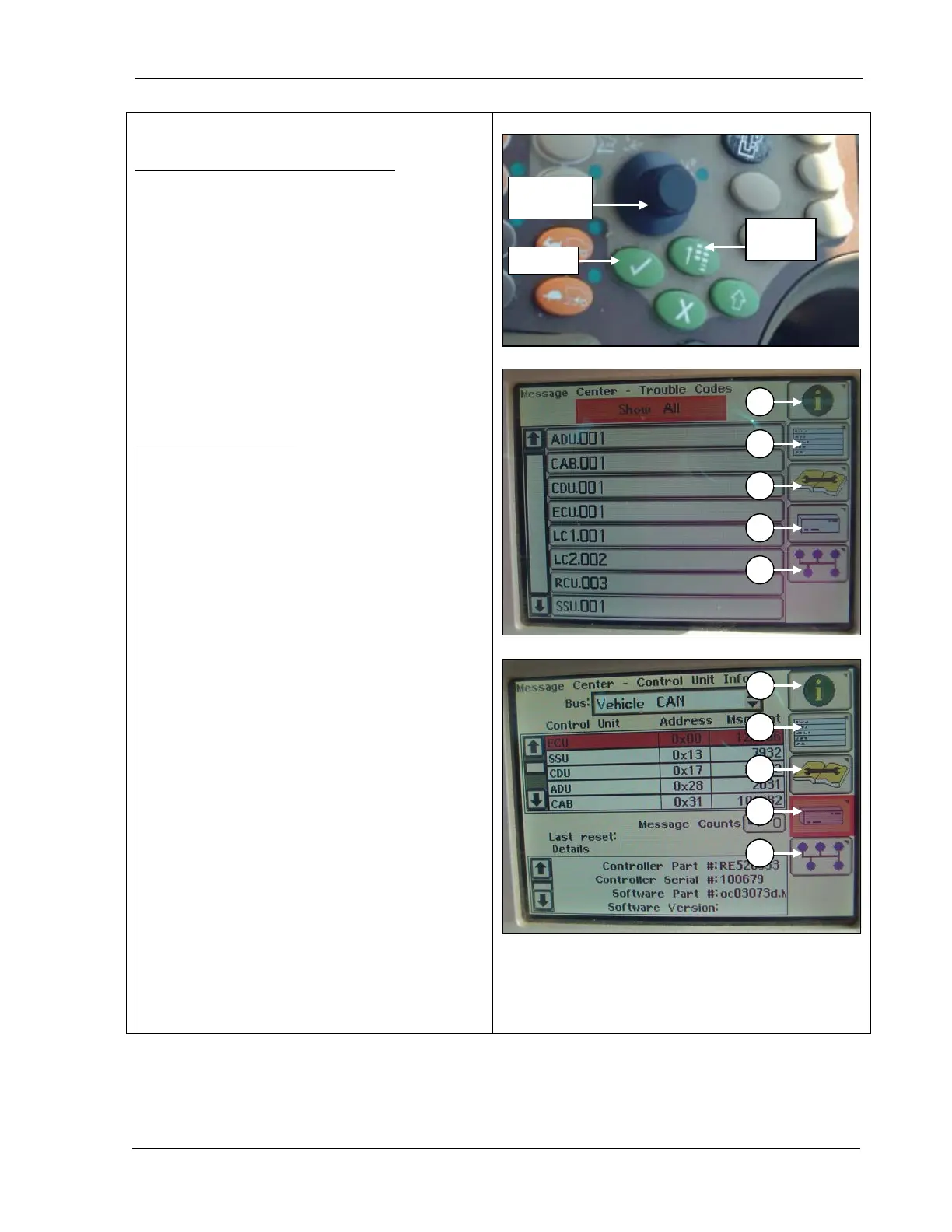
9980 Self-Propelled Peanut Combine CommandCenter Display
Electronic Control Unit Information
Allows you to view
control units, addresses,
message counts, controller part numbers and
serial numbers, software part numbers and
versions (see your AMADAS/John Deere
dealer for more information).
1.
Rotate the Selection dial until the
Electronic Control Unit Information icon
(D) is highlighted.
2. Press Confirm.
CAN Bus Information
Allows you to view if network status is active
or not active, total message counts, and CAN
high or low voltages (see your AMADAS/John
Deere dealer for more information).
1. Rotate the Selection
Bus Information icon (E) is highlighted.
2. Press Confirm.
A – Message Center Icon
B – Diagnostic Address Icon
C – Diagnostic Trouble Codes Icon
D – Electronic Control Unit Information Icon
E – CAN Bus information Icon
MAN141 09/04/15 109



 To Next Page