CommandTouch Cornerpost 9980 Self-Propelled Peanut Combine
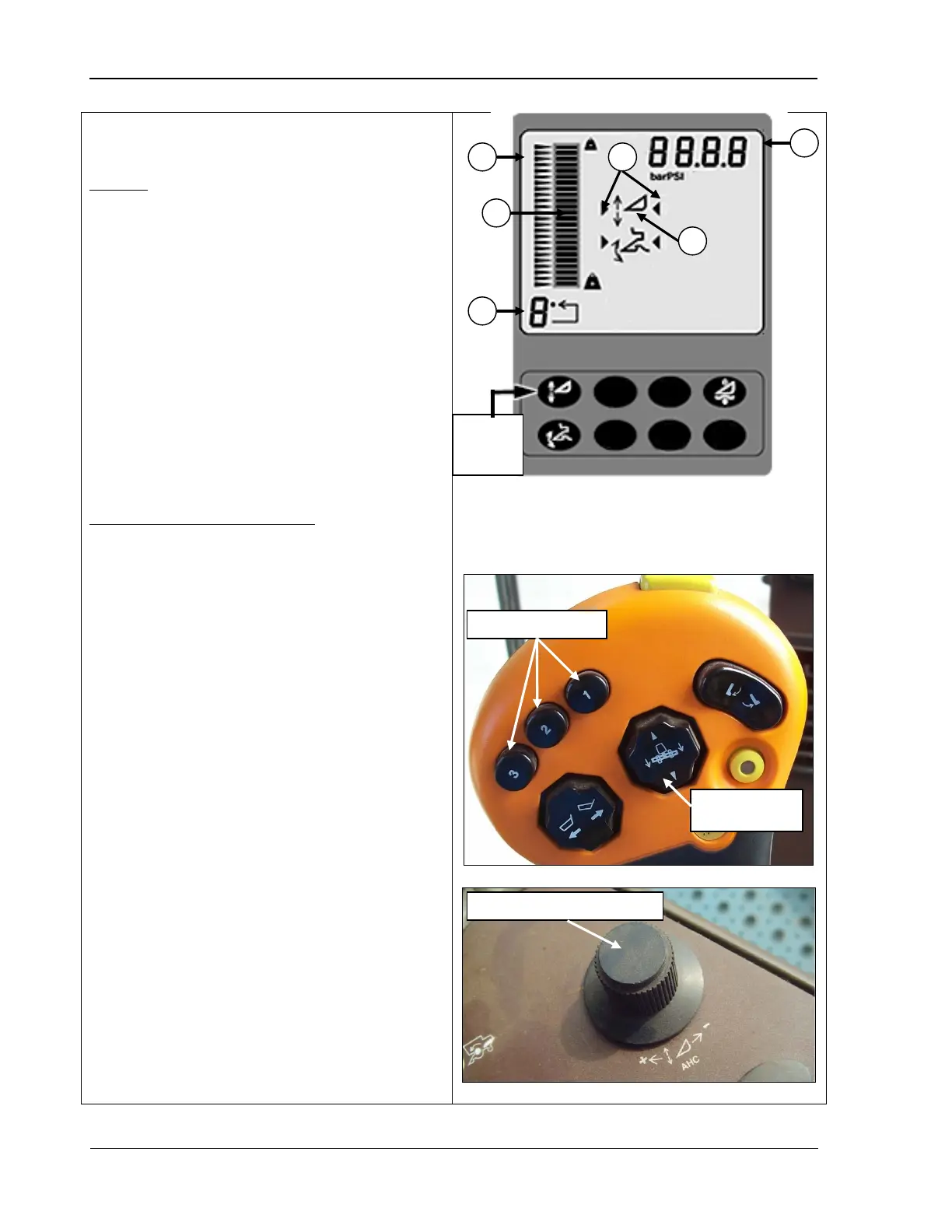
Header height sensing functions as follows:
To start:
1. Press the header height sensing button
(top photo) to enable the system; the
header height sensing symbol (A) appears
on the display.
2. Activate the header by pressing one of the
activation buttons (middle photo) on the
multifunction control handle; the system
activation arrows (B) display to indicate the
system is active.
Note that the activation number in the
lower left hand corner (C) indicates which
activation button was selected.
To use header height sensing:
•
To change the height set point of the
activation buttons, press the desired
activation button and adjust the height
using the header height control dial
(bottom photo).
Turn the dial toward the plus (+) sign to
raise the header and set point or toward
the minus (-) sign to lower the header and
set point.
• The bar graph (E) and numeric display (F)
show the header’s relative position based
on the header height sensor linked to the
feeder house.
• Manually adjusting the header height using
the header lower s
witch (middle photo)
temporarily deactivates the system until
the switch is released. Once the switch is
released, the system returns to automatic
mode. Using the header raise temporarily
deactivates the system until
activation buttons is pressed.
button is pressed, the system reactivates.
height
A - Header height sensing
symbol
B – System activation arrows
C – Activation button number
E – Bar graph
F – Numeric display
Header height control dial
Header raise/
lower switch
120 09/04/15 MAN141



 To Next Page