A
B
C
D
E
F
G
H
L
M
N
P
Uso e manutenzione
Use and Maintenance operations
sezione / section
D 5
74 749/749 DARK/749S Aggiornamento/Update - M.Y. 2006 - edizione/edition 00
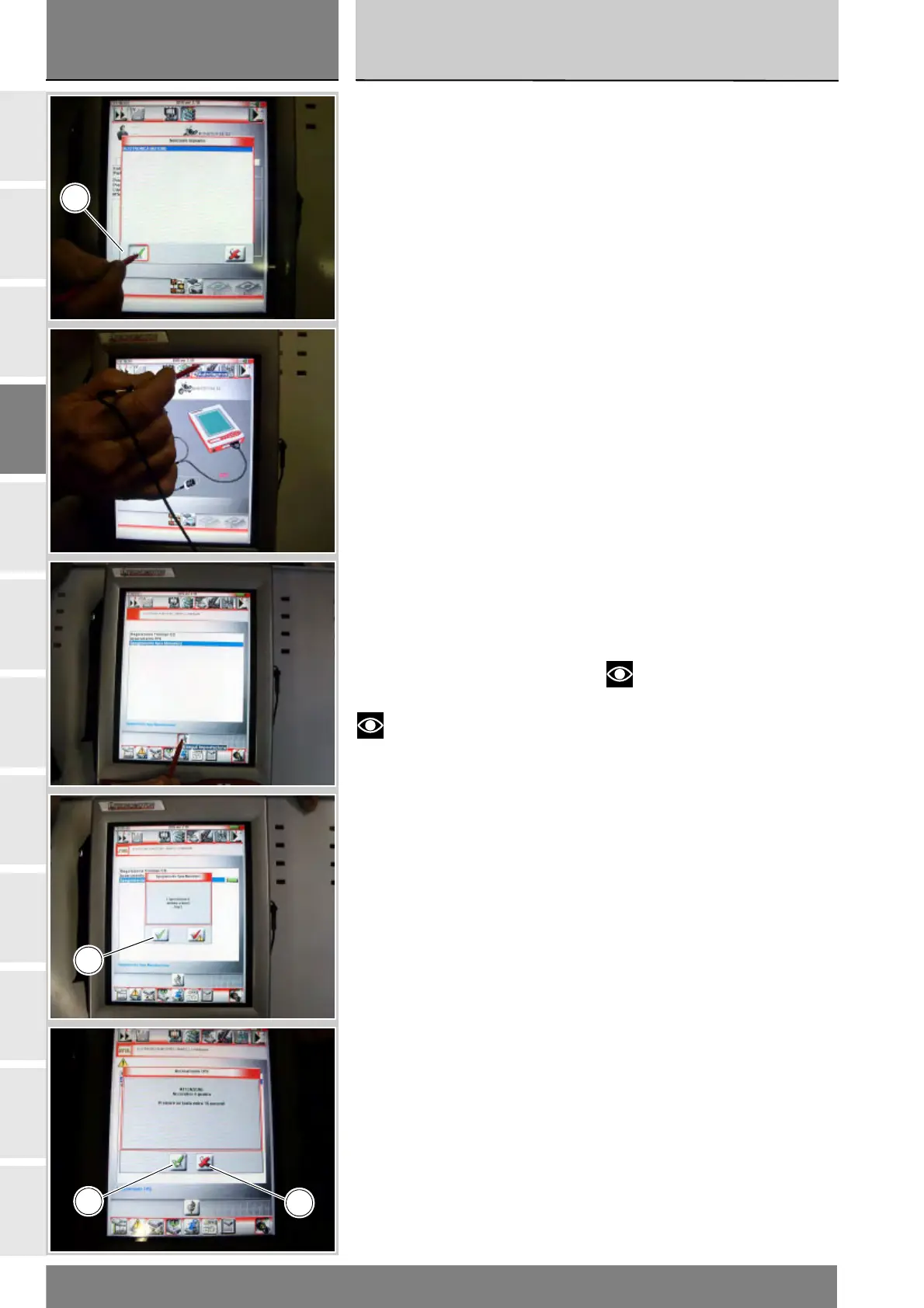
Sul display del visore compariranno
gli impianti del veicolo che possono
essere esaminati.
Selezionare l'opzione “Elettronica
motore”.
Confermare premendo l'icona
“Conferma” (C). Poi entrare nella
funzione Autodiagnosi, premendo
l'icona “Autodiagnosi”.
Lo strumento DDS interrogherà la
centralina e verranno visualizzati gli
elementi in esame e i relativi valori.
Premere l'icona “Impostazioni” per
visualizzare i parametri speciali.
Selezionare l'opzione “Spegnimento
Spia Manutenz” e premere l'icona
“Esegui impostazioni”.
Se l'operazione è stata effettuata,
compare il messaggio “L'operazione
è andata a buon fine?” e premere
l'icona “Conferma” (C).
Nel caso si presenti dei problemi
all'effettuazione dell'operazione,
compariranno i relativi messaggi
indicanti gli errori verificatesi: ogni
messaggio deve essere confermato,
premendo l'icona “Conferma” (C),
oppure rifiutato, premendo l'icona
“Uscire” (D).
Note
Dopo aver concluso la
procedura di azzeramento della spia
“effettuazione tagliando” con lo
strumento di diagnosi DDS posizionare
l’interruttore chiave su OFF e
attendere almeno 30 secondi prima
di riportarlo nuovamente su ON.
A list of the motorcycle’s systems
that can be analysed will appear on
the display.
Select “Engine electronics”.
Press the “Confirm” icon (C). Next,
press the “Self-diagnosis” icon to
access the corresponding function.
The DDS tester will interrogate the
electronic control unit and display the
parameters analysed with their
relative values.
Press the “Settings” icon to display
the special parameters. Select the
option “Mainten. light OFF” and
then press the “Apply” icon.
On completion of the operation, the
message “Was the operation was
completed successfully?” will
appear; press “Confirm” (C).
If any problems were encountered
during the operation, the tester will
display the relative error messages:
each message must be confirmed,
by pressing the “Confirm” icon (C),
or rejected (by pressing the “Exit”
icon (D).
Notes
Once the “maintenance”
indication has been reset with the
DDS tester, set the ignition switch to
OFF and wait for at least 30 seconds
before switching it ON again.
C
C
C
D











 To Next Page