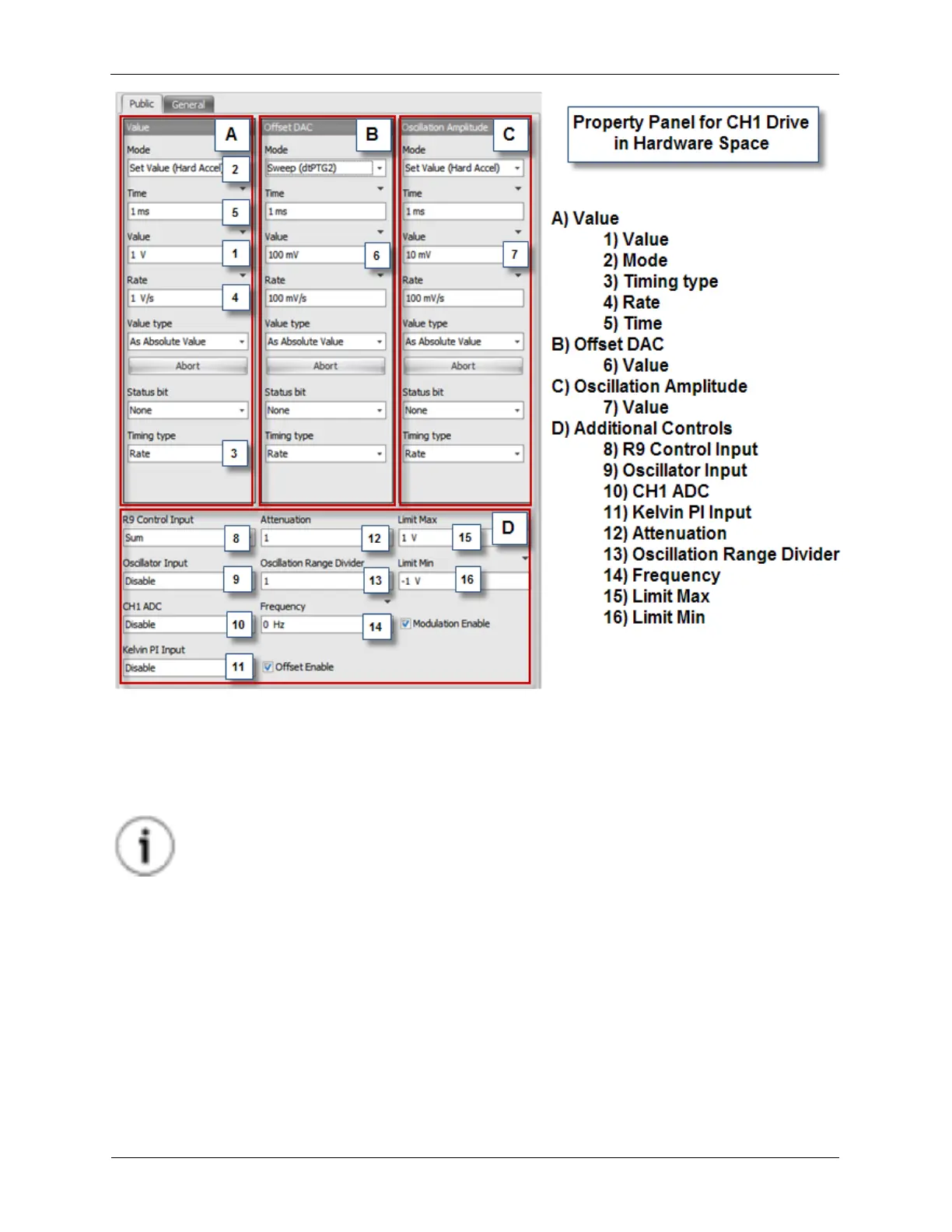
Hardware Space Components
As it can be seen, there are many possible parameters for Ch 1 Drive in Hardware Space. This looks
much more complicated than it really is. The Property Panels are common to Hardware Space,
Procedure Space, and the Dashboard, but only some of the parameters are used in each of these
spaces. The layout of these panels may not exactly match what is shown on your system since many of
the parameter boxes can be dragged around and re-grouped.
Tip
Taking a few minutes to understand the meanings of these controls will greatly improve
your ability to utilize the flexibility of R9.
The Panels labeled Value (A), Offset DAC (B), and Oscillation Amplitude (C) have identical structures.
This structure is referred to as an R9 Control. An R9 Control is a firmware construction that allows the
parameters of R9 components to be changed in a safe and controlled manner. Once this basic structure
is understood, most of the controls that appear to be complex are reduced to simple and intuitive controls.
To set the Bias voltage in Hardware Space, the desired value is entered in the Value data entry box (1)
in the Value Pane (A). The current value shown in this example is 1 V. If a value of 2 V is now entered in
the Value data entry box, the settings of the other parameters in the Value R9 Control will determine how
the Bias voltage moves from 1V to 2V.
The Mode (2) dropdown box in this example is set to Set Value (Hard Acceleration). That means the
voltage will immediately jump from 1 V to 2 V. Other choices in the Mode dropdown box are Sweep



 To Next Page