Details on Procedure Space Constructions
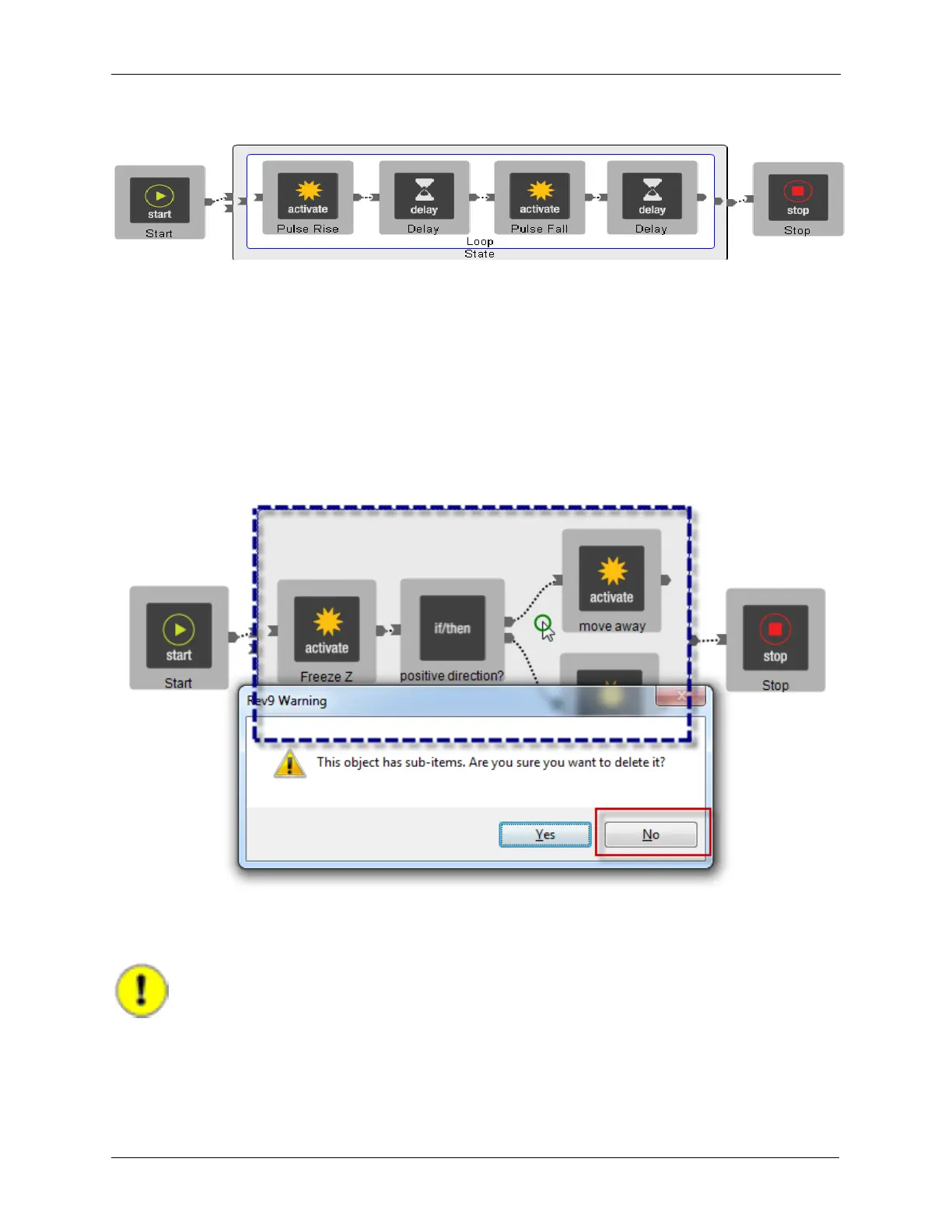
Figure J.30. Tip Pulses inside a Loop
J.11.1. Accidental Deletion of a State or Loop
R9s will ask for confirmation when deleting a State or a Loop that contains other objects. This is to help
protect against accidentally deleting a container object from mis-clicking the mouse.
In the example below, the wire between positive direction? and move away was meant to be selected
and deleted but the containing State was accidentally selected. When the delete button was pressed, the
software will warn against this action as it could be a mistake. In this example, pressing No will cancel
the delete operation.
Figure J.31. Protection against Accidentally Deleting a State or Loop
J.12. Adding Conditionals to Procedures
Important
Pressing the Stop button during the execution of the procedure will NOT stop the
procedure. When the procedure is started, it will always run to completion. If the ability to
stop a procedure during execution is desired, the procedure must be modified.
A Conditional, also referred to as an 'if/then' is added to the Loop after the second Delay. The
Properties for the Conditional are shown below. Each time the Procedure runs through the Loop, the



 To Next Page