1.3.1 Ethernet Connection
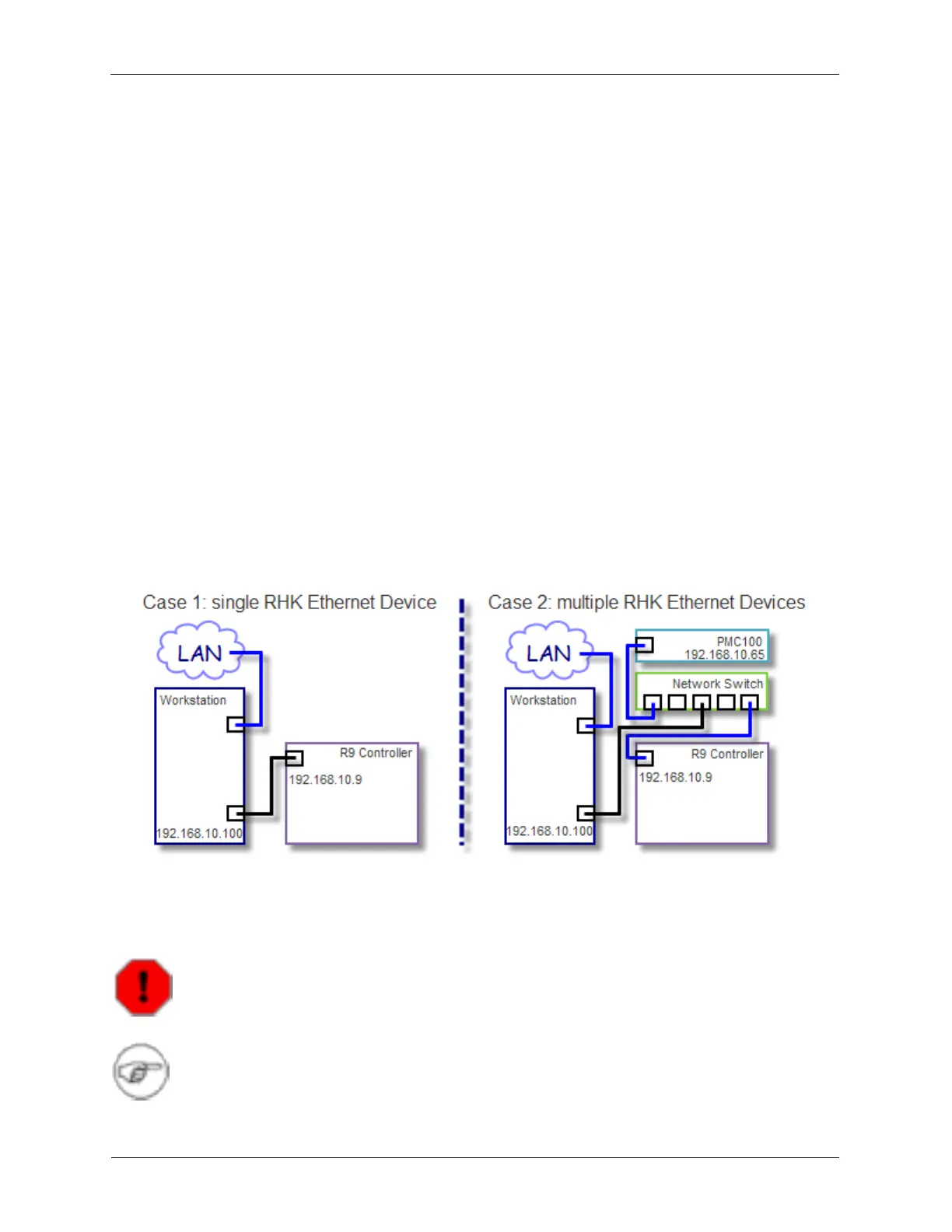
The workstation running R9 Software has two network interface adapters. One connection is required
between the computer and the R9 Controller. The second connection (optional) is usually connected to a
Local Area Network (LAN).
The R9 Control System workstation supplied by RHK has the necessary network adapters already
installed. The add-on adapter is usually named RHK Connection. It is set to have a fixed IP Address and
Subnet Mask (192.168.10.100 and 255.255.255.0, respectively). The Windows Firewall should be
disabled for the RHK Connection. The RHK Connection port on the workstation will be connected
directly to the R9 Controller using a crossover Ethernet cable if it is the only Ethernet-based device you
have from RHK.
The workstation's integrated network adapter is named Dell Gigabit Connection. This port will have the
Window's setting 'Obtain IP Address Automatically'. Unfortunately, this setting does not always correctly
configure the integrated network port to enable communications between the workstation and the LAN. If
you can not access your LAN from the R9 Controller's workstation, you may require assistance from your
IT Administrator to configure the integrated network adapter port.
1.3.2 Using more than one Ethernet Communications Link
If there are other Ethernet-based devices from RHK, such as a PMC100, a network switch is required. In
this case the workstation and all the other RHK devices should be connected to the network switch.
Figure 1.3. Ethernet Connection Diagram
1.4 Start and try the R9 Control System Software (R9s)
Warning
The Windows keyboard settings must be left at their default (US) setting.
Note
We assume in this Guide that you are using an RHK supplied workstation with R9 Software
already installed from the factory.



 To Next Page