External Control Interface
depending on the stiffness of the cantilever and the environment in which the cantilever is being
modulated.
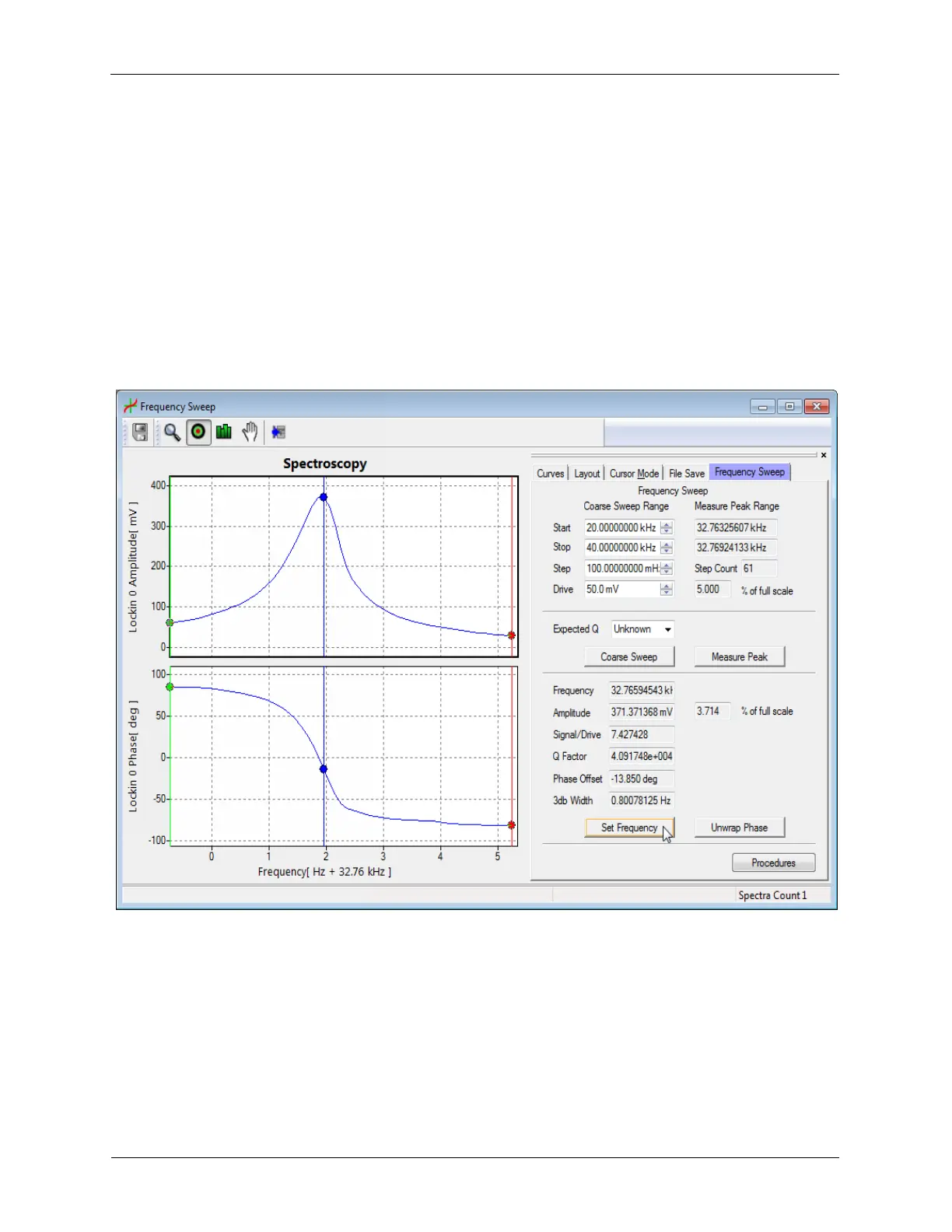
The Frequency Sweep tool can be opened by pressing the Frequency Sweep button on the
PSD Alignment Window or by selecting Frequency Sweep from the Spectroscopy menu on the
ribbon bar. There are several steps to perform on the Frequency Sweep window. The Coarse
Sweep procedure is used to quickly find possible resonant peaks. The Measure Peak procedure
is used to more accurately plot and characterize a resonant peak, and the Set Frequency
procedure is used to select the center modulation frequency. The Unwrap Phase procedure
can be used to repeat the Measure Peak procedure if the LIA Phase wraps from -180 degrees
to 180 degrees near the resonant frequency (optional as the Set Frequency procedure fixes this
internal to the R9)
Figure N.3. Frequency Sweep
N.2.1. Coarse Sweep
The Coarse Sweep is defined by several parameters. The Start and Stop frequencies control
the range of the frequency sweep and can be set in a broad range to locate possible resonance
peaks. The Step determines the frequency resolution of the Coarse Sweep (as well as the
number of frequencies at which the software will plot the Amplitude and Phase). The Drive sets
the Oscillation Amplitude of the Drive Output that will be performing the frequency sweep.
Pressing Coarse Sweep will begin the resonance peak search.



 To Next Page