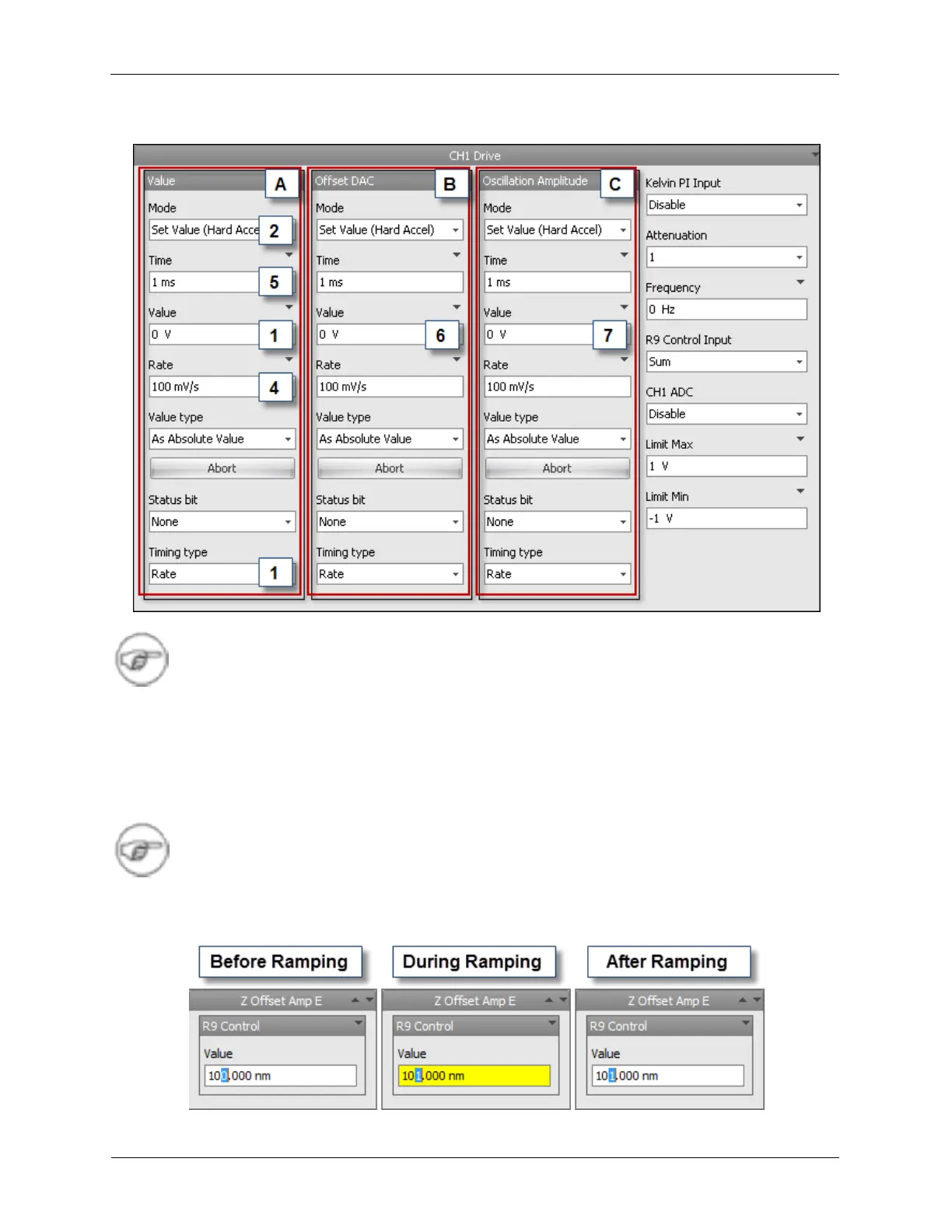
Figure A.5. R9 Controls
Note
For most cases, the PTG2 should be selected.
There are two ways that a voltage ramp can be defined: Rate or Time. This parameter is selected under
Timing type (3). If the Timing type is set to Rate, the parameter in the Rate (4) data entry box will be
used to configure the sweep. In this case the rate is set at 1V/s, so entering 2 V into the Value will cause
the bias voltage to ramp from 1 V to 2 V at the rate of 1V/s. If the Timing Type was instead set to Time,
the Value in the Time (5) data entry box will be used to configure the sweep. In this case the time is set
to 1 ms, so entering 2 V into the Value will cause the bias to ramp from 1 V to 2 V in 1 ms.
Note
R9 Controls will turn Yellow on the Dashboard while the control is ramping. It will turn back
to white when the control has finished ramping.
Figure A.6. Ramping R9 Controls



 To Next Page