Acquire Spectroscopy Data
Note
The I/Z Ramp Spectroscopy Settings control panel is hidden by default as the I/Z
Spectroscopy procedure is used less frequently than the I/V Spectroscopy procedure. To
display the I/Z Spectroscopy Settings control panel, go to Hardware Space, select the IZ
Spec Settings hardware item, select the General tab on the Property Panel, and enable
Show on Dashboard.
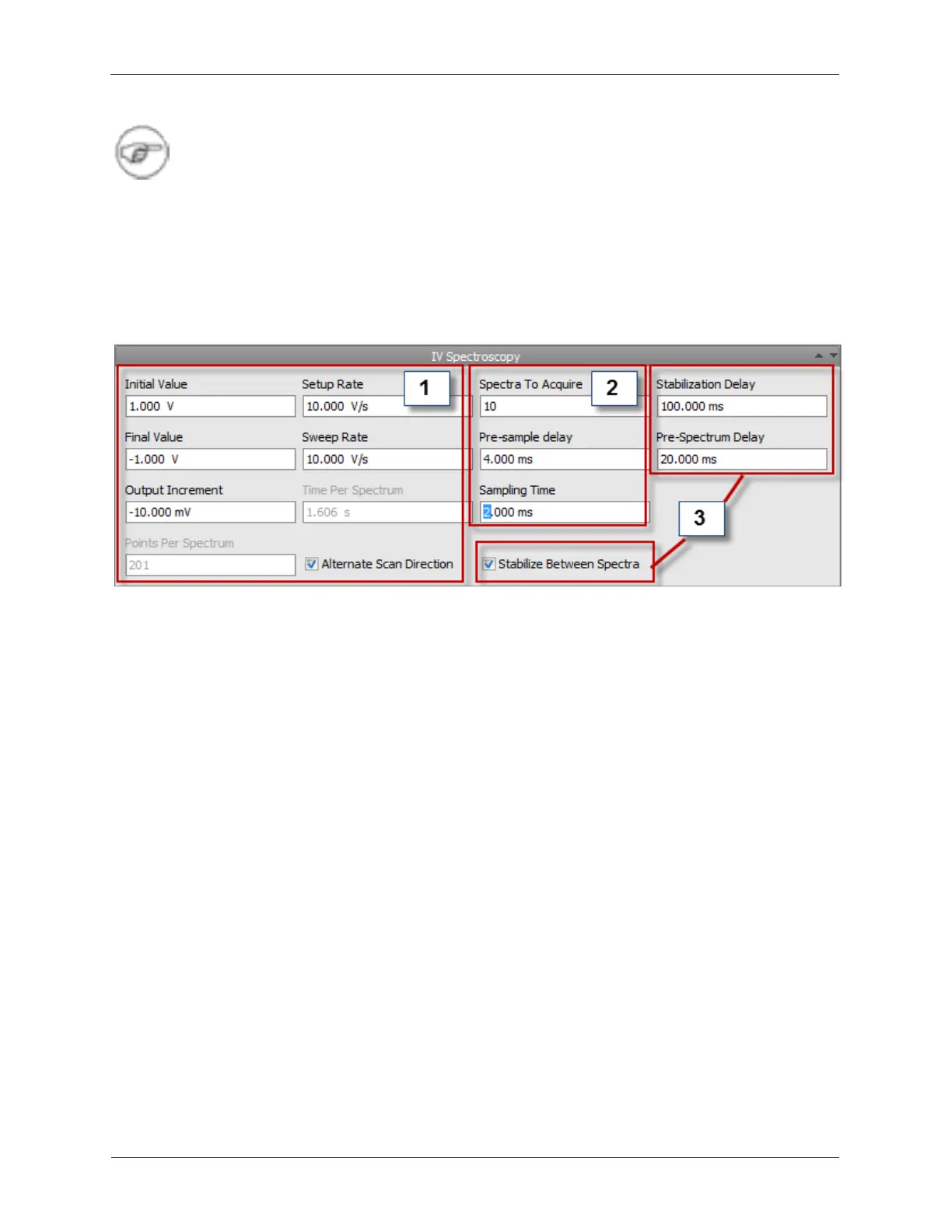
The Ramp Spectroscopy Settings hardware item is described below. The following figure shows the
settings dashboard view of the Ramp Spectroscopy Settings item.
Figure 6.1. Dashboard View of the IV Ramp Spectroscopy Settings
There are three main sections to the Ramp Spectroscopy Settings Item. They are:
1. Spectroscopy independent parameter settings.
In this grouping the you set the Initial Value and Final Value of your independent parameter. Because
this hardware item is connected to the STM Bias Drive, the Initial and Final values of the independent
parameter have the units of Volts. If the independent parameter had been magnetic field, then the
appropriate units would be displayed here.
You also select the Setup Rate, will depend on the details of your system. This defines how fast the
independent parameter is swept to get to the Initial Value. If you are taking a large number of spectra,
this can be a significant contributor to the total measurement time.
The Output Increment is the size of the step in the independent parameter (bias voltage) between
each measurement of the spectroscopic response signal (tunneling current). The Sweep Rate
specifies how fast the independent parameter is changed to reach each new value in the spectroscopy
measurement. This parameter also has a strong influence on the total measurement time.
The next box provides you with information, it provides the result of a calculation of the number of
Points Per Spectrum based on the formula:
|Initial Value - Final Value|/Output Increment
rounded to the nearest integer.
The last item in Spectroscopy Independent Parameter settings, the Alternative Scan Direction check
box, lets you select if you want to take spectroscopy data going in both the Initial to Final value
direction and the Final to Initial value direction. If this is selected, response signal data are recorded
and displayed for both directions. Hysteresis effects, among others, are particularly evident when this
option is selected.



 To Next Page