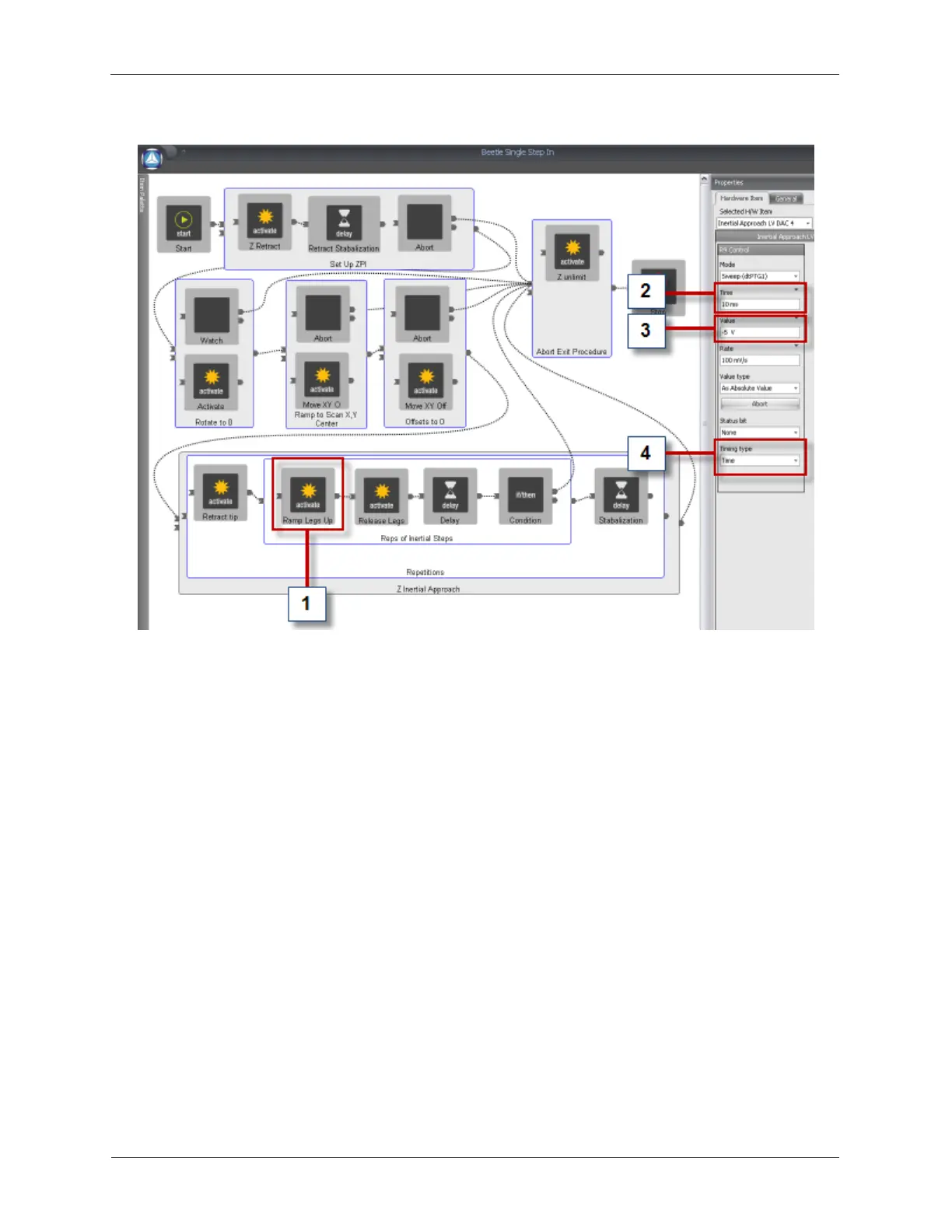
Figure F.4. Beetle Single Step In Procedure
The R9 Controller will switch the PPC200 to Z-AFM and the AFM scan head will make a single coarse
step towards the sample. This can be useful for fine adjustments. The important pieces of the Procedure
have been marked:
1. Ramp Legs Up: Select this item to display its Properties in the Properties Pane.
2. Time: This controls the Ramp Up Time for the sawtooth approach waveform. Default: 10 ms.
3. Value: This is the low voltage (unamplified) sawtooth waveform's amplitude. It will be amplified by the
gain of the high voltage outputs of the R9 Controller. Default: -5 V.
4. Timing Type: Set this to Time.
F.2.2.2. Beetle Single Step Out
The Beetle Single Step Out Procedure is almost identical to the Beetle Single Step In Procedure. The
difference is the polarity of the Value of the Ramp Legs Up item. Default: 5 V.
F.2.2.3. Beetle Fast In
The Beetle Fast In Procedure is almost identical to the Beetle Single Step In Procedure. The
differences are usually:
• The Value (amplitude) of the Ramp Legs Up item is increased to create bigger steps. Remember to
set a negative polarity for the Value of the Ramp Legs Up item.



 To Next Page